
OpelBook.ru
Cars AvtoVAZ Cars Mitsubishi Cars BMW Cars Mercedes Cars Nissan Cars Toyota Cars Chevrolet
English Русский
Български
Беларускі
Український
Српски
Hrvatski
Română
Polski
Slovenský
Magyar
 |  Sitemap  |  Contacts  |    


Main Astra Corsa Insignia Kadett Omega Vectra Zafira Others Articles
Astra F (1991-1998, petrol) Astra G (1998-2004, petrol) Astra G (1998-2004) Astra H (2004-2009) Astra J (2009-2015, petrol)
  • Main
  • Astra
  • Astra H
  • Chassis
  • Brake system
  • Replacing the rear wheel disc brake pads

Replacing the rear wheel disc brake pads (Opel Astra H)

            0

Attention: It is necessary to replace all brake pads of one axle of the vehicle at the same time, even if only one of them has reached the wear limit! Use only pads approved for use by the manufacturer!


1. Support the front wheels with wheel chocks, jack up the rear of the car and place it on supports. Remove both rear wheels.

2. Release the parking brake completely and loosen the drive cable by loosening the adjusting nut (see Section 12).

3. Use a screwdriver to press the actuator lever on the rear wheel brake caliper and disconnect the cable end from it, release the lock and release the cable from the support bracket (see accompanying illustration).
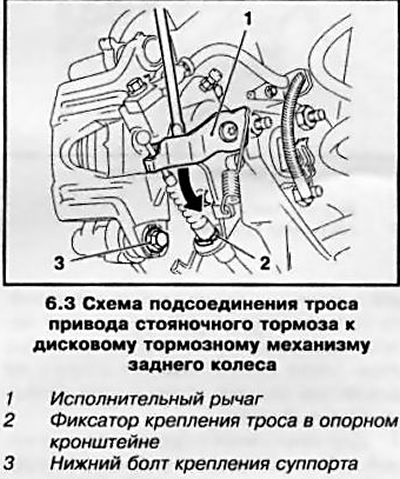
3. Use a screwdriver to press the actuator lever on the rear wheel brake caliper and disconnect the…


4. Remove the lower bolt (see illustration 6.3) caliper mounts, holding the guide pin from turning with a second wrench.

5. Rotate the support upward on the upper guide axis (see accompanying illustration).
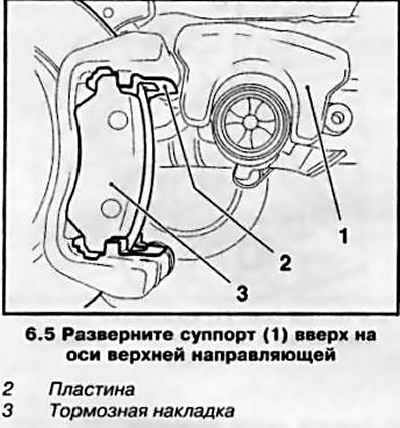
5. Rotate the support upward on the upper guide axis (see accompanying illustration).


6. Press the brake piston using a special tool (see accompanying illustration) until it stops - the piston creates significant resistance.
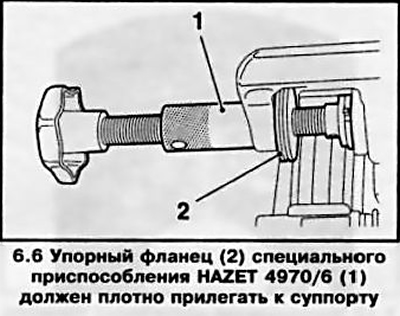


6. Press the brake piston using a special tool (see accompanying illustration) until it stops - the…


Caution: Do not press the piston using a handy tool - this may result in the parking brake being out of adjustment.


When pressing the piston, watch the brake fluid level in the reservoir. To prevent the brake fluid from leaking, check its level first - pump out the excess if necessary.

7. Then turn the piston out again so that its groove is in line with the inspection window of the caliper (see accompanying illustration).
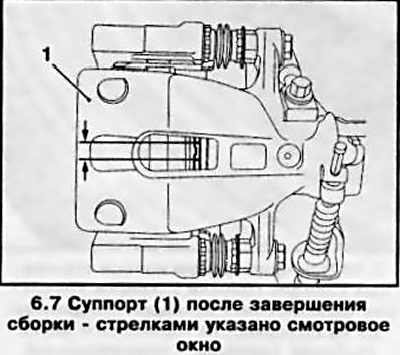
7. Then turn the piston out again so that its groove is in line with the inspection window of the…


8. Remove the upper caliper mounting bolt, holding the guide from turning with a second wrench. Remove the caliper and tie it with wire to the rear suspension spring.

9. Remove the brake pads from the guide, mark the installation position of the pads. Remove the plates from the guide.


10. Perform all checks and recommendations given in paragraphs 7 through 10 Section 5.

11. When installing, it is imperative to replace the plates on the guide, having previously lubricated them with heat-resistant grease (for example, Liqui Moly).

12. Insert new brake pads between the plates. Install a pad with an acoustic wear indicator (with appropriate equipment) (see accompanying illustration). At the same time, ensure that the brake pads are correctly positioned in the guide plates.
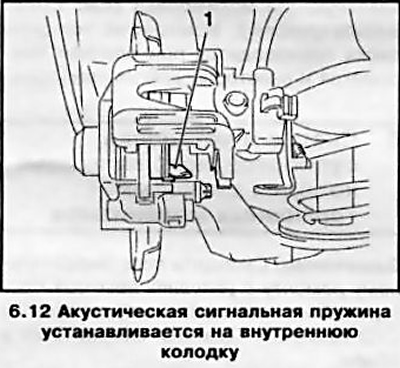
12. Insert new brake pads between the plates. Install a pad with an acoustic wear indicator (with…


13. After installing the pad, remove the protective film from its back side - it contains an adhesive substance for connecting to the caliper.

14. Place the caliper on the guide and pads, making sure that the plates do not bend and that the brake pads do not stick to the caliper too early.

15. Clean and lubricate the threads of the guide bushing bolts with locking compound (for example, Loctite Tour 243), install new bolts if necessary. Screw in the bolts and tighten them to the required torque, holding the bolts from turning with a second wrench.

16. Insert the parking brake cable into the support bracket and secure with the clamp. Press the actuator lever (see illustration 6.3) brake and connect the cable end to it.


17. Press the foot brake pedal several times until you feel a "firm" sensation in its movement.

18. Proceed in a similar manner to replace the brake pads of the opposite wheel.

19. Adjust the parking brake drive cable (see Section 12).

20. Install the wheels, lower the vehicle to the ground and tighten the wheel bolts to the required torque.

21. Check the brake fluid level and make adjustments if necessary (see Chapter 1).

22. Before starting intensive use, allow the brake pads to rub in a little by braking the car several times from 80 km/h to 40 km/h by lightly pressing the pedal. Then allow the brake to cool down.

Note: After replacing the pads, try to avoid sudden braking for approximately 200 km.


This article is available at russian, bulgarian, belarusian, ukrainian, serbian, croatian, romanian, polish, slovak, hungarian
Checking the article: Simonov Timofey

Share information:

Previous articles
Opel Astra H: Brake system
Next articles

Replacing the front disc brake pads
Checking the condition and replacing brake lines and hoses
Bleeding the brake system
Electronic braking control systems
General information
Brake system specifications
Removal, installation and inspection of the brake disc
Removal and installation calipers/pad guides for disc brake mechanisms
Removal and installation of the master brake cylinder (MBC)
Removal and installation the foot brake pedal
Checking the condition, removing and installing the brake booster assembly
Adjusting the parking brake drive


See similar ones from other Opel car manuals:
▶ Replacing the rear wheel disc brake pads Opel Corsa C (2000-2006)
▶ Replacing the rear wheel disc brake pads Opel Vectra C (2002-2008)
▶ Replacing the brake pads of the rear disc brake mechanisms Opel Kadett E (1984-1995)
▶ Replacing rear brake pads Opel Insignia A (2008-2017)
▶ Rear Brake Pads — Checking and Replacing Opel Omega B2 (1999-2003)
Link to this page in different formats

Visitor comments


No comments yet


How much will 38 + 46 =


Astra J (2009-2015, petrol) 
  • General information
  • Vehicle device
  • User manual
  • Faults en route
  • Maintenance
  • Power unit
  • Engine repair
  • Cooling and lubrication system
  • Engine power system
  • Exhaust system
  • Transmission
  • Clutch
  • Car gearbox
  • Drive shafts
  • Chassis
  • Front suspension
  • Rear suspension
  • Steering
  • Brake system
  • Wheels and tires
  • Body
  • Exterior
  • Interior
  • Doors and windows
  • Body Care
  • Heating and air conditioning
  • Security systems
  • Electrical equipment
  • Equipment and devices
  • Lighting and signaling
  • Power devices
  • Electrical circuits
Astra H (2004-2009) 
  • General information
  • Introduction to the guide
  • Troubleshooting
  • User manual
  • Maintenance
  • Power unit
  • Engine repair
  • Cooling and heating
  • Power and exhaust system
  • Ignition system
  • Launch and charge system
  • Transmission
  • Mechanical gearbox
  • Automatic gearbox
  • Drive shafts
  • Chassis
  • Brake system
  • Car suspension
  • Steering
  • Body
  • Interior
  • Exterior
  • Electrical equipment
  • Equipment and devices
  • Electrical circuits
Astra G (1998-2004) 
  • General information
  • Introduction to manual
  • User manual
  • Maintenance
  • Power unit
  • SOHC gasoline engines
  • DOHC gasoline engines
  • Diesel engines 1.7 and 2.0
  • Engine repair
  • Cooling system
  • Supply system
  • Injection system (gasoline)
  • Injection system (diesel)
  • Exhaust system
  • Charge and launch system
  • Ignition system (gasoline)
  • Preheat system (diesel)
  • Transmission
  • Manual gearbox
  • Automatic gearbox
  • Clutch
  • Drive shafts
  • Chassis
  • Brake system
  • Wheel suspension
  • Steering
  • Body
  • Exterior
  • Interior
  • Doors and windows
  • Ventilation and heating
  • Electrical equipment
  • Equipment and devices
  • Electrical circuits
Astra G (1998-2004, petrol) 
  • General information
  • User manual
  • Car care
  • Maintenance
  • Power unit
  • Single shaft engines
  • Twin shaft engines
  • Engine repair
  • Cooling and heating
  • Fuel and exhaust systems
  • Starting and charging system
  • Ignition system
  • Transmission
  • Clutch
  • Mechanical gearbox
  • Automatic gearbox
  • Drive shafts
  • Chassis
  • Brake system
  • Car suspension
  • Steering
  • Body
  • Interior
  • Exterior
  • Electrical equipment
  • Equipment and devices
  • Wiring diagrams Opel Astra
  • Wiring diagrams Opel Zafira
Astra F (1991-1998, petrol) 
  • General information
  • Maintenance
  • Power unit
  • Engine in car
  • Engine removed
  • Cooling system
  • Heating and ventilation
  • Fuel supply (carburetor)
  • Fuel supply (injector)
  • Emission control
  • Ignition system
  • Transmission
  • Clutch
  • Mechanical gearbox
  • Automatic gearbox
  • Drive shafts
  • Chassis
  • Brake system
  • Car suspension
  • Steering
  • Body
  • Exterior
  • Interior
  • Electrical equipment
  • Equipment and devices
  • Electrical circuits
OpelBook.ru © 2017–2026 · Mobile version · · Sitemap: EN BG BY UA RS HR RO PL SK HU · Feedback · Site search
Astra F, petrol · Astra G, petrol · Astra G · Astra H · Astra J, petrol · Corsa B · Corsa C, petrol · Corsa C · Insignia A · Kadett D · Kadett E · Omega A · Omega B · Omega B2 · Vectra A, petrol · Vectra A · Vectra B, petrol · Vectra B · Vectra C · Zafira A, petrol · Frontera A, petrol · Frontera B · Ascona C · Vivaro A ·
We want your visit to be comfortable 🤝! We use cookies 🍪 to make that happen.