


Attention: It is necessary to replace all brake pads of one axle of the vehicle at the same time, even if only one of them has reached the wear limit! Use only pads approved for use by the manufacturer!
1. Set the parking brake, jack up the front of the car and place it on supports. Remove the front wheels.
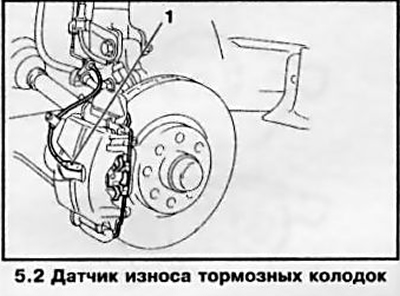
2. Using a small flat-blade screwdriver, remove the brake pad wear sensor from the hole in the caliper (with appropriate equipment) and take him aside (see accompanying illustration).
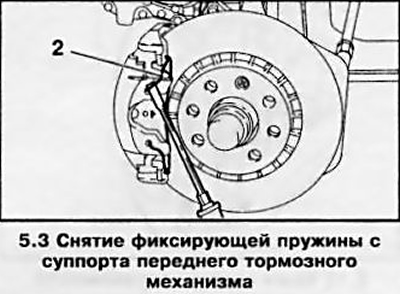
3. Remove the large spring clip from the caliper (see accompanying illustration) - Be careful to avoid the spring from jumping off, cover it with a rag first.
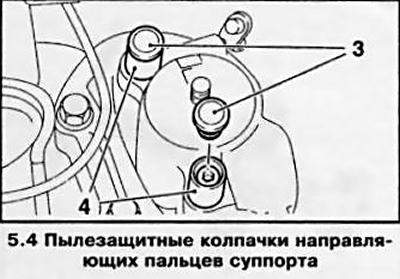
4. Remove the dust caps from the caliper guide pin holes (see accompanying illustration).
5. Unscrew the guide bolts and remove the caliper with pads from the anchor bracket or hub carriage (depending on the method of execution) (see accompanying illustration). Tie the caliper to the strut with a piece of wire - do not leave it hanging by the hose.
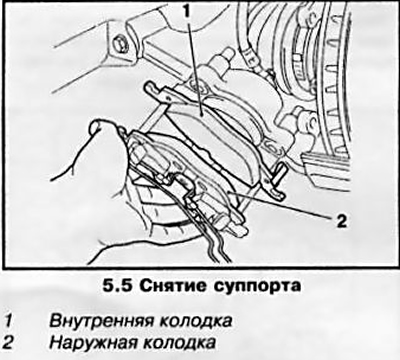
Note: After prolonged use, difficulties may arise when removing the caliper with pads manually - use a crowbar or other suitable tool. First remove the brake fluid reservoir cap.
6. Remove the outer pad from the caliper, then remove the inner pad (see illustration 5.5).
Note: If you plan to reinstall the same brake pads, mark their installation locations when removing them. It is not allowed to switch the brake pads from the outer side to the inner side and from the right wheel to the left!
Caution: After removing the brake pads, do not press the brake pedal, otherwise the piston may be pushed out of the housing. In this case, you will have to go to a service station to install the piston back.
7. Sweep away any dust that has accumulated on the brake components (see Precautions in Section 1). Wipe the caliper and piston end surface with a clean rag. Remove rust from the edge of the brake disc.
8. Check the condition and thickness of the brake pads (see Chapter 1, Section 14). Oily pads must be replaced without fail - first eliminate the cause of the leak. Check the surface of the brake disc with your fingers by touch. A brake disc with unevenness can be turned if it is thick enough - contact an Opel service station.
Attention: Both brake discs of one axle must be turned to the same thickness. If the thickness of the disc has reached the maximum wear (see Specifications), replace it.
9. If the condition of the brake pads and disc is found to be satisfactory, thoroughly clean them and the contact surfaces of the brake discs from dirt with a soft wire brush, paying special attention to the back and sides. Clean the grooves in the friction linings, completely removing foreign inclusions from them. Clean the seating places of the pads in the caliper and anchor bracket. After this, wipe all mating surfaces with a rag moistened with alcohol.
Attention: Use only alcohol to clean the brakes, and do not use tools with sharp edges to avoid damaging the sealing cuffs!
10. The guide pins should move easily in the caliper bushings; clean the pins if necessary. Check the condition of the dust cover installed on the piston, inspect the piston for signs of developing brake fluid leaks, traces of corrosion and mechanical damage. Replace defective components. Disassembly of the caliper for restoration repairs should only be performed at a service station.
11. When installing new pads, the piston must be sunk into the caliper cylinder to release it for installing thicker new pads. The piston is pressed back using a special device, although a clamp of a suitable size or a wooden lever will work no less effectively (see accompanying illustrations), if necessary, place an old brake shoe as a support surface in front of the piston. Be careful not to damage the piston surface and protective cap. When the piston returns, brake fluid is squeezed out of the brake cylinder into the reservoir, so the reservoir cap must be removed. To prevent brake fluid from leaking out, first check its level - pump out excess if necessary.
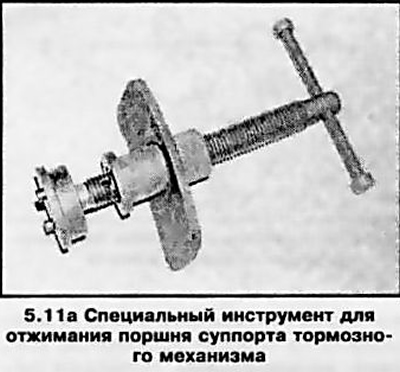
Caution: Pressing the piston down carries the risk of damaging the sealing lip and the piston surface - use caution!
12. Before installing new brake pads, clean the guide. Lubricate the guide surfaces of the pads (see accompanying illustration) a thin layer of heat-resistant grease (for example, with Liqui Moly paste).
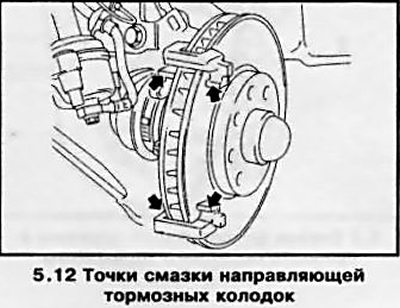
13. Insert the inner brake pad into the caliper, seating its spring in the recess in the end surface of the piston, and then install the outer pad.
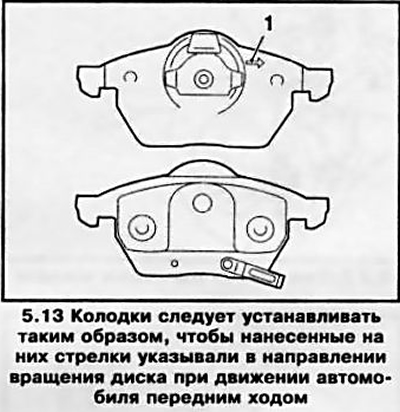
Note: The inner and outer pads are different in design - please pay attention to the arrow marking on the base of the pad (see accompanying illustration) — the arrow should point in the direction of rotation of the disk when the vehicle is moving forward.
14. Install the caliper with brake pads, making sure that the brake hose is not twisted.
15. Lubricate the threads of the guide bushing bolts with locking compound (for example Loctite Tour 243) - if the bolts have traces of rust or damage, they should be replaced with new ones. Screw in the bolts and tighten them to the required force.
16. Install the anthers.
17. Install the caliper spring by inserting its ends into the holes in the bracket.
Note: There are two types of springs used - one that attaches to the caliper, the other to the mounts on the outer shoe. If you are installing the latter type of spring, first attach it to the shoe, then hook it over the tabs on the caliper.
18. If equipped, install the brake pad wear sensor into the inner brake pad and secure the wiring to the shock absorber strut.
19. Press the foot brake pedal several times until you feel a firm movement - the brake pads are adjacent to the discs and occupy a position corresponding to the operating condition.
20. Proceed in a similar manner to replace the brake pads of the opposite wheel.
21. Install the wheels, lower the vehicle to the ground and tighten the wheel bolts to the required torque.
22. Check the brake fluid level and make adjustments if necessary (see Chapter 1).
23. Before starting intensive use, allow the brake pads to rub in a little by braking the car several times from 80 km/h to 40 km/h by lightly pressing the pedal. Then allow the brake to cool down.
Note: After replacing the pads, try to avoid sudden braking for approximately 200 km.
Visitor comments