


Note: When replacing or resurfacing brake discs, new brake pads must be installed on them at the same time.
Removal
2. Raise the vehicle and remove the wheels (see Chapter "Introduction").
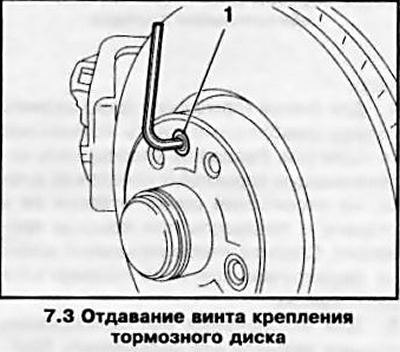
3. To remove the front brake disc, it is necessary to release the brake hose from the support bracket on the suspension strut (see Section 4) and unscrew the mounting screw (see accompanying illustration) — there is no need to remove the caliper.
4. To remove the rear wheel brake disc, it is necessary to remove the brake pads (see Section 6), disconnect the brake pad guide from the disc, without disconnecting the hose, move it to the side and tie it up with wire. Make sure that the brake hose is not twisted or stretched.
5. To prevent the piston from slipping out, clamp it with a wooden block, placing the latter between the piston and the caliper. Unscrew the mounting screw and remove the brake disc from the wheel hub (see illustration 7.3).
6. If, as a result of long-term use, any of the disks has become stuck to the wheel hub, use a plastic hammer and knock the disk off with light blows.
Attention: When removing the disc, strong impacts are not allowed!
Try using a rust dissolving agent as well. If these attempts are unsuccessful, remove the disk using a puller or knock off the disk with a heavy hammer. When removing the disk with a puller, it must be replaced with a new one; when using a heavy hammer, it is also necessary to replace the wheel bearings.
Installation
7. Check the condition of the brake disc (see below). Measurements when checking the disc must be accurate, so the authors of this Guide recommend contacting a service station or a specialist who has the appropriate measuring tool and the necessary experience in performing these jobs.
8. Installation is carried out in the reverse order of dismantling the components. Before installation, make sure that the mating surfaces of the disc and hub are absolutely clean and dry. Lightly lubricate the threaded part of the disc mounting screw with a fixing compound. If the disc is being replaced, remove the protective varnish from the new brake disc with thinner. When installing the rear wheel brake mechanism, do not forget to adjust the parking brake (see Section 12).
Checking the status
9. It is best to carry out the check in a stationary workshop, where all the conditions and necessary tools are available. However, in some cases it is possible to check the disks without removing them from the car - this reduces the labor intensity of the work somewhat, but it is more difficult to achieve the required accuracy of measurements. All the dimensions to be checked are given in the Specifications to this Chapter.
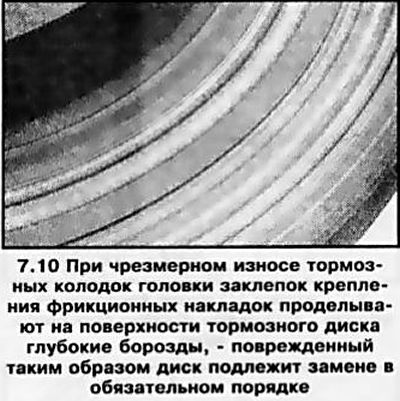
10. Perform a visual inspection of the condition of the working surface of the disk (see accompanying illustration). Minor defects can be removed with fine-grained sandpaper. To remove deep grooves, the disc should be subjected to turning. Remember that the disc should be inspected from both sides. Rusty brake discs create increased noise when braking; if the noise does not disappear after a sufficiently long period of operation, replace the discs.
11. If pulsations of the foot brake pedal are noticed during braking, not related to the operation of the ABS, the lateral runout of the brake disc should be assessed. The lateral runout value is checked using a plunger-type dial gauge. The measurement result should not go beyond the permissible range specified in the Specifications, otherwise the disc must be resurfaced.
Note: The authors of this Manual recommend turning the disks regardless of their condition in order to remove any defects from the working surfaces. In extreme cases, you can limit yourself to processing the disk with fine-grained sandpaper.
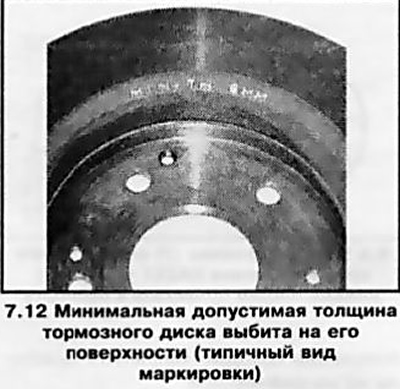
12. When turning the disk, special attention should be paid to compliance with the requirements of the Specifications for its minimum permissible thickness. The corresponding marking is provided on the end surface of the disk (see accompanying illustration). The thickness of the disc is measured using a micrometer and some other devices.
Original posted on the website: www.OpelBook.ru
Visitor comments