
OpelBook.ru
Cars AvtoVAZ Cars Mitsubishi Cars BMW Cars Mercedes Cars Nissan Cars Toyota Cars Chevrolet
English Русский
Български
Беларускі
Український
Српски
Hrvatski
Română
Polski
Slovenský
Magyar
 |  Sitemap  |  Contacts  |    


Main Astra Corsa Insignia Kadett Omega Vectra Zafira Others Articles
Vectra A (1988-1995, petrol) Vectra A (1988-1995) Vectra B (1995-2002, petrol) Vectra B (1995-2002) Vectra C (2002-2008)
  • Main
  • Vectra
  • Vectra A
  • Chassis
  • Brake system
  • Front brake pads — inspection, removal and installation

Front brake pads — inspection, removal and installation (Opel Vectra A)

            0

Contents: Inspection ⬇ Models 1.4, 1.6 and 1.8 l ⬇ 2.0L models ⬇
Note: Handle the brake system with care and avoid inhaling dust generated by wear of its components, as it may contain asbestos, which is harmful to health.


Inspection


1. Where applicable, remove the front wheel caps, then loosen the wheel bolts and apply the handbrake. Jack up and support the front of the vehicle on axle stands.

2. Remove the wheels. Turn the steering wheel to the extreme right position and check the right brake pads for wear. Make sure that the brake pad thickness is (including the block) — not less than the minimum value given in the Specifications.

3. Turn the steering wheel to the extreme left position and check the left brake pads in the same way.

4. If the thickness of at least one of the brake pads is less than that specified in Specifications minimum, replace all front pads as a set.

5. If the pads require replacement, proceed as follows.

Models 1.4, 1.6 and 1.8 l


Removal


6. Remember how the brake shoe pressure springs are installed (see illustration), then remove the upper and lower brake shoe mounting pins from the caliper using a punch.
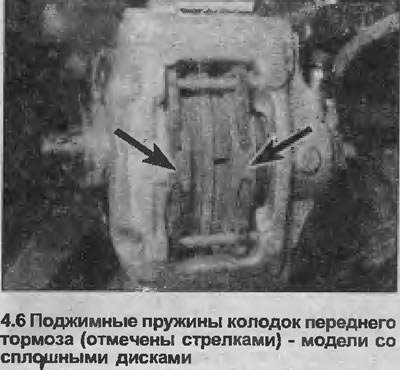
6. Remember how the brake shoe pressure springs are installed (see illustration), then remove the…


7. Remove the brake shoe pressure springs (see illustration).
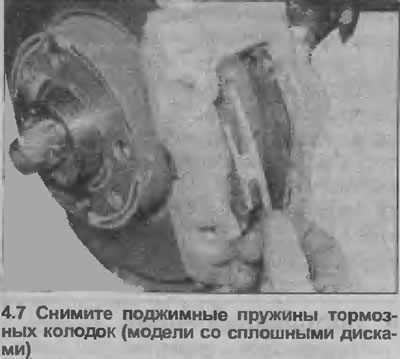


7. Remove the brake shoe pressure springs (see illustration).


8. Move the pads slightly away from the disc, then use pliers to remove the outer pad (see illustration).
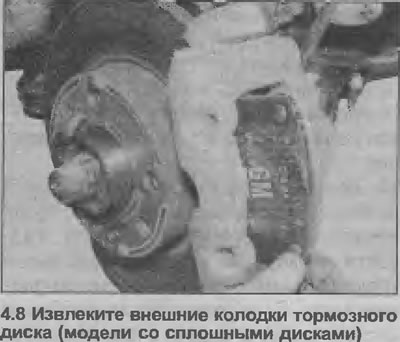
8. Move the pads slightly away from the disc, then use pliers to remove the outer pad (see…


9. Remove the inner pad and the gasket installed between the pad and the caliper piston (see illustration).
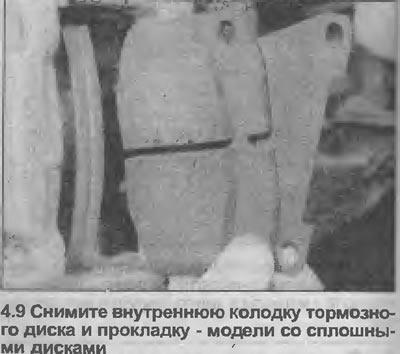
9. Remove the inner pad and the gasket installed between the pad and the caliper piston (see…


Installation


10. Clean off any dust or dirt from the caliper, being careful not to inhale any particles that may become airborne. Carefully scrape off any rust from the edge of the brake disc.


11. To install new (thicker) pads, you need to push the caliper piston all the way into the cylinder bore using a flat metal rod. This action will raise the fluid level in the reservoir, so to avoid losing fluid, suck out some of it using an old hydrometer or pipette. See the note at the beginning Chapters 3. Do not insert a flat rod between the piston and the disc in an attempt to displace the piston.

12. Make sure that the slots in the piston are aligned vertically. If necessary, carefully turn the piston to the correct position.

13. Apply a small amount of brake grease to the top and bottom edges of the metal base of the new pads.

14. Install the new pads onto the caliper, placing a shim between the inner pad and the piston. Make sure the brake pads are facing the disc and that the pads move freely.

15. Install the pressure springs onto the brake shoes, then insert the mounting pins (from the outside of the caliper), pressing on the springs. Drive the pins into the caliper (see illustration).
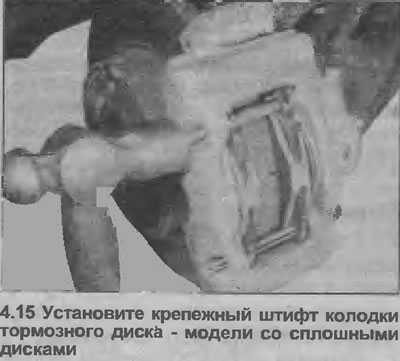
15. Install the pressure springs onto the brake shoes, then insert the mounting pins (from the…


16. Repeat the steps on the second wheel.

17. Install the wheels and lower the vehicle to the ground. Do not fully tighten the wheel bolts until the vehicle is lowered to the ground.


18. Press the brake pedal firmly several times to press the pads against the disc.

19. Check and, if necessary, top up the brake fluid level.

20. New brake pads must first be bedded in, so try to avoid sudden braking for the first 160 km after installing new pads.

2.0L models


Removal


21. Where applicable, move the wear sensor away from the inner pad and disconnect the wiring connector under the wheel arch, near the suspension strut (see illustration). Remember how the wire runs.
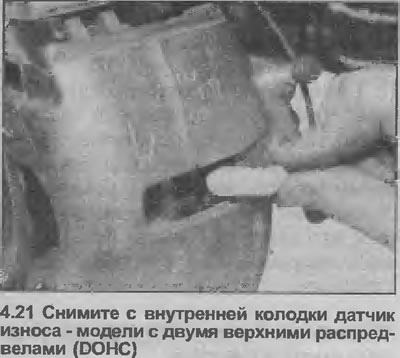
21. Where applicable, move the wear sensor away from the inner pad and disconnect the wiring…


22. Using a screwdriver as a lever, remove the brake pad retaining clip from the outer edge of the caliper (see illustration).
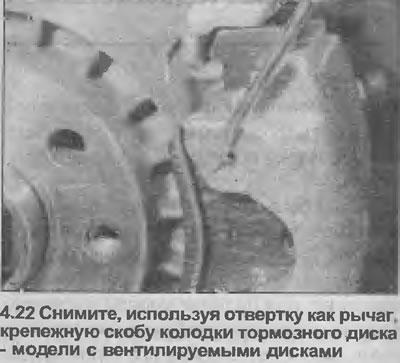
22. Using a screwdriver as a lever, remove the brake pad retaining clip from the outer edge of the…


23. Using a screwdriver as a lever, remove the dust caps from the two guide bolts on the inside edge of the caliper, then use a socket wrench to remove the guide bolts and lift the caliper and inner pad off the bracket. Remove the outer brake pad (see illustrations). Tie the caliper to the body with wire or twine to avoid deformation of the brake hoses.
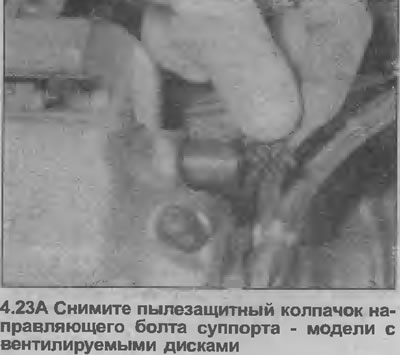
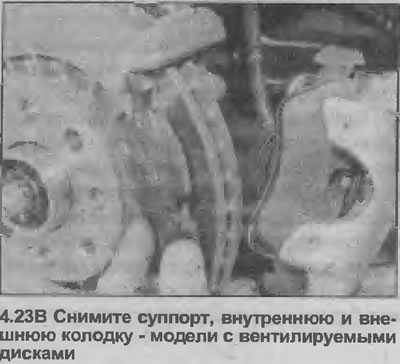

23. Using a screwdriver as a lever, remove the dust caps from the two guide bolts on the inside…


23. Using a screwdriver as a lever, remove the dust caps from the two guide bolts on the inside…


24. Move the inner pad away from the caliper piston (the shoe is secured with a bracket mounted on its metal base) (see illustration).
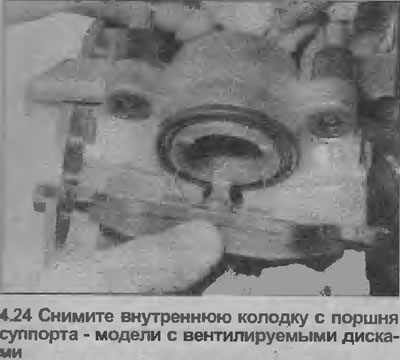
24. Move the inner pad away from the caliper piston (the shoe is secured with a bracket mounted on…


Installation


25. Proceed as described in points 10-12 (see illustration).
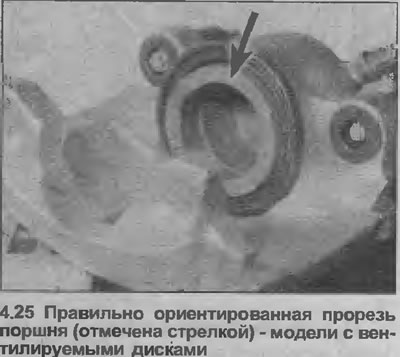
25. Proceed as described in points 10-12 (see illustration).


26. Apply a small amount of brake grease to the caliper contact surfaces of the new brake pads.


27. Install the new inner pad onto the caliper piston, making sure the piston is positioned correctly.

28. Install the outer pad onto the caliper bracket with the brake pad facing the disc.

[Original source is on the website: OPELBOOK.ru]

29. Install the caliper on the bracket and tighten the guide bolts to the specified tightening torque Specifications (see illustration).
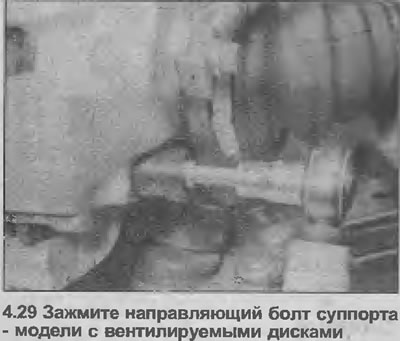
29. Install the caliper on the bracket and tighten the guide bolts to the specified tightening…


30. Install the guide bolt dust caps.

31. Install the shoe mounting bracket.

32. Where applicable, install a new wear sensor on the inner shoe and connect its wiring to the connector under the wheel arch. Route the wiring as noted during removal.

33. Repeat the steps on the second wheel.

34 Proceed as described in paragraphs 17-20 inclusive.


This article is available at russian, bulgarian, belarusian, ukrainian, serbian, croatian, romanian, polish, slovak, hungarian
Checking the article: Chernov Alexander

Share information:

Previous articles
Opel Vectra A: Brake system
Next articles

Brake hydraulic system — bleeding
Anti-lock braking system (ABS) — general description
General description of the braking system
Brake system specifications
Rear Disc Brake Pads — Inspection, Removal and Installation
Rear brake shoes (drum brakes) — inspection, removal and installation
Handbrake pads (rear disc brakes) — inspection, removal and installation
Front Brake Caliper — Removal, Overhaul and Installation
Rear Disc Brake Caliper — Removal, Overhaul and Installation
Brake disc — inspection, removal and installation


See similar ones from other Opel car manuals:
▶ Front Brake Pads — Removal Opel Astra F (1991-1998, petrol)
▶ Replacing the front disc brake pads Opel Corsa B (1993-2000)
▶ Replacing the front brake pads Opel Insignia A (2008-2017)
▶ Front Brake Pads — Inspection and Replacement Opel Omega A (1986-1993)
▶ Front brake pads — replacement Opel Zafira A (1999-2005, petrol)
Link to this page in different formats

Visitor comments


No comments yet


How much will 49 + 30 =


Vectra C (2002-2008) 
  • General information
  • User manual
  • Vehicle device
  • Maintenance
  • Troubleshooting
  • Power unit
  • Engine repair
  • Cooling system
  • Power and control system
  • Engine electrics
  • Transmission
  • Clutch
  • Car gearbox
  • Drive shafts
  • Chassis
  • Car suspension
  • Steering
  • Brake system
  • Body
  • Exterior
  • Interior
  • Doors, locks and windows
  • Heating and ventilation
  • Electrical equipment
  • Equipment and devices
  • Headlights and lighting
  • Electrical circuits
Vectra B (1995-2002) 
  • General information
  • User manual
  • Weekly checks
  • Maintenance (gasoline)
  • Maintenance (diesel)
  • Troubleshooting
  • Power unit
  • SOHC gasoline engine
  • DOHC petrol engine
  • Diesel engine 1.7 liter
  • Diesel engine 2.0 liters
  • Engine repair
  • Cooling system
  • Fuel system (gasoline)
  • Fuel system (diesel)
  • Charging system
  • Launch system
  • Ignition and preheat
  • Transmission
  • Clutch
  • Mechanical gearbox
  • Automatic gearbox
  • Drive shafts
  • Chassis
  • Brake system
  • Wheel suspension
  • Steering
  • Body
  • Exterior
  • Interior
  • Doors and windows
  • Heating and ventilation
  • Electrical equipment
  • Equipment and devices
  • Electrical circuits
Vectra B (1995-2002, petrol) 
  • General information
  • Maintenance
  • Help with malfunctions
  • Power unit
  • Engine repair
  • Exhaust system
  • Cooling system
  • Fuel system
  • Multec injection system
  • Four point injection
  • Transmission
  • Clutch
  • Gearbox and drive
  • Chassis
  • Wheel suspension
  • Steering
  • Brake system
  • Wheels and tires
  • Body
  • Exterior
  • Interior
  • Electrical equipment
  • Fuses and electronics
  • Power devices
  • Ignition system
  • Lighting and signaling
  • Equipment and devices
  • Heating and ventilation
  • Electrical circuits
Vectra A (1988-1995) 
  • Power unit
  • Engine repair
  • Ignition system
  • Lubrication system
  • Cooling system
  • Injection system
  • Fuel system (carburetor)
  • Fuel system (diesel)
  • Exhaust system
  • Transmission
  • Clutch
  • Car gearbox
  • Chassis
  • Front suspension
  • Rear suspension
  • Steering
  • Brake system
  • Wheels and tires
  • Body
  • Exterior
  • Interior
  • Electrical equipment
  • Electrical circuits
Vectra A (1988-1995, petrol) 
  • General information
  • User manual
  • Maintenance
  • Power unit
  • SOHC engine
  • DOHC engine
  • Cooling and ventilation
  • Fuel system (carburetor)
  • Fuel system (injector)
  • Exhaust converter
  • Transmission
  • Clutch
  • Mechanical gearbox
  • Automatic gearbox
  • Drive shafts
  • Chassis
  • Brake system
  • Car suspension
  • Steering
  • Body
  • Body elements
  • Electrical equipment
  • Power devices
  • Equipment and devices
  • Electrical circuits
OpelBook.ru © 2017–2026 · Mobile version · · Sitemap: EN BG BY UA RS HR RO PL SK HU · Feedback · Site search
Astra F, petrol · Astra G, petrol · Astra G · Astra H · Astra J, petrol · Corsa B · Corsa C, petrol · Corsa C · Insignia A · Kadett D · Kadett E · Omega A · Omega B · Omega B2 · Vectra A, petrol · Vectra A · Vectra B, petrol · Vectra B · Vectra C · Zafira A, petrol · Frontera A, petrol · Frontera B · Ascona C · Vivaro A ·
We want your visit to be comfortable 🤝! We use cookies 🍪 to make that happen.