OpelBook.ru
Cars AvtoVAZ Cars Mitsubishi Cars BMW Cars Mercedes Cars Nissan Cars Toyota Cars Chevrolet
English Русский
Български
Беларускі
Український
Српски
Hrvatski
Română
Polski
Slovenský
Magyar
 |  Sitemap  |  Contacts  |    


Main Astra Corsa Insignia Kadett Omega Vectra Zafira Others Articles
Astra F (1991-1998, petrol) Astra G (1998-2004, petrol) Astra G (1998-2004) Astra H (2004-2009) Astra J (2009-2015, petrol)
  • Main
  • Astra
  • Astra J
  • Chassis
  • Brake system
  • Replacing the brake pads of the rear wheel brake mechanism

Replacing the brake pads of the rear wheel brake mechanism (Opel Astra J)

            0

Check the condition of the brake pads at every maintenance.

Brake pads require replacement when the linings are worn out (the minimum permissible thickness of friction linings is 2.0 mm), the linings are not firmly connected to the base, the working surfaces are oily, or there are deep grooves or chips.

Attention!
  • Replace the rear brake pads only as a set – 4 pcs. (two on each side).
  • Before replacing the brake pads, check the brake fluid level in the master cylinder reservoir. If the level is close to the "MAX" mark, it is necessary to pump out some of the fluid (for example, with a medical syringe or a rubber bulb), because after replacing worn pads with new ones the level will rise.


You will need: wrenches "13", "18", pliers with thin jaws, a wrench for wheel nuts.

1. Remove the rear wheel from the side where the pads are being replaced.

1. Remove the rear wheel from the side where the pads are being replaced.


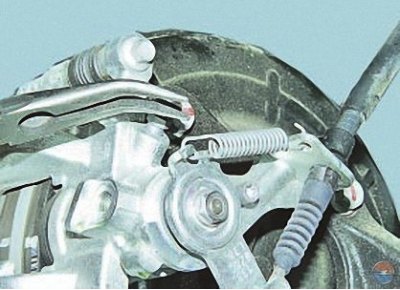
2. Disconnect the release spring from the parking brake actuator lever…

2. Disconnect the release spring from the parking brake actuator lever…


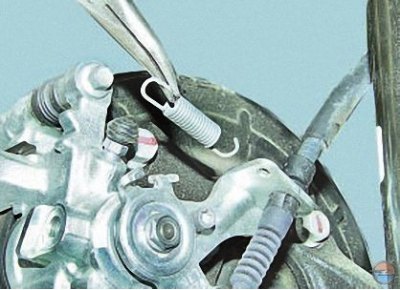
3. …and from the bracket, then remove the spring.
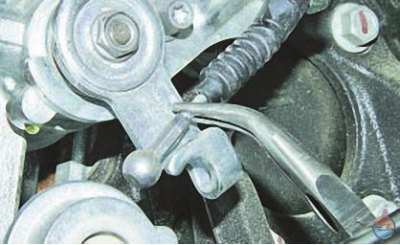


3. …and from the bracket, then remove the spring.


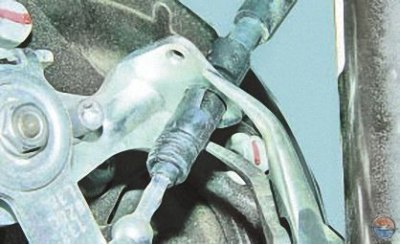
4. Disconnect the rear parking brake cable end from the drive mechanism lever by removing the end from the slot in the lever.

4. Disconnect the rear parking brake cable end from the drive mechanism lever by removing the end…


5. Use pliers to squeeze the two locking clips of the parking brake cable housing stop…

5. Use pliers to squeeze the two locking clips of the parking brake cable housing stop…


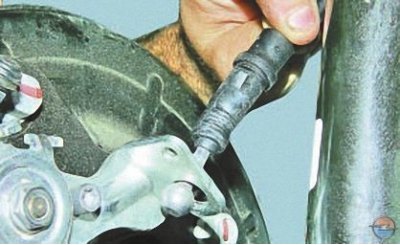
6. …and remove the cable from the hole in the parking brake drive mechanism bracket.

6. …and remove the cable from the hole in the parking brake drive mechanism bracket.


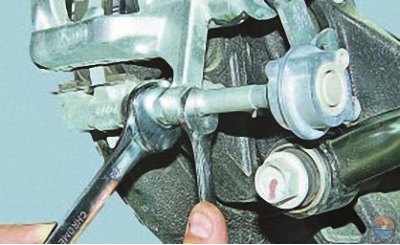
7. Loosen the tightening of the lower guide pin mounting bracket of the caliper, holding the pin from turning with a second key..


7. Loosen the tightening of the lower guide pin mounting bracket of the caliper, holding the pin…


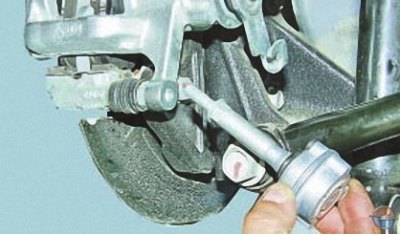
8. …and unscrew the rack.

8. …and unscrew the rack.


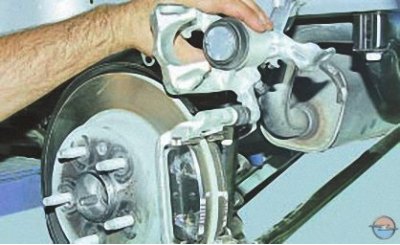
9. Lift the caliper up…

9. Lift the caliper up…


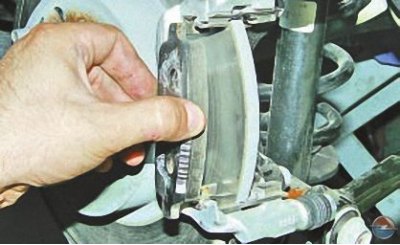
10. …and remove the inner…

10. …and remove the inner…


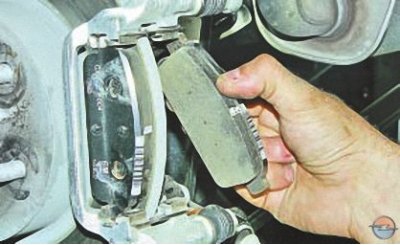
11. …and the outer brake pads.


11. …and the outer brake pads.


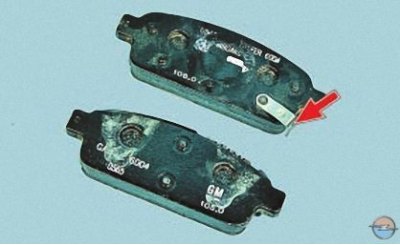
Note: This is what the rear brake pads look like. They are the same in shape, but slightly different in design (the inner shoe has a sound indicator of the maximum wear, shown in the photo by the arrow) and have different catalog numbers.


Note: This is what the rear brake pads look like. They are the same in shape, but slightly…


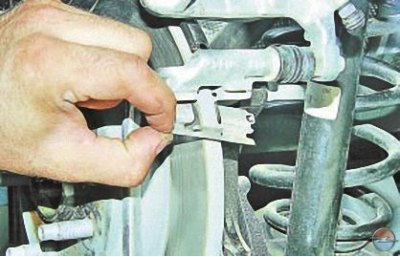
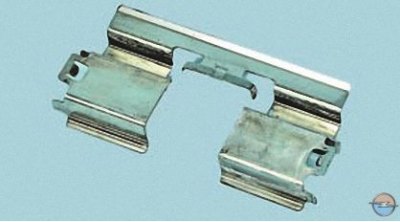
12. Remove both brake shoe pressure springs and inspect them.

12. Remove both brake shoe pressure springs and inspect them.


Note: Replace any deformed or heavily corroded springs.


Each time you replace the brake pads, be sure to check the condition of the protective rubber boots of the guide pin and the movement of the caliper relative to the brake pad guide.

If movement is difficult, lubricate the caliper guide pins with grease.
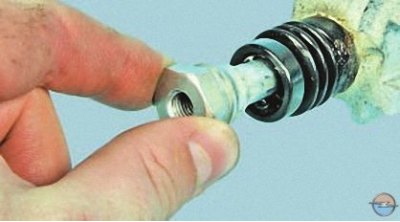
If movement is difficult, lubricate the caliper guide pins with grease.


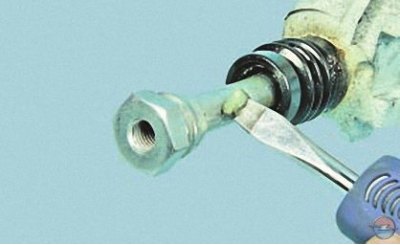
To do this, remove the guide pin…

To do this, remove the guide pin…


..lubricate it with grease, and then lubricate the protective cover of the finger. Similarly lubricate the second guide finger and its cover.

Install the guide pins in the reverse order of removal.
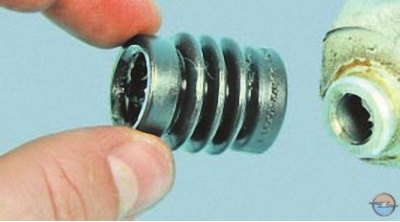
Install the guide pins in the reverse order of removal.


Replace guide pin boots if they are hardened, deformed or torn.


13. Install new rear brake pads in the reverse order of removal.

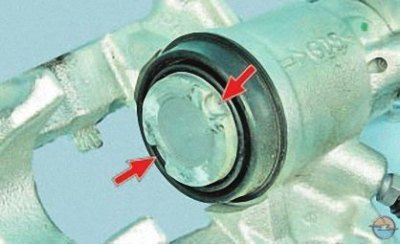
Note: Since the new brake pads are thicker, the caliper piston will need to be pressed into the cylinder.


Note: Since the new brake pads are thicker, the caliper piston will need to be pressed into the…


For this purpose, two grooves are made on the end of the piston.

For this purpose, two grooves are made on the end of the piston.


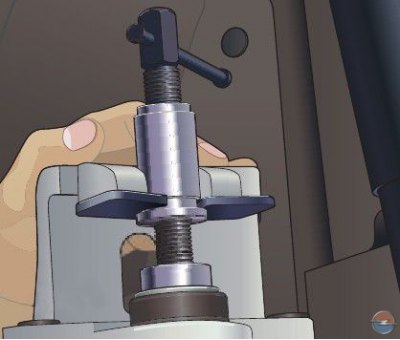
14. Install the special device (see below) into the caliper as shown in the photo, with the two cylindrical protrusions on the device washer fitting into the grooves on the end of the piston.

14. Install the special device (see below) into the caliper as shown in the photo, with the two…


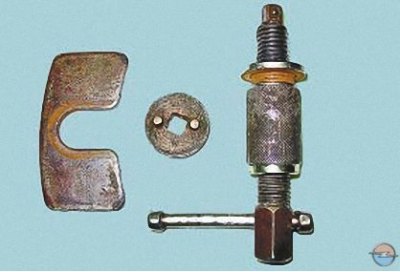
Note: This is what the parts of the rear wheel brake piston recessing tool look like.


15. Rotate the worm of the device to press the piston into the caliper cylinder.

16. Install the parts in the reverse order of removal.

17. To prevent the caliper guide pins from loosening, lubricate their threads with anaerobic thread locker before installation.

18. Press the brake pedal several times to bring the brake pads to the disc.

19. Install the wheel.

20. Similarly, replace the brake pads of the right rear wheel brake mechanism.

21. Check and, if necessary, restore the brake fluid level in the master cylinder reservoir.

Useful tips


Having replaced worn brake pads with new ones, do not rush to immediately drive onto busy highways. It is possible that at the first intensive braking you will be unpleasantly surprised by the low efficiency of the brakes, although the pads are branded. Brake discs also wear out, and new pads touch them only with their edges, practically not braking.

Choose a quiet street or a driveway without cars and brake gently several times so that the pads are ground in and begin to fit over the entire surface. At the same time, evaluate the effectiveness of the brakes.

Try not to brake sharply for at least the first 100 km. If the brake pads are too hot, the top layer of their linings will burn and the brakes will not be as effective as possible for a long time.


This article is available at russian, bulgarian, belarusian, ukrainian, serbian, croatian, romanian, polish, slovak, hungarian
Checking the article: Trifonova Emilia

Share information:

Previous articles
Opel Astra J: Brake system
Next articles

Replacing the brake disc of the front wheel brake mechanism
Replacing the front wheel brake caliper
Replacing the brake pads of the front wheel brake mechanism
Removal and installation the brake pedal
Replacing brake pipes
Replacing brake hoses
Replacing the rear wheel brake caliper
Replacing the brake disc of the rear wheel brake mechanism
Adjusting the parking brake drive
Replacing the rear parking brake cables
Removal and installation the parking brake lever


See similar ones from other Opel car manuals:
▶ Replacing the rear wheel disc brake pads Opel Corsa C (2000-2006)
▶ Replacing the rear wheel disc brake pads Opel Vectra C (2002-2008)
▶ Replacing rear brake pads Opel Insignia A (2008-2017)
▶ Rear wheel brake mechanism device Opel Kadett E (1984-1995)
▶ Rear Brake Pads — Checking and Replacing Opel Omega B2 (1999-2003)
Link to this page in different formats

Visitor comments


No comments yet


How much will 44 + 19 =


Astra J (2009-2015, petrol) 
  • General information
  • Vehicle device
  • User manual
  • Faults en route
  • Maintenance
  • Power unit
  • Engine repair
  • Cooling and lubrication system
  • Engine power system
  • Exhaust system
  • Transmission
  • Clutch
  • Car gearbox
  • Drive shafts
  • Chassis
  • Front suspension
  • Rear suspension
  • Steering
  • Brake system
  • Wheels and tires
  • Body
  • Exterior
  • Interior
  • Doors and windows
  • Body Care
  • Heating and air conditioning
  • Security systems
  • Electrical equipment
  • Equipment and devices
  • Lighting and signaling
  • Power devices
  • Electrical circuits
Astra H (2004-2009) 
  • General information
  • Introduction to the guide
  • Troubleshooting
  • User manual
  • Maintenance
  • Power unit
  • Engine repair
  • Cooling and heating
  • Power and exhaust system
  • Ignition system
  • Launch and charge system
  • Transmission
  • Mechanical gearbox
  • Automatic gearbox
  • Drive shafts
  • Chassis
  • Brake system
  • Car suspension
  • Steering
  • Body
  • Interior
  • Exterior
  • Electrical equipment
  • Equipment and devices
  • Electrical circuits
Astra G (1998-2004) 
  • General information
  • Introduction to manual
  • User manual
  • Maintenance
  • Power unit
  • SOHC gasoline engines
  • DOHC gasoline engines
  • Diesel engines 1.7 and 2.0
  • Engine repair
  • Cooling system
  • Supply system
  • Injection system (gasoline)
  • Injection system (diesel)
  • Exhaust system
  • Charge and launch system
  • Ignition system (gasoline)
  • Preheat system (diesel)
  • Transmission
  • Manual gearbox
  • Automatic gearbox
  • Clutch
  • Drive shafts
  • Chassis
  • Brake system
  • Wheel suspension
  • Steering
  • Body
  • Exterior
  • Interior
  • Doors and windows
  • Ventilation and heating
  • Electrical equipment
  • Equipment and devices
  • Electrical circuits
Astra G (1998-2004, petrol) 
  • General information
  • User manual
  • Car care
  • Maintenance
  • Power unit
  • Single shaft engines
  • Twin shaft engines
  • Engine repair
  • Cooling and heating
  • Fuel and exhaust systems
  • Starting and charging system
  • Ignition system
  • Transmission
  • Clutch
  • Mechanical gearbox
  • Automatic gearbox
  • Drive shafts
  • Chassis
  • Brake system
  • Car suspension
  • Steering
  • Body
  • Interior
  • Exterior
  • Electrical equipment
  • Equipment and devices
  • Wiring diagrams Opel Astra
  • Wiring diagrams Opel Zafira
Astra F (1991-1998, petrol) 
  • General information
  • Maintenance
  • Power unit
  • Engine in car
  • Engine removed
  • Cooling system
  • Heating and ventilation
  • Fuel supply (carburetor)
  • Fuel supply (injector)
  • Emission control
  • Ignition system
  • Transmission
  • Clutch
  • Mechanical gearbox
  • Automatic gearbox
  • Drive shafts
  • Chassis
  • Brake system
  • Car suspension
  • Steering
  • Body
  • Exterior
  • Interior
  • Electrical equipment
  • Equipment and devices
  • Electrical circuits
OpelBook.ru © 2017–2026 · Mobile version · · Sitemap: EN BG BY UA RS HR RO PL SK HU · Feedback · Site search
Astra F, petrol · Astra G, petrol · Astra G · Astra H · Astra J, petrol · Corsa B · Corsa C, petrol · Corsa C · Insignia A · Kadett D · Kadett E · Omega A · Omega B · Omega B2 · Vectra A, petrol · Vectra A · Vectra B, petrol · Vectra B · Vectra C · Zafira A, petrol · Frontera A, petrol · Frontera B · Ascona C · Vivaro A ·
We want your visit to be comfortable 🤝! We use cookies 🍪 to make that happen.