


Contents: Rotary switch for outdoor lighting…⬇ Instrument lighting brightness…⬇ Headlight optical axis direction…⬇ Fog light switch ⬇ Rear fog light switch ⬇ Bonnet Lock Latch Release Lever ⬇
The exterior lighting/instrument lighting switch panel is built into the instrument panel to the left of the steering column. Depending on the vehicle's equipment, it may contain up to five controls (see illustrations 15.1, 17.6):
- rotary switch for outdoor lighting modes;
- instrument lighting dimmer (potentiometer);
- headlight optical axis direction regulator;
- fog light switch;
- rear fog light switch.
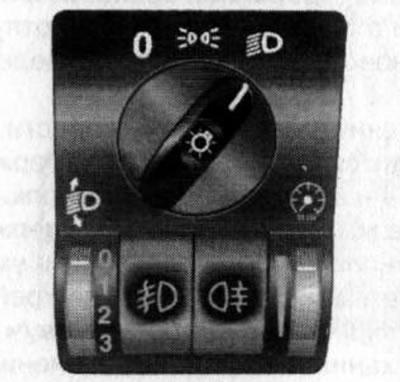
17.6. Exterior Lighting Switch Panel/Instrument Cluster Lighting
Note: Depending on the configuration, the appearance and design of the regulators may differ from those shown in the illustrations. However, their symbolic designations and control principle are the same as those described below.
Rotary switch for outdoor lighting modes
The rotary switch is located at the top of the switch panel (see illustration 17.6) and can be installed in one of 3 positions:
ABOUT In this switch position, all external lighting devices are turned off.
 When the rotary switch handle is moved to this position, the front and rear parking lights, as well as the license plate light, are turned on.
 When the rotary switch handle is moved to this position, the low beam headlights are turned on in addition to the previously activated running lights.
If the vehicle is equipped with a daytime running light system, even if the rotary switch is set to the "O" position, the low beam headlights will be activated automatically when the ignition is turned on. The instrument lighting will remain off.
Instrument lighting brightness controller (potentiometer)
The instrument lighting is activated when the exterior lighting is turned on. The brightness of the lighting can be adjusted using the roller control built into the lower right corner of the switch panel (see illustration 17.6).
Adjustment is made by rotating the roller regulator in the appropriate direction.
Note: On models equipped with a central information display, the brightness of the screen is adjusted simultaneously with the brightness of the instrument lighting.
Headlight optical axis direction regulator
Manual adjustment of the tilt of the optical axes of the headlights
Roller adjuster for the direction of the optical axes of the headlights (with appropriate equipment) built into the lower left corner of the switch panel and has four positions (see illustration 17.6).
The regulator allows changing the direction of the optical axes of the headlights in the vertical plane within certain limits. The tilt of the optical axes of the headlights is greater, the higher the number selected on the regulator scale (see illustration 17.6). As the number of passengers and the vehicle loading increase, increase the angle of the light beams to prevent blinding drivers of oncoming vehicles and vehicles in front.
Rotate the regulator to set it to the desired position. Adjustment is performed with the low beam headlights activated (see above).
Recommended settings for Corsa C/Combo/Combo Tour:
- 0 - only front seats occupied;
- 1 - all seats are occupied;
- 2 - all seats and cargo in the luggage compartment are occupied;
- 3 - the driver's seat is occupied and there is cargo in the luggage compartment.
Recommended settings for Corsa-van/Combo-van:
- 0 - seats occupied;
- 1 - seats occupied and luggage compartment half full;
- 2 - all seats are occupied and the luggage compartment is fully loaded;
- 3 - the driver's seat is occupied and the luggage compartment is fully loaded.
Automatic adjustment of the tilt of the optical axes of the headlights
On models equipped with a xenon headlight system, the angle of the headlights' optical axes is adjusted automatically. If a malfunction of the automatic adjustment device occurs, the corresponding indicator lamp is activated on the instrument cluster (see Section 16) - the malfunction must be corrected immediately.
Asymmetrical headlight distribution
All models described in this Manual are equipped with headlights with asymmetrical low beam. Asymmetrical headlights improve the view of the road from the front passenger side. If you are going to a country with left-hand traffic, asymmetrical light can cause blinding of oncoming drivers and emergency situations. Sometimes this mode needs to be removed for other reasons.
To eliminate the effect of asymmetrical light distribution, it is necessary to install special caps on the headlights - contact the official representatives of Opel, where they will be able to select the appropriate equipment for you.
Fog light switch
If equipped, fog light switch
 built into the bottom of the switch panel (see illustration 17.6).
The fog lights are activated by pressing the switch if the ignition and external lighting of the car are on - the corresponding indicator on the instrument cluster should light up (see Section 16). Pressing the same button again will deactivate the fog lights - the indicator on the instrument cluster will go out.
Rear fog light switch
If equipped, rear fog light switch
 built into the bottom of the switch panel (see illustration 17.6).
The lights are activated by pressing the switch if the ignition and external lighting of the car are on - the corresponding indicator on the instrument cluster should light up (see Section 16). Pressing the same button again will deactivate the rear fog lights - the indicator on the instrument cluster will go out.
Note: When towing a trailer, the rear fog lights are switched off.
Bonnet Lock Latch Release Lever
The hood release lever is located under the instrument panel to the left of the steering column (see illustration 15.1). The procedure for opening the hood is described in Section 4 (see Part A).
Visitor comments