
OpelBook.ru
Cars AvtoVAZ Cars Mitsubishi Cars BMW Cars Mercedes Cars Nissan Cars Toyota Cars Chevrolet
English Русский
Български
Беларускі
Український
Српски
Hrvatski
Română
Polski
Slovenský
Magyar
 |  Sitemap  |  Contacts  |    


Main Astra Corsa Insignia Kadett Omega Vectra Zafira Others Articles
Vectra A (1988-1995, petrol) Vectra A (1988-1995) Vectra B (1995-2002, petrol) Vectra B (1995-2002) Vectra C (2002-2008)
  • Main
  • Vectra
  • Vectra A
  • Electrical equipment
  • Power devices
  • Generator brushes — removal, inspection and installation

Generator brushes — removal, inspection and installation (Opel Vectra A)

            0

Contents: Delco-Remy type (except "compact") ⬇ Generator type Bosch ⬇ Delco-Remy "compact" ⬇

Delco-Remy type (except "compact")


Removal


1. Remove the generator as described in Chapter 9.

2. Draw a line to align the casings.

3. Unscrew the three tie bolts, remove the drive side casing and the rotor from the other half of the casing and the stator (see illustration).
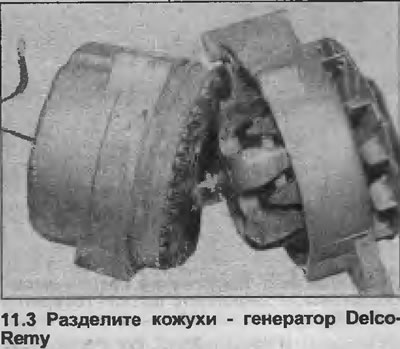
3. Unscrew the three tie bolts, remove the drive side casing and the rotor from the other half of…


4. Check the condition of the generator rings, if necessary, clean them with a cloth or very fine sandpaper (see illustration).
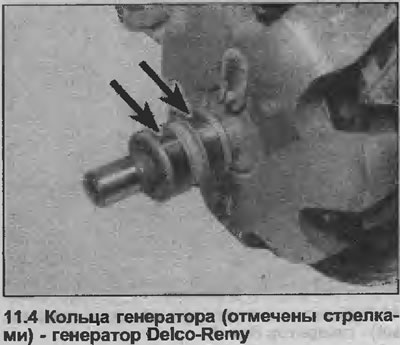
4. Check the condition of the generator rings, if necessary, clean them with a cloth or very fine…


5. Unscrew and remove the three nuts and washers securing the stator wiring to the rectifier, remove the stator assembly (see illustration).
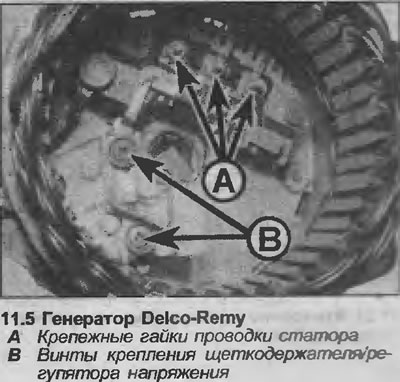
5. Unscrew and remove the three nuts and washers securing the stator wiring to the rectifier,…


6. Loosen the screw and lift up the diode assembly.


7. Remove the two screws securing the brush holder and voltage regulator to the slip ring housing and remove the brush holder assembly. Note the location of the insulating washers under the screw head.

8. Check that the brushes move freely in the guides and that their length is within the limits given in Specifications. If you are in doubt about the condition of the brushes, it is better to replace them.

9. To install new brushes, unsolder the contacts of the old brushes from the brush holder and solder the new ones in their place.

10. Check that the new brushes move freely in the guides.

Installation


11. Before installing the brush holder assembly, secure the brushes in a fixed position using a piece of wire or a drill.

12. Install the brush holder assembly so that the wire or drill protrudes through the groove in the housing with the sliding ring, tighten the mounting screws.

13. Install the diode assembly and stator assembly into the housing, tighten the screws and nuts.

14. Assemble the housings with the rotor together, aligning the previously made marks. Insert and tighten the three tie bolts.

15. Remove the wire or drill from the groove in the housing with the slip ring so that the brushes rest on the generator rotor rings (see illustration).
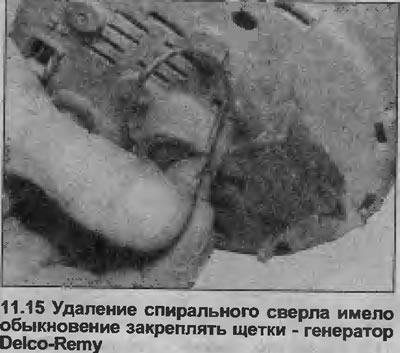
15. Remove the wire or drill from the groove in the housing with the slip ring so that the brushes…


16. Install the generator as described in Chapter 9.


Generator type Bosch


Removal


17. Disconnect the main air duct from the air cleaner, air block or throttle body, depending on the model, and remove it for better access.

18. Disconnect the battery wiring.

19. If required for better accessibility, the generator can be removed as described in Chapter 9.

20. Unscrew the two mounting screws and remove the brush holder/voltage regulator assembly (see illustrations).
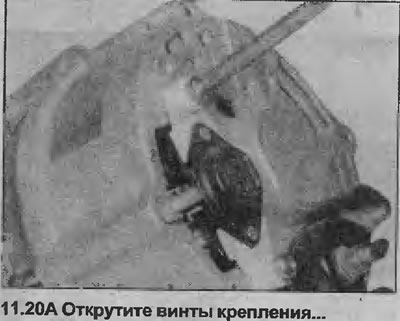
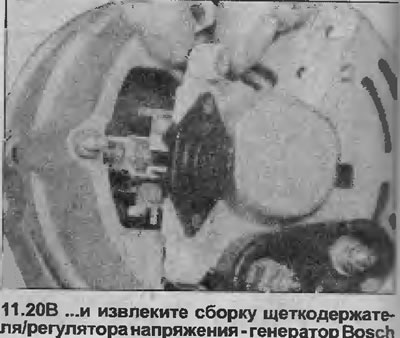
20. Unscrew the two mounting screws and remove the brush holder/voltage regulator assembly (see…


20. Unscrew the two mounting screws and remove the brush holder/voltage regulator assembly (see…


21. Check that the brushes move freely in the guides and that the length of the brushes is within the limits given in Specifications (see illustration).
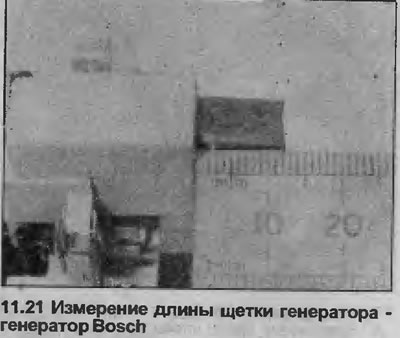
21. Check that the brushes move freely in the guides and that the length of the brushes is within…


If you are in doubt about the condition of the brushes, it is best to replace them as follows.


22. Unsolder the brush wire from the brush holder. Remove the brush. Do the same with the remaining brush.

Installation


23. Please note that whenever new brushes are installed, new springs must also be installed.

24. Install new springs in the brush holder, insert new brushes, and check that they move freely in the guides. If they stick, file them down slightly with a fine file or sandpaper.

25. Solder the ends of the brush wires to the brush holder, being careful not to let any solder get on the twisted wire.

26. Check the condition of the generator rings, if necessary clean them with a cloth or very fine sandpaper (see illustration).
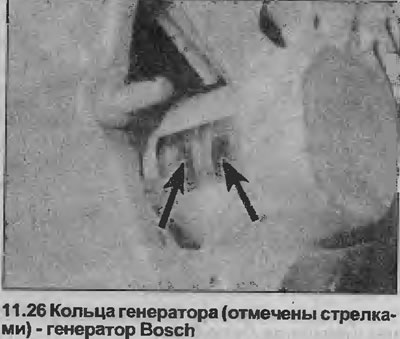
26. Check the condition of the generator rings, if necessary clean them with a cloth or very fine…


27. Install the voltage regulator brush holder assembly and tighten the mounting screws.

28. Where necessary, install the generator as described in Chapter 9.

29. Reconnect the battery wiring.

30. Install the main air duct.

Delco-Remy "compact"


Removal


31. Remove the generator as described in Chapter 9.

32. Remove the plastic cover from the back of the generator.

33. Remove the two bolts securing the brush holder to the rear of the generator, one bolt also secures the interference suppression capacitor.


34. Remove the noise suppression capacitor, then pull out the brush holder, noting the position of the flat connector on the side.

35. Check that the brushes move freely in the holders and that the brush length is within the limits given in the Specifications. If you are in doubt about the condition of the brushes, it is better to replace them.

36. Check the condition of the generator rings, clean them with a cloth or fine sandpaper.

Installation


37. The brush is installed in the reverse order.


This article is available at russian, bulgarian, belarusian, ukrainian, serbian, croatian, romanian, polish, slovak, hungarian
Checking the article: Chernov Alexander

Share information:

Previous articles
Opel Vectra A: Power devices
Next articles

Generator — check
Generator — removal and installation
Generator — description
Battery — Removal and Installation
Battery — Checking and Charging
Checking the ignition system — general description
Generator Drive Belt — Removal, Installation and Adjustment
Starter — General Description
Starter — check
Starter — removal and installation
Starter — overhaul
Ignition coil — removal, inspection and installation


See similar ones from other Opel car manuals:
▶ Replacing generator brushes Opel Astra G (1998-2004)
▶ Replacing generator brushes Opel Corsa B (1993-2000)
▶ Generator brushes and voltage regulator — removal and… Opel Omega A (1986-1993)
▶ Generator brushes (Bosch type) — checking, removal and… Opel Ascona C (1981-1988)
▶ Generator replacement Opel Insignia A (2008-2017)
Link to this page in different formats

Visitor comments


No comments yet


How much will 44 + 30 =


Vectra C (2002-2008) 
  • General information
  • User manual
  • Vehicle device
  • Maintenance
  • Troubleshooting
  • Power unit
  • Engine repair
  • Cooling system
  • Power and control system
  • Engine electrics
  • Transmission
  • Clutch
  • Car gearbox
  • Drive shafts
  • Chassis
  • Car suspension
  • Steering
  • Brake system
  • Body
  • Exterior
  • Interior
  • Doors, locks and windows
  • Heating and ventilation
  • Electrical equipment
  • Equipment and devices
  • Headlights and lighting
  • Electrical circuits
Vectra B (1995-2002) 
  • General information
  • User manual
  • Weekly checks
  • Maintenance (gasoline)
  • Maintenance (diesel)
  • Troubleshooting
  • Power unit
  • SOHC gasoline engine
  • DOHC petrol engine
  • Diesel engine 1.7 liter
  • Diesel engine 2.0 liters
  • Engine repair
  • Cooling system
  • Fuel system (gasoline)
  • Fuel system (diesel)
  • Charging system
  • Launch system
  • Ignition and preheat
  • Transmission
  • Clutch
  • Mechanical gearbox
  • Automatic gearbox
  • Drive shafts
  • Chassis
  • Brake system
  • Wheel suspension
  • Steering
  • Body
  • Exterior
  • Interior
  • Doors and windows
  • Heating and ventilation
  • Electrical equipment
  • Equipment and devices
  • Electrical circuits
Vectra B (1995-2002, petrol) 
  • General information
  • Maintenance
  • Help with malfunctions
  • Power unit
  • Engine repair
  • Exhaust system
  • Cooling system
  • Fuel system
  • Multec injection system
  • Four point injection
  • Transmission
  • Clutch
  • Gearbox and drive
  • Chassis
  • Wheel suspension
  • Steering
  • Brake system
  • Wheels and tires
  • Body
  • Exterior
  • Interior
  • Electrical equipment
  • Fuses and electronics
  • Power devices
  • Ignition system
  • Lighting and signaling
  • Equipment and devices
  • Heating and ventilation
  • Electrical circuits
Vectra A (1988-1995) 
  • Power unit
  • Engine repair
  • Ignition system
  • Lubrication system
  • Cooling system
  • Injection system
  • Fuel system (carburetor)
  • Fuel system (diesel)
  • Exhaust system
  • Transmission
  • Clutch
  • Car gearbox
  • Chassis
  • Front suspension
  • Rear suspension
  • Steering
  • Brake system
  • Wheels and tires
  • Body
  • Exterior
  • Interior
  • Electrical equipment
  • Electrical circuits
Vectra A (1988-1995, petrol) 
  • General information
  • User manual
  • Maintenance
  • Power unit
  • SOHC engine
  • DOHC engine
  • Cooling and ventilation
  • Fuel system (carburetor)
  • Fuel system (injector)
  • Exhaust converter
  • Transmission
  • Clutch
  • Mechanical gearbox
  • Automatic gearbox
  • Drive shafts
  • Chassis
  • Brake system
  • Car suspension
  • Steering
  • Body
  • Body elements
  • Electrical equipment
  • Power devices
  • Equipment and devices
  • Electrical circuits
OpelBook.ru © 2017–2026 · Mobile version · · Sitemap: EN BG BY UA RS HR RO PL SK HU · Feedback · Site search
Astra F, petrol · Astra G, petrol · Astra G · Astra H · Astra J, petrol · Corsa B · Corsa C, petrol · Corsa C · Insignia A · Kadett D · Kadett E · Omega A · Omega B · Omega B2 · Vectra A, petrol · Vectra A · Vectra B, petrol · Vectra B · Vectra C · Zafira A, petrol · Frontera A, petrol · Frontera B · Ascona C · Vivaro A ·
We want your visit to be comfortable 🤝! We use cookies 🍪 to make that happen.