


Caution: New flywheel/drive plate mounting bolts will be required during installation.
Removal
Models with manual transmission
1. Remove the transmission (see Section 7A), then remove the clutch assembly as described in Section 6.
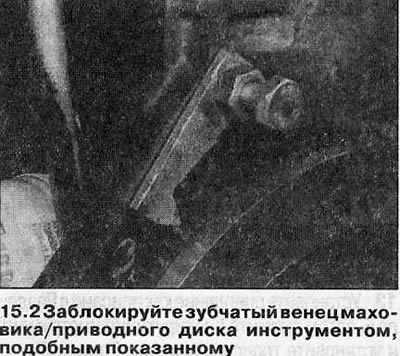
2. Lock the flywheel teeth as shown (see illustration). Alternatively, bolt a metal strip to the flywheel and crankcase. Make alignment marks on the flywheel and crankshaft using paint or a suitable marker.
3. Unscrew the mounting bolts and remove the flywheel. Do not drop it - the component is very heavy.
Models with automatic transmission
4. Remove the transmission as described in Section 7B.
5. Lock the drive disk (see point 2), then loosen the disc mounting bolts.
6. Remove the bolts and the mounting plate, centering ring and drive plate from the end of the crankshaft, noting the location of the components.
Inspection
7. On models with a manual transmission, inspect the flywheel for scratches on the contact surface with the clutch disc. If this surface is worn, the flywheel can theoretically be reground, but it is preferable to replace it. Check the flywheel ring gear teeth for wear and chipping. If the teeth are damaged, the flywheel must be replaced (replacement of its gear ring is not possible).
8. On models with automatic transmission, carefully inspect the drive disc and its ring teeth for damage and signs of wear.
9. If there is any doubt about the condition of the flywheel/drive disc, contact your Opel dealer for advice.
Installation
Models with manual transmission
10. Clean the contact surfaces of the flywheel and crankshaft and remove all traces of locking compound from the threads of the bolt holes in the crankshaft.
11. Attach the flywheel and install new mounting bolts. If installing the same component, align the marks made before removal.
12. Lock the flywheel using the method used during removal and tighten the mounting bolts to the Stage 1 torque value. Tighten the bolts to the Stage 2 angle using the socket and extension bar, then to the Stage 3 angle. It is recommended that an angle template be used for this to ensure accuracy. If a template is not available, paint alignment marks on the bolt head and flywheel to help ensure that the bolt is turned to the correct angle.
13. Install the clutch as described in Section 6, then remove the locking tool and install the transmission (see Section 7A).
Models with automatic transmission
14. Clean the contact surfaces of the drive disc and crankshaft and remove all traces of locking compound from the threads of the bolt holes in the crankshaft.
15. Place the drive disc together with the centering ring and mounting plate in the working position, then screw in the new mounting bolts.
16. Tighten the mounting bolts to the torque specified in the Specifications and tighten them further as described in step 12. When finished, remove the locking tool and install the transmission (see Section 7B).
Visitor comments