


Contents: Selector lever position/start…⬇ Sports mode switch ⬇ Winter mode switch ⬇ Kickdown mode activation switch…⬇ Electronic control module ⬇ Input and output shaft speed sensors…⬇ ATF temperature sensor ⬇
Selector lever position/start enable/reverse lights switch sensor
This combined switch-sensor is responsible for the operation of the reverse lights, ensures the ability to start the engine only in certain positions of the selector lever ("P" and "N"), and also monitors the operation of the indicators on the control panel. If any of the listed functions fails, the switching mechanism should be adjusted. If the adjustment does not give the desired results, replace the switch-sensor.
Removal
1. Set the selector lever to the "N" position. Set the parking brake, jack up the rear of the car and place it on supports.
2. In order to provide access to the sensor switch, remove the battery with the installation tray (see Chapter Engine electrical equipment).
3. Release the lock (if such is provided) and carefully disconnect the selector cable from the AT lever. Loosen the mounting nut and remove the lever from the AT selector shaft.
4. Follow the wiring harness from the sensor switch to the contact connector and disconnect the latter, having first released the retainer from its housing.
5. On aF20 transmissions remove the dipstick, loosen the fastening nut and remove the dipstick guide tube from the AT crankcase; the tube sealing element must be replaced without fail.
6. Bend the lock washer (if provided), loosen the main nut and remove the washers from the AT selector shaft.
7. Loosen the bolts securing the switch plate and wiring harness, pull up and remove the switches.
Installation
1. Before installation, make sure that the selector lever shaft is in the neutral position - if you are not sure, put the selector lever on the shaft and move it back as far as it will go (to the "P" position), then move it forward two clicks.
2. Install the sensor switch on the transmission shaft, install the support bracket for fastening the electrical wiring. Screw in the mounting bolts, tighten them, but only by hand for now.
3. Install the washers and screw the main nut onto the selector shaft. Tighten the nut to the required torque. Secure the nut by bending the edge of the lock washer.
4. Adjust the sensor switch (see below).
5. Connect the electrical wiring - make sure the harness is routed correctly.
6. On aF20 transmissions place the new sealing element into the hole in the AT housing, insert the measuring tube guide and securely tighten its mounting nut. Insert the dipstick into the tube.
7. Install the selector lever on the shaft and tighten the nut to the required torque. Connect the selector cable to the lever hinge.
8. Install the battery and check the proper functioning of the sensor switch - if necessary, adjust the selector cable (see Adjusting the gear selection mechanism).
Adjustment
Before adjusting the switch sensor, make sure that the selector cable is adjusted correctly (see Adjusting the gear selection mechanism).
1. Perform the procedures Withdrawals, pp. 1-3 (see above).
2. Shift the transmission to the "N" position — the selector shaft should turn with its flats parallel to the marking on the sensor-switch housing. If necessary, loosen the sensor-switch mounting bolts and adjust the position of the latter accordingly. Having achieved the desired result, tighten the bolts with the required force.
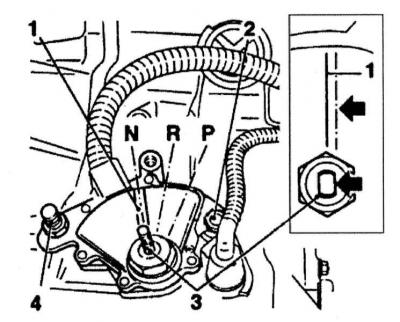
1 — Marking of the sensor-switch assembly
2 - Mounting bolt
3 - Selector shaft
4 - Mounting bolt
3. Install the selector lever on the shaft and tighten the mounting nut to the required torque. Connect the selector cable end to the lever and (with appropriate equipment) secure it with a clamp.
(Text copied from this portal OpelBook.ru)
4. Replace the battery and check the sensor switch for proper operation. If the adjustment does not produce the desired results, replace the sensor switch.
Sports mode switch
You will need a soldering iron, solder and acid-free solder paste.
Removal
1. Remove the selector lever assembly (see Removal and installation the AT selector lever assembly).
2. Push the switch out of the top of the lever by threading a piece of welding electrode through the special hole.
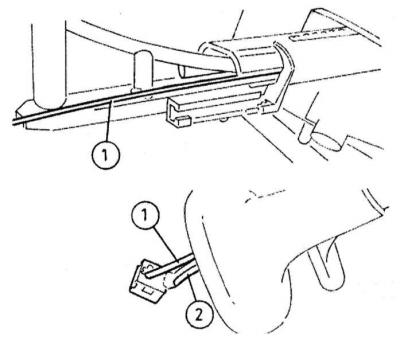
3. Clearly mark the switch and the wiring leading to it, then unsolder the wires from the switch terminals and remove the switch - the wiring harness can be pulled out from the base of the lever if necessary.
Installation
1. Solder the wires to the switch terminals; connect in accordance with the markings applied during dismantling.
2. Carefully place the switch in its regular place, then install the selector lever (see Removal and installation the AT selector lever assembly).
Winter mode switch
Removal
1. Remove the center console (see Chapter Body). Remove the two mounting screws from the back of the cover and remove the cover from the lever assembly.
2. Release the fasteners and remove the indicator panel from the lever assembly support bracket.
3. Follow the wiring harness from the switch to the connector and disconnect the connector. Release the switch from the indicator panel and remove it from the car.
Installation
Installation is carried out in the reverse order of dismantling the components.
Kickdown mode activation switch sensor
The sensor switch is built into the accelerator cable and cannot be replaced individually. The procedure for replacing the cable is described in Chapter Power and exhaust systems.
Electronic control module
Removal
The control module is installed on the right under the instrument panel and is attached to the air distributor housing with a bracket.
1. Before removing the module, you must disconnect the negative cable from the battery.
2. Remove the center console (see Chapter Body). Remove the left central air duct (see Chapter Cooling and heating systems).
3. Disconnect the module support bracket from the air distributor housing and move the module to the side. If the wiring interferes with the assembly, cut the plastic clamp securing the harness. Disconnect the wiring from the module; if necessary, remove the module from the support bracket.
Installation
Installation is performed in the reverse order of dismantling the components. Make sure the electrical wiring is connected correctly.
Input and output shaft speed sensors AT
Removal
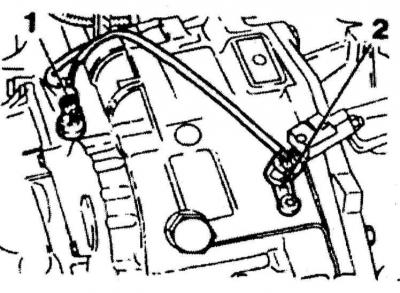
Speed sensor of input (1) and output (2) shafts of AT (2.0L models)
On aF20 transmissions the sensors are mounted on top of the crankcase. The input shaft sensor is in front and closer to the left edge of the transmission, the output shaft sensor is at the back. On aF13 and AF17 transmissions the sensors are installed at the top in the rear part of the crankcase, the output shaft sensor is above the input shaft sensor.
1. On models equipped with AF13 and AF17 transmission set the parking brake, jack up the front of the car and place it on supports. Remove the left front wheel and its wheel arch protection liner (if provided - see Chapter Body). On models with AF20 transmissions to gain access to the sensors, remove the battery with the mounting tray (see Chapter Engine electrical equipment).
2. Disconnect the electrical wiring and wipe clean the sensors and adjacent surfaces of the crankcase.
3. Unscrew the mounting bolt and remove the corresponding sensor from the transmission; the sealing ring must be replaced without fail.
Installation
1. After lubricating with ATF, place a new sealing ring on the sensor.
2. Insert the sensor into its mounting socket, screw in the mounting bolt and tighten it to the required torque. Restore the original wiring connection.
3. On 2.0L models (aF20 transmission) install the battery. On models equipped with AF13 and AF17 transmission install wheel arch liner (if you filmed) and the left front wheel. Lower the vehicle to the ground and tighten the wheel nuts to the required torque.
ATF temperature sensor
Removal
For AF13 and AF17 transmissions, the ATF temperature sensor is supplied complete with the wiring harness. To remove the sensor, it is necessary to remove the transmission side cover, behind which various valves and electromagnetic switches are installed - this is a rather complex task that requires maintaining perfect cleanliness, therefore, it is better to entrust its implementation to car service specialists. Below is a description of the procedure for removing the sensor from AF20 transmissions installed on models equipped with 2.0 L engines.
1. The sensor is screwed into the front of the transmission housing base - disconnect the negative battery cable before attempting to remove it.
2. Set the parking brake, jack up the front of the car and place it on supports.
3. Walk from the sensor along the wiring - try to remember the route of the harness. Disconnect the wiring and release it from the intermediate clamps.
4. Unscrew the mounting bolts and remove the cover from the sensor.
A — Bolts for fastening the AT crankcase cover
B — ATF temperature sensor
A.
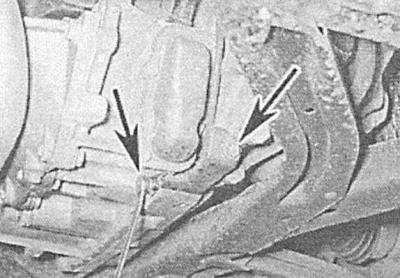
B.
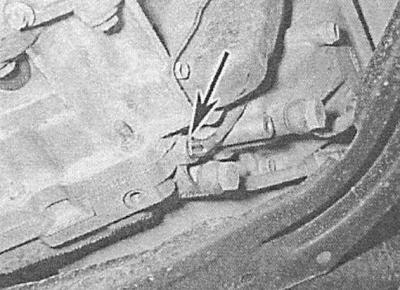
5. Wipe the surface of the AT crankcase adjacent to the sensor.
6. Unscrew the sensor and remove it together with the wiring harness. Immediately plug the hole in the crankcase with a suitable plug.
Installation
1. Place a new sealing washer on the sensor, remove the plug and quickly screw the sensor into the hole in the transmission housing. Tighten the sensor to the required torque. Immediately collect traces of spilled fluid with a clean rag, then replace the cover and securely tighten its mounting bolts.
2. Properly route the wiring harness and secure it in all provided intermediate fasteners.
3. Lower the vehicle and connect the negative battery cable. Check the ATF level and adjust if necessary (see Chapter Routine maintenance).
Visitor comments