


Contents: Removal ⬇ Installation ⬇
Removal
1. Remove the instrument panel visor attached to the instrument panel (figure 9.78).
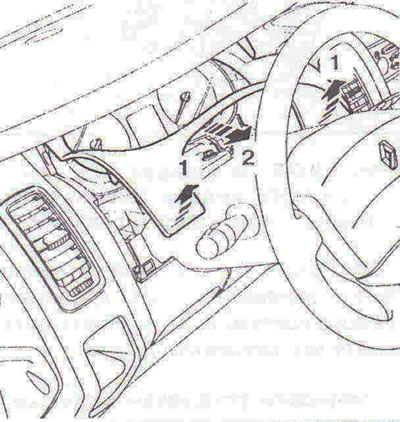
Figure 9.78. Remove the instrument panel visor secured to the instrument panel.
2. Unscrew bolts A (figure 9.79).
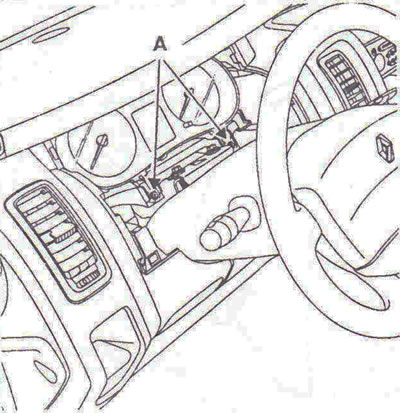
Figure 9.79. Unscrew bolts A.
3. Disconnect the wiring connectors and remove the instrument panel.
Installation
4. Installation is carried out in the reverse order of removal.
Configuration
5. When replacing the instrument panel, its configuration occurs automatically when the ignition is turned on. The central electronic switching unit of the passenger compartment (CEC) transmits the configuration of the previous instrument cluster stored in memory to the instrument cluster. If the instrument cluster has not been pre-configured, the fault "Instrument cluster not configured" will be present in the UCH section.
6. To change the instrument cluster configuration, use the diagnostic tool to perform the following procedure:
- perform a multiplex network test to ensure it is in good condition, then exit diagnostic mode;
- disconnect the battery for at least 1 minute, then reconnect it;
- WITHOUT TURNING ON THE IGNITION, repeat the multiplex network test (ignore malfunctions caused by ignition failure);
- enter dialogue mode with the UECBS;
- in the menu "Command", "Special command" confirm "CF 719 instrument cluster type";
- The diagnostic device will display the message "Are you sure you want to perform the configuration?" - "YES" or "NO": "NO" - the procedure is completed, if "YES", the device will display:
- turn off ignition, then confirm: clock "is present or not", vehicle speed signal "from ABS or from gearbox sensor", engine type "petrol or diesel", speed measurement index (215/65 R16, 205/65 R16, 215/65 R16), tachograph "is there or not".
[Source is on the website: opelbook.ru]
Once the procedure is complete, the device will display: "Is the configuration correct?" If "YES", turn the ignition off and on twice to confirm the instrument cluster configuration. The device will display the message: "Configuration complete".
If an error occurs, select "NO" to repeat the procedure from the beginning.
Visitor comments