
OpelBook.ru
Cars AvtoVAZ Cars Mitsubishi Cars BMW Cars Mercedes Cars Nissan Cars Toyota Cars Chevrolet
English Русский
Български
Беларускі
Український
Српски
Hrvatski
Română
Polski
Slovenský
Magyar
 |  Sitemap  |  Contacts  |    


Main Astra Corsa Insignia Kadett Omega Vectra Zafira Others Articles
Astra F (1991-1998, petrol) Astra G (1998-2004, petrol) Astra G (1998-2004) Astra H (2004-2009) Astra J (2009-2015, petrol)
  • Main
  • Astra
  • Astra H
  • Power unit
  • Engine repair
  • Checking the condition and replacing the powertrain suspension supports

Checking the condition and replacing the powertrain suspension supports (Opel Astra H)

            0

Contents: Examination ⬇ Replacement ⬇

Examination


1. The engine is rigidly connected to the transmission assembly and has a common suspension with it, which is made in the form of a subframe and 4 supports - the right and left supports are attached to the side members, and the front and rear supports are attached to the subframe. The general layout of the powertrain suspension supports is shown in the accompanying illustration.
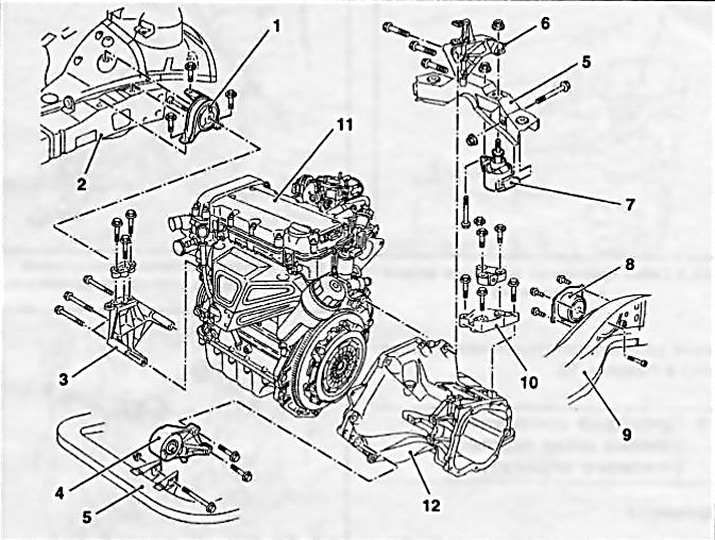
18.1 General layout of the powertrain suspension supports on Opel Astra/Zafira models

18.1 General layout of the powertrain suspension supports on Opel Astra/Zafira models
1 Right support
2 Frame
3 Right support bracket
4 Front support
5 Subframe beam
6 Rear support bracket
7 Torque damper
8 Left support
9 Subframe
10 Transmission support
11 Engine
12 Transmission


2. If necessary, jack up the front of the vehicle and support it to ensure free access. If equipped, remove the crankcase guard.

3. Check the condition of the rubber support cushions. If cracks, delamination, separation from the metal base, signs of rubber hardening, or other similar defects are detected, replace the support.

4. Using a torque wrench, check the tightening force of the support fasteners.


5. Using a crowbar, check the bearings for signs of excessive play - if necessary, ask an assistant to rock the unit in different directions and observe the behavior of the bearings. Play present in new components leads to rapid wear of the bearings. Replace defective components.

Replacement


Note: Before removing components, mark their installation positions with paint.


Right support

6. To remove the right support, it is necessary to install special devices (see section 5) and unscrew the bolts securing the support to the side member and to the engine bracket (see illustrations 7.19, 6.22).

Front support

7. Set the parking brake, then jack up the front of the vehicle and place it on supports.

8. To unload the support, support the engine with a trolley jack; to distribute the load, place a wooden block between the jack head and the oil pan.

Caution: When jacking up the power unit, be careful not to load the exhaust system; if necessary, disconnect the exhaust pipe from the exhaust manifold (see Chapter 4).


9. Loosen the nut that secures the support to the bracket and remove it along with the washer. Remove the mounting bolt (see accompanying illustration).
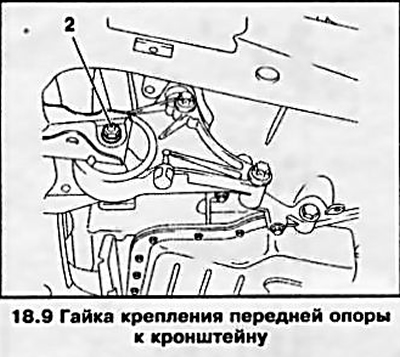
9. Loosen the nut that secures the support to the bracket and remove it along with the washer.…


10. Remove the bolts securing the support bracket to the transmission housing (see accompanying illustration) and remove it together with the pillow.
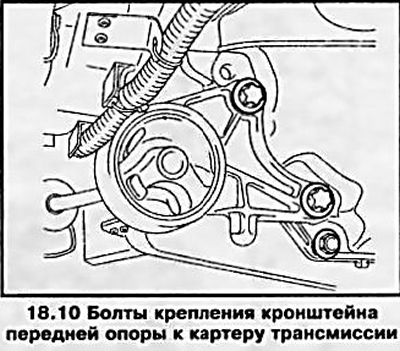


10. Remove the bolts securing the support bracket to the transmission housing (see accompanying…


11. Check the condition of all support components. Replace worn or damaged parts.

12. Installation is performed in the reverse order of removal, tighten the mounting bolts and nut to the required force. Lower the car to the ground.

Rear support

13. The rear support mount is shown in the accompanying illustration. The procedure for replacing it is the same as for the front support (see above).
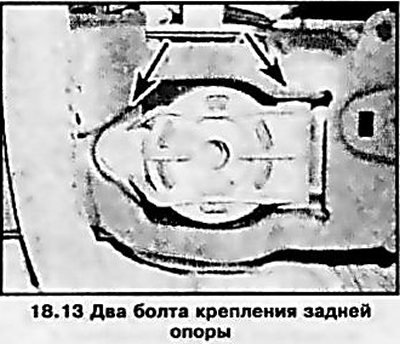
13. The rear support mount is shown in the accompanying illustration. The procedure for replacing…


Left support

14. Set the parking brake, jack up the front of the vehicle, place it on supports and remove the crankcase guard.

15. Remove the battery, unscrew the mounting bolts and remove the battery support tray (see Chapter 5).

16. Install the support removal tool (see section 5) or support the transmission with a trolley jack, placing a wooden block between the jack head and the pan to distribute the load.


17. Remove the mounting bolts and remove the transmission mounting support bracket from the transmission (see accompanying illustration).
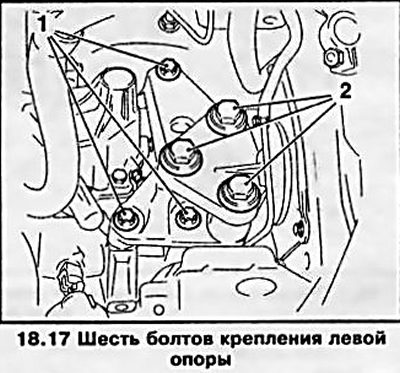
17. Remove the mounting bolts and remove the transmission mounting support bracket from the…


18. Remove the four TORX-head mounting bolts and remove the support, separating it from the body (see accompanying illustration).
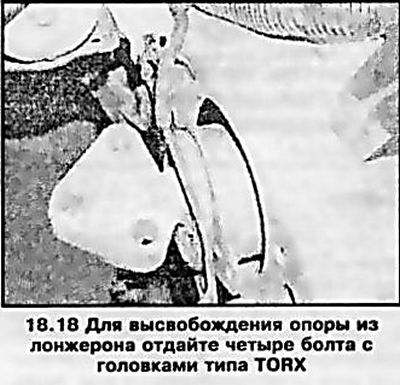
18. Remove the four TORX-head mounting bolts and remove the support, separating it from the body…


19. If necessary, the support can be disassembled by unscrewing a single bolt threaded through the center of the cushion (see accompanying illustration).
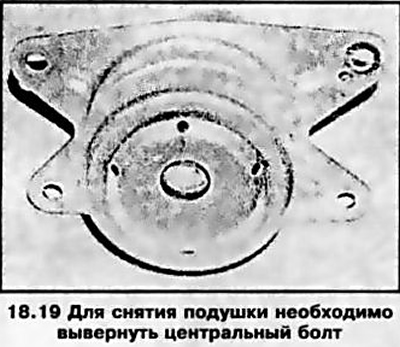
19. If necessary, the support can be disassembled by unscrewing a single bolt threaded through the…


20. Installation is carried out in the reverse order. Make sure that all fasteners are tightened to the required force.


This article is available at russian, bulgarian, belarusian, ukrainian, serbian, croatian, romanian, polish, slovak, hungarian
Checking the article: Simonov Timofey

Share information:

Previous articles
Opel Astra H: Engine repair
Next articles

Replacing camshaft seals
Replacing crankshaft seals
Removal, checking condition and installing flywheel/drive disk
Removal and installation the engine oil level sensor
Removal and installation the oil pump
Removal and installation the oil pan
Removal the engine


See similar ones from other Opel car manuals:
▶ Checking the condition and replacing the powertrain… Opel Corsa B (1993-2000)
▶ Checking the condition and replacing the powertrain… Opel Vectra C (2002-2008)
▶ Accessory Drive Belt — Checking Condition and Replacing Opel Zafira A (1999-2005, petrol)
▶ Checking the condition and replacing the engine compartment… Opel Frontera A (1991-1998, petrol)
▶ Cleaning and checking the technical condition of the… Opel Insignia A (2008-2017)
Link to this page in different formats

Visitor comments


No comments yet


How much will 13 + 44 =


Astra J (2009-2015, petrol) 
  • General information
  • Vehicle device
  • User manual
  • Faults en route
  • Maintenance
  • Power unit
  • Engine repair
  • Cooling and lubrication system
  • Engine power system
  • Exhaust system
  • Transmission
  • Clutch
  • Car gearbox
  • Drive shafts
  • Chassis
  • Front suspension
  • Rear suspension
  • Steering
  • Brake system
  • Wheels and tires
  • Body
  • Exterior
  • Interior
  • Doors and windows
  • Body Care
  • Heating and air conditioning
  • Security systems
  • Electrical equipment
  • Equipment and devices
  • Lighting and signaling
  • Power devices
  • Electrical circuits
Astra H (2004-2009) 
  • General information
  • Introduction to the guide
  • Troubleshooting
  • User manual
  • Maintenance
  • Power unit
  • Engine repair
  • Cooling and heating
  • Power and exhaust system
  • Ignition system
  • Launch and charge system
  • Transmission
  • Mechanical gearbox
  • Automatic gearbox
  • Drive shafts
  • Chassis
  • Brake system
  • Car suspension
  • Steering
  • Body
  • Interior
  • Exterior
  • Electrical equipment
  • Equipment and devices
  • Electrical circuits
Astra G (1998-2004) 
  • General information
  • Introduction to manual
  • User manual
  • Maintenance
  • Power unit
  • SOHC gasoline engines
  • DOHC gasoline engines
  • Diesel engines 1.7 and 2.0
  • Engine repair
  • Cooling system
  • Supply system
  • Injection system (gasoline)
  • Injection system (diesel)
  • Exhaust system
  • Charge and launch system
  • Ignition system (gasoline)
  • Preheat system (diesel)
  • Transmission
  • Manual gearbox
  • Automatic gearbox
  • Clutch
  • Drive shafts
  • Chassis
  • Brake system
  • Wheel suspension
  • Steering
  • Body
  • Exterior
  • Interior
  • Doors and windows
  • Ventilation and heating
  • Electrical equipment
  • Equipment and devices
  • Electrical circuits
Astra G (1998-2004, petrol) 
  • General information
  • User manual
  • Car care
  • Maintenance
  • Power unit
  • Single shaft engines
  • Twin shaft engines
  • Engine repair
  • Cooling and heating
  • Fuel and exhaust systems
  • Starting and charging system
  • Ignition system
  • Transmission
  • Clutch
  • Mechanical gearbox
  • Automatic gearbox
  • Drive shafts
  • Chassis
  • Brake system
  • Car suspension
  • Steering
  • Body
  • Interior
  • Exterior
  • Electrical equipment
  • Equipment and devices
  • Wiring diagrams Opel Astra
  • Wiring diagrams Opel Zafira
Astra F (1991-1998, petrol) 
  • General information
  • Maintenance
  • Power unit
  • Engine in car
  • Engine removed
  • Cooling system
  • Heating and ventilation
  • Fuel supply (carburetor)
  • Fuel supply (injector)
  • Emission control
  • Ignition system
  • Transmission
  • Clutch
  • Mechanical gearbox
  • Automatic gearbox
  • Drive shafts
  • Chassis
  • Brake system
  • Car suspension
  • Steering
  • Body
  • Exterior
  • Interior
  • Electrical equipment
  • Equipment and devices
  • Electrical circuits
OpelBook.ru © 2017–2026 · Mobile version · · Sitemap: EN BG BY UA RS HR RO PL SK HU · Feedback · Site search
Astra F, petrol · Astra G, petrol · Astra G · Astra H · Astra J, petrol · Corsa B · Corsa C, petrol · Corsa C · Insignia A · Kadett D · Kadett E · Omega A · Omega B · Omega B2 · Vectra A, petrol · Vectra A · Vectra B, petrol · Vectra B · Vectra C · Zafira A, petrol · Frontera A, petrol · Frontera B · Ascona C · Vivaro A ·
We want your visit to be comfortable 🤝! We use cookies 🍪 to make that happen.