


Contents: Rotary switch for outdoor lighting…⬇ Instrument lighting brightness…⬇ Fog light switch ⬇ Rear fog light switch ⬇ Bonnet Lock Latch Release Lever ⬇ Hazard warning switch ⬇ Sports mode switch (SPORT) ⬇ Anti-skid (ESP)/traction control…⬇ Seat heating switches ⬇ Anti-theft alarm switch ⬇ Rear window sunshade electric switch ⬇ Control unit for the operation of…⬇ Controls located on the center…⬇ Controls located on the overhead…⬇ Battery discharge protection ⬇ Additional lighting ⬇ Sun protection blind ⬇ Storage compartments and pockets ⬇ Cup holders ⬇ Sun visors ⬇
The exterior lighting/instrument lighting switch panel is integrated into the instrument panel to the left of the steering column. Depending on the vehicle's equipment, it may contain up to five control elements (see illustrations 15.1, 17.6).
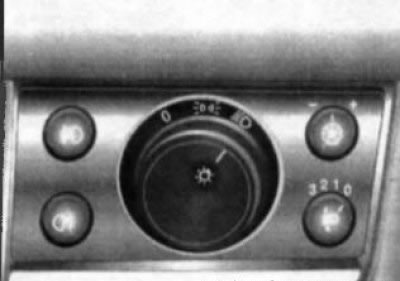
17.6 Exterior Lighting Switch Panel/Instrument Cluster Lighting
- rotary switch for outdoor lighting modes;
- instrument lighting dimmer (potentiometer);
- headlight optical axis direction regulator;
- fog light switch;
- rear fog light switch.
The mounting sockets that are not occupied by the installation of the corresponding control element are covered with decorative plugs.
Rotary switch for outdoor lighting modes
The rotary switch is located in the center of the switch panel (see illustration 17.6) and can be installed in one of 3 positions:
- ABOUT - In this switch position, all external lighting devices are turned off.
 When the rotary switch handle is moved to this position, the front and rear parking lights, as well as the license plate light, are turned on.
 When the rotary switch handle is moved to this position, the low beam headlights are turned on in addition to the previously activated running lights.
If the vehicle is equipped with a daytime running light system, even if the rotary switch is set to the "O" position, the low beam headlights will be activated automatically when the ignition is turned on. The instrument lighting will remain off.
Instrument lighting brightness controller (potentiometer)
The instrument lighting is activated when the external lighting is switched on. The brightness of the lighting can be adjusted using a potentiometer, the rotary knob of which
 built into the upper right corner of the switch panel (see illustration 17.6).
To adjust, release the rotary knob of the regulator from the mounting socket by pressing. Then turn the knob to the right/left until it stops and, holding it in this position, achieve the required brightness of the backlight: to the right - increase the brightness, to the left - decrease the brightness. After completing the adjustment, press the knob into the mounting socket until it locks.
Fog light switch
If equipped, fog light switch
 built into the upper left corner of the switch panel (see illustration 17.6). fog lights are activated by pressing the switch if the ignition and external lighting of the car are on - the corresponding indicator on the instrument cluster should light up. Pressing the same button again will deactivate the fog lights - the indicator on the instrument cluster goes out.
Rear fog light switch
if equipped, the rear fog light switch is built into the lower left corner of the switch panel (see illustration 17.6).
The lights are activated by pressing the switch if the ignition and external lighting of the car are on - the corresponding indicator on the instrument cluster should light up (see Section 16). Pressing the same button again will deactivate the fog lights - the indicator on the instrument cluster will go out.
Note: When towing a trailer, the rear fog lights are switched off.
Bonnet Lock Latch Release Lever
The hood release lever is located under the instrument panel to the left of the steering column (see illustration 15.1). The procedure for serving the hood is described in Section 4.
Hazard warning switch
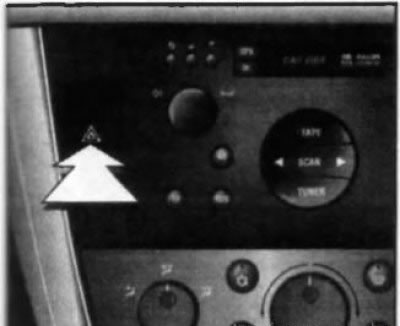
17.9 Hazard warning switch
The hazard warning lights are switched on using a push-button switch mounted in the left switch panel of the console section of the instrument panel (see illustrations 15.1 and 17.9). The button is marked with a pictogram depicting two triangles inscribed in each other. To make it easier to find the switch, the red field of the button is illuminated when the ignition is turned on. Pressing the hazard warning button causes all four direction indicators to operate simultaneously (and their indicator lights on the vehicle's instrument cluster). The alarm is designed to warn other road users about a forced stop of the vehicle and is also used in other dangerous situations provided for by the traffic regulations. To turn off the hazard warning, press the switch button again.
Sports mode switch (SPORT)
Models of recent years can be equipped with a sports driving mode system (see Section 25). Sports mode activation button "SPORT" (with appropriate equipment) built into the right switch panel of the console section of the instrument panel (see illustration 17.12a).
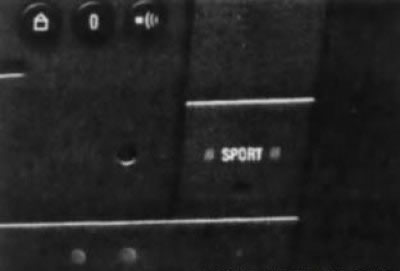
17.12a Sports mode switch
For more detailed information, please contact your authorized Opel dealer.
Anti-skid (ESP)/traction control (TC) switch
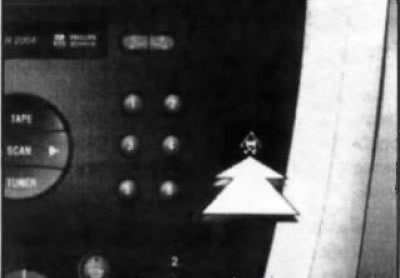
17.12b Anti-skid (E8P)/Traction Control (TC) Switch
On models with the corresponding configuration, the switch button for the corresponding system is built into the right switch panel of the console section of the instrument panel (see illustration 17.12b).
The ESP/TC system is activated automatically when the ignition is turned on; the functional readiness of the system is confirmed by an indicator on the instrument panel (see Section 16). If necessary, this system can be forcibly switched off by pressing the switch button - the indicator built into the instrument panel should light up continuously. Switching off the system is only possible when the car is moving at speeds below 60 km/h. The system is activated after being switched off by pressing the switch button again or automatically when the ignition is turned on again.
Seat heating switches
On models with the corresponding configuration, the front and rear side seat cushions are equipped with built-in heating elements, which are activated by individual switches. The front seat switches are built into the console section of the instrument panel (see illustration 17.13a), and the rear side seat switches are located on the rear end panel of the center console (see illustration 17.13b).
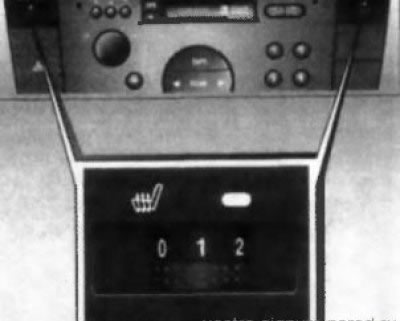
17.13a Switch buttons and roller controls for electric heating of front seat cushions
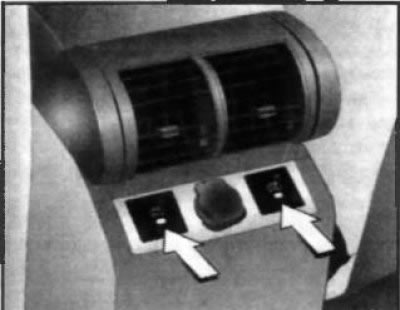
17.13 B Switch buttons for electric heating of the rear side seat cushions
To activate the electric heating, you need to press the button of the corresponding switch - the LED built into the switch button should light up. The front seats have a function for adjusting the heating intensity - turn the roller regulator to the desired position.
Attention! People with increased skin sensitivity are not recommended to use heating for a long time when the heating elements are activated at the highest intensity!
The operation of each seat's electric heater is controlled by a temperature-sensitive switch sensor, which automatically switches the corresponding heating element on and off, maintaining the set temperature. The electric heating system only starts to operate when the ignition is on.
Warning! Do not turn on electric heaters for a long time, and also if there is no passenger on the seat! Never cover the seats with any heat-insulating coverings (blankets, sofa cushions, covers, etc.), - this may lead to overheating of the heating elements! Do not place hard or heavy objects on the seats, do not pierce the seat cushions with pins or similar objects - this may lead to failure of the heating elements.
Anti-theft alarm switch
If equipped, the switch is mounted in the right-hand switch panel of the console section of the instrument panel under the switch for the front passenger seat heating (see illustration 8.3). For more detailed information, see Section 8 of this Chapter.
Rear window sunshade electric switch
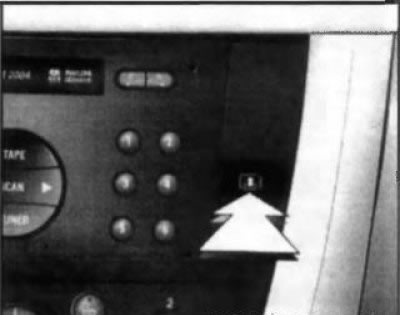
17.14 Rear window sunshade switch
If equipped, the rear window can be closed with a sunshade to reduce the impact of the sun's rays. To raise the sunshade, press the switch button (see illustration 17.14), located on the right panel of the console section of the instrument panel. To lower the curtain, press the same button again.
Control unit for the operation of ventilation, heating and air conditioning systems
The control unit for the ventilation/heating/air conditioning (HVAC) systems is located in the lower portion of the instrument panel console. Detailed information on the unit with a description of the principles of control of the systems is given in Part D of this Chapter. Within the scope of this subsection, only the pushbutton switch is considered (see illustration 17.15) activation of the rear window/door mirror heating, built into the HVAC control panel.
Pushbutton switch for heated rear window/door mirrors
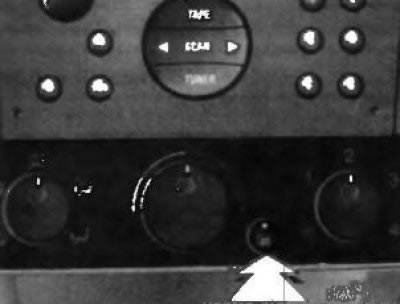
17.15 Rear window/door mirror heating pushbutton switch
Electric heating is activated by pressing the switch button
 with the engine running. Electric heating allows you to remove condensation, frost, and even light ice from the glass surface. The correct activation of the heating element is confirmed by the operation of the LED built into the button. On models with the appropriate configuration, the electric heating of the door rear-view mirrors is activated simultaneously with the heating of the rear window. The heating is switched off by pressing the button again, or automatically, about 15 minutes after activation by a signal from a special timer - the LED should go out.
The thread-like mesh of the heater heating element is glued to the inner surface of the rear window and requires careful handling - try not to damage the mesh when wiping the glass (wiping should be done only along the heating threads).
Controls located on the center console
AT/gear selector lever for manual transmission
The AT/RCPP gear selector lever is a floor-mounted design and is located on the center console panel. The vehicle control features for different trim levels are described in Part E.
Parking brake release lever
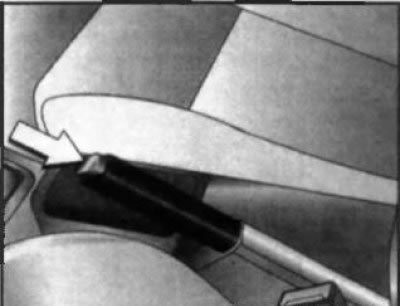
17.16 Parking brake release lever
The parking brake release lever is located between the front seats, on the center console (see illustration 17.16)To set the parking brake, without pressing the locking button on the end part, pull the lever up towards you (the lever is locked automatically), - the corresponding indicator lamp on the instrument cluster should be activated (see Section 16). To release the parking brake, pull the lever up slightly, press the release button on the end of the lever handle, then lower it down. To make it easier to move the lever, it is recommended to hold the car with the foot brake pedal.
Attention! Do not forget to release the parking brake before starting to move - make sure that the indicator lamp built into the instrument cluster is switched off!
Controls located on the overhead console
Interior lighting mode selection switches
The interior lighting is provided by activating the lamps built into the ceiling panels of the interior (see illustrations 17.17, 17.18).
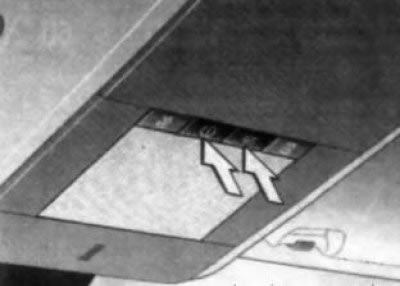
17.17 Front interior light switches
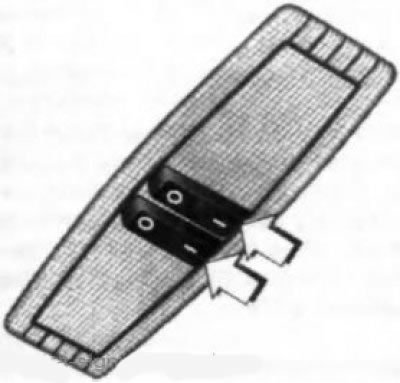
17.18 Rear general interior lighting/reading lights
The front light is activated when one of the side doors of the car is opened and goes out with a slight delay after the door is closed. To activate the light with the doors closed, you must press the switch button
 The lamp is switched off by pressing the same button again. To switch off the front interior lights, press the switch button . Rear lights (see illustration 17.18) (with appropriate equipment) are equipped with 3-position switches. In the middle position of the switches, the lighting is activated automatically when any of the side doors of the car is opened and goes out with a short delay after the door is closed. When you press the left/right switch, the corresponding lamp starts to function as an individual reading light (see below).
Switches for individual directional lights in front seats
If equipped accordingly, the individual directional lights for the front seats are integrated into the front interior light (see above). The lights are activated when the ignition is on by pressing the button
 the corresponding switch (see illustration 17.19) and provide individual illumination of the driver's and front passenger's seats. Pressing the button again deactivates the corresponding light.
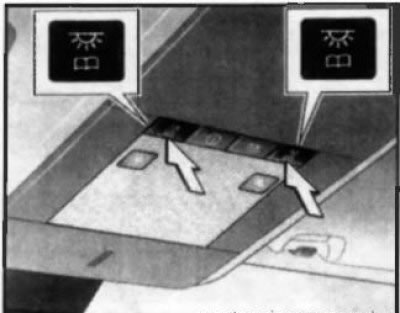
17.19 Switches for individual front seat lamps Switches for individual rear seat directional lamps
Rear reading lights if equipped (see illustration 17.18) are activated separately (right and left) with the ignition on, when the corresponding switch is moved to the "I" position. To deactivate, move the switch to the "O" position.
Battery discharge protection
On models with the appropriate equipment, the interior lighting, reading lamps, luggage compartment lighting and main glove compartment lighting are automatically switched off after the ignition is switched off 20 minutes regardless of the position of the switches.
Caution! Do not leave the lights on for a long time with the engine off!
Additional lighting
To ensure ease of use of some controls and equipment of the car in poor lighting conditions, interior lighting is provided. The interior lighting of the luggage compartment and the main storage compartment is activated when the tailgate/glove compartment lid is opened. If equipped, the lighting can be activated:
- Make-up mirror in sun visors - when opening the mirror cover;
- Cigarette lighter and ashtray illumination - when the ignition is on.
Sun protection blind
Both in the closed and open position, the upper hatch can be covered with a sunshade. The movement of the sunshade is done manually. When the upper hatch is opened, the sunshade is retracted automatically - after closing the hatch, it can only be returned to its original position manually.
Sunshades for rear side windows
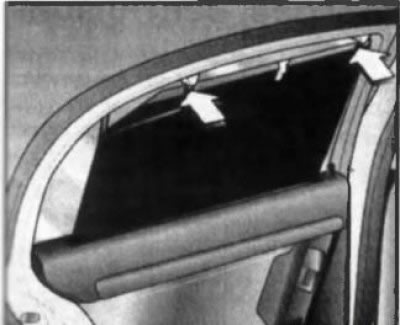
17.27 Closing the rear side window blind
If equipped, the rear side windows can be covered with sunshades to reduce the impact of the sun's rays. Pull the appropriate sunshade out by the handle located in the center of the upper edge of the sunshade and secure the sunshade in the upper holders (see illustration 17.27).
Storage compartments and pockets
Attention! Before starting to move, all storage compartments must be closed!
Main storage compartment
The main storage compartment is located on the right side of the instrument panel and has a hinged lid. There is a pencil holder in the front part of the open lid.
On models with the corresponding configuration (equipped with air conditioning) the main glove compartment has a cooling function. Cooled air comes through a nozzle located on the side wall of the compartment. If there is no need to cool the front glove compartment, move the regulator down (see illustration 17.31).
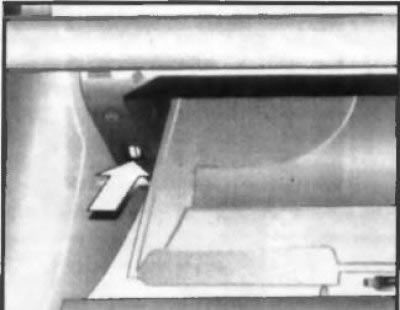
17.31 Main glove compartment air supply regulator
Storage compartment in the front armrest
If equipped, a storage compartment is built into the front seat armrest - see Section 12.
Overhead console storage bins
If equipped accordingly, the storage compartment can be integrated into the overhead console next to the front seat light (see illustration 17.32). To open the box, press on its lid in the marked place. When closing the lid, the latch snaps into place automatically.
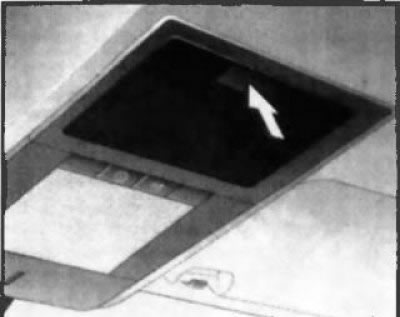
17.32 Overhead console storage box
On Signum models, the full-size ceiling panel can be equipped with a complete system of storage boxes (see illustration 17.33). These storage boxes are designed to store books, folders with documents, eyeglass cases and other small items that may be needed during a trip and should be at hand. The maximum permissible load of the storage boxes of the overhead console is 0.4 kg.
Luggage compartment storage boxes
On the left and right sides of the luggage compartment, there are storage boxes. Depending on the body type, the boxes can be of different shapes and sizes. The storage box on the left side is used to store a first aid kit, and on some models, also to store an emergency stop sign (see below). To open the lid of the storage box, press the upper lock (locks) and fold the lid down (see illustration 17.34).
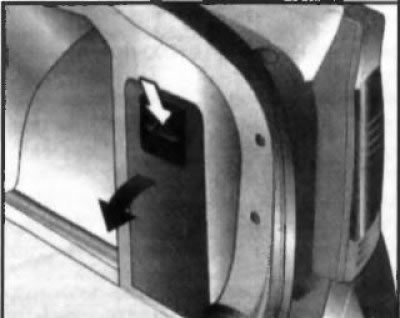
17.34 Opening the luggage compartment storage compartment
Pockets
Door pockets are designed to store small items and objects that need to be at hand during the trip.
Attention! Do not overload your pockets, do not put excessively heavy objects in them!
Some versions may be equipped with two more soft pockets in the upholstery on the rear side of the front seat backs or pockets made in the form of nets; these pockets should not be used to store hard objects.
Cup holders
Warning! The driver should not drink beverages or use cup holders while the vehicle is moving - all the driver's attention should be focused on driving the vehicle and ensuring traffic safety! Avoid sudden acceleration and braking when beverage containers are installed in the cup holders - if a hot beverage spills, the driver or passengers may get burned!
Front cup holders
Front cup holders (with appropriate equipment) are located on the center console, between the front seats. When not in use, the cup holders are covered with a lid (see illustration 17.35).
Rear cup holders
On models with the corresponding equipment, the rear cup holders are mounted in the central part of the rear bench seat cushion (see illustration 17.36). To use them, you need to press the front edge of the cup holders - they will move out into the position for use. Do not forget to fold the cup holders when they are not used for their intended purpose - the locking mechanism snaps into place automatically.
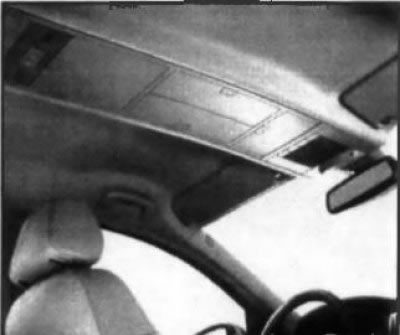
17.33 Overhead console storage bins on Signum models (with appropriate equipment)
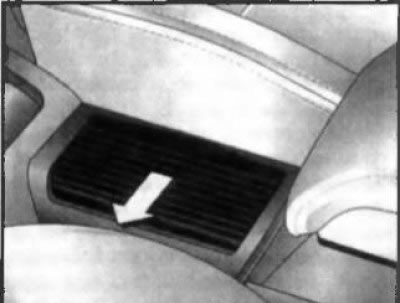
17.35 Opening the front cup holder cover
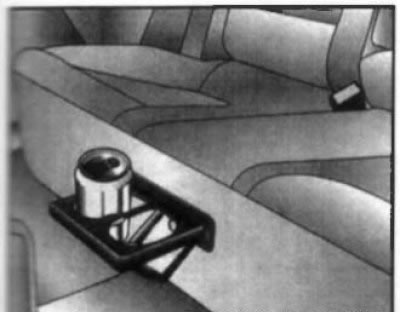
17.36 Rear cup holders
Sun visors
Sun visors provide protection for the driver/front passenger's eyes from being dazzled by direct sunlight. The visors are mounted on brackets with a rotating design, allowing them to be turned parallel to the side windows of the car if necessary (first release the bracket from the retainer)Depending on the configuration, the back of the visor may have a pocket for storing documents or a built-in make-up mirror (on some models the mirror may be equipped with a backlight).
Visitor comments