


Contents: General information ⬇ Anti-theft system ⬇ Information display ⬇ General controls for the…⬇ Activating/deactivating the audio…⬇ Adjusting the sound volume ⬇ Setting up sound parameters ⬇
Note: Earlier models may have been equipped with different types of audio systems.
General information
The infotainment system is a single functional unit with an information display and an on-board computer (with appropriate equipment).
Depending on the configuration, various audio systems can be installed on the car, equipped with additional optional equipment and any type of information display, depending on the customer's wishes. An external signal source can also be connected to the infotainment system - for example, a mobile phone, a navigation system, etc. The authors of this manual recommend entrusting the connection and installation of additional equipment to Opel service station specialists, where you can also get comprehensive information on the functions, settings and rules for using this equipment together with the infotainment system.
This Guide discusses the control methods and capabilities of the audio system using a basic audio system as an example CD 30/MP3.
The standard equipment of this audio system includes a radio with automatic tuning and recall of preset frequencies from memory, with the ability to receive radio stations in RDS format, a CD player and optionally an MP3 player, 6 acoustic speakers, a multifunctional information display (BID).
Note: All display types (see below) can be installed with this audio system.
The infotainment system features automatic volume control to compensate for road noise and a digital equalizer with five preset tone controls to optimize the sound. When equipped, the system has the ability to connect external devices (for example, a mobile phone), remote control via buttons built into the steering wheel and the ability to connect the Twin Audio system for rear passengers. Well-thought-out design of the controls and a large, convenient button for power and volume control make the system easy to operate.
Anti-theft system
The infotainment system is equipped with an electronic anti-theft system. An individual security code is entered into the electronic device - it is impossible to activate the audio system when installing it on another car.
Important! If you need to disconnect the battery, before you start work, make sure you have the correct combination to activate the equipment after connecting the battery. The security code must be specified in the user manual of the infotainment system - it must be kept outside the car. If you lose the combination, contact an Opel service station for help.
Note: On models produced since 2005, the security code is recognized by the electronic system without the owner's intervention and does not need to be entered when connecting the battery.
Information display
Depending on the configuration, one of three display options is built into the instrument panel:
Three-function information display
When the ignition is turned on, the display shows the current time, outside air temperature and date. When the audio system is activated, the current audio system playback mode is displayed in the display field instead of the date(see illustration 19.1).
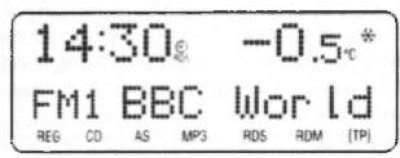
19.1 Three-function information display (TID) field appearance when the audio system is activated
Multi-information display (BID)
When the ignition is switched on, the display shows the current time, outside air temperature, day of the week and date. In addition, when the trip computer mode is activated, instead of the day of the week and date, the name of the control parameter and its digital values can be displayed. When the audio system is activated, instead of the day of the week/name of the control parameter, the current audio system playback mode is displayed in the display field (see illustration 19.2), bottom line (current date/digital values of the control parameter) remains on the screen.
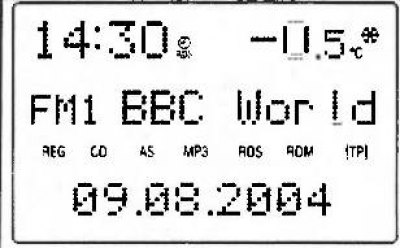
19.2 Multi-information display (BID) field appearance when the audio system is activated
Graphical Information Display (GID)
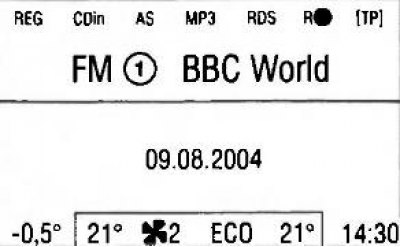
19.3 Main menu of the audio system indication mode
When selecting the audio system indication mode, the main menu of this mode will appear in the display field (see illustration 19.3). The lower part of the display shows the outside air temperature, the current operating mode of the ventilation, heating and air conditioning systems, and the current time. When the audio system is activated, information about the audio signal source appears in the information display field:
- Radio frequency range/CD player mode;
- Name or frequency of the radio station being received/number or title of the CD track;
- Depending on the current settings of the audio system, the corresponding indicators appear in the display field (see below).
The information display allows you to monitor the current audio system settings and adjust system parameters.
General controls for the infotainment system
The location of the controls on the infotainment panel is shown in Figure 19.4, to which all references in the text refer.
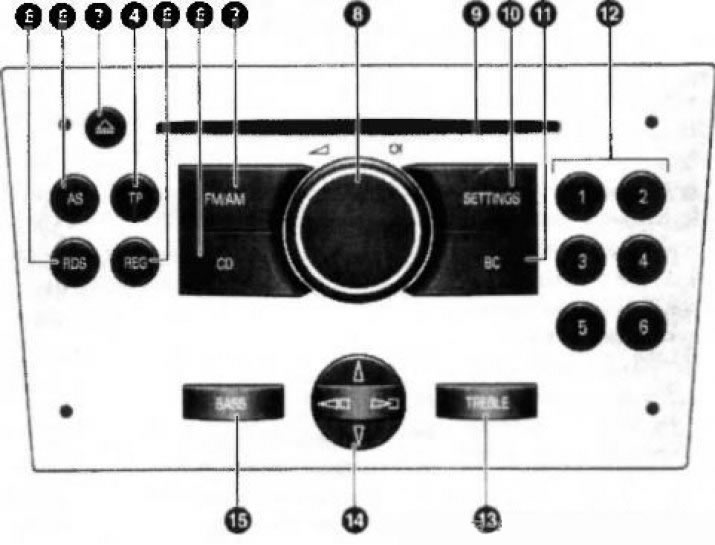
19.4 Location of controls on the infotainment system panel
Activating/deactivating the audio system
The infotainment system is activated by pressing the central button of the rotary volume control (8). The system will be activated in the playback mode that was set before the system was deactivated. To switch the system off, press the button (8) again.
Note: If you activate the infotainment system with the ignition off, the system will automatically turn off after 1 hour.
If equipped accordingly, it is possible to activate/deactivate the system when turning the ignition on/off (auto power on function) - to operate in this mode, it is necessary to turn off the ignition without turning off the audio system - the system is deactivated. When the ignition is turned on again, the audio system will be activated in the mode that was set before turning off the ignition.
This function is installed in the factory settings of the system and is activated by default. If necessary, it can be disabled - the audio system will be activated/deactivated only by pressing the button (8).
To deactivate the automatic turn-on feature:
- Press the SETTINGS button (10) - the display will show "Audio";
- Press the lower sector of the 4-position switch (14) - the display will show "System";
- By successively pressing the right sector of the 4-position switch (14), select the item in the menu "Ign.Logic ON/OFF";
- By pressing the upper or lower sector of the 4-position switch (14), select the required setting:
- when choosing "Ign.Logic ON" auto power on function activated;
- when choosing "Ign.Logic OFF" the automatic switch-on function is disabled.
- After about 6 seconds after the last press of the buttons, the display will return to the main menu display mode.
Note: When the battery is disconnected and reconnected, the automatic shutdown function will be reactivated.
Adjusting the sound volume
The sound volume is adjusted by turning the volume control knob (8).
Note: On models equipped with SSV sound level control system (Speed Sensitive control Volume), the audio system playback volume will be adjusted automatically depending on the vehicle speed.
When activated, the infotainment system starts playing the sound at the last set volume. Using the corresponding menu (see below), you can set the maximum volume level when switching on. The selected maximum volume level when activating the infotainment system will only be set if the sound volume before switching off the system was higher than this value, and the infotainment system must be switched off for at least 5 minutes with the ignition off. If necessary, the sound can be switched off without switching off the system as a whole (sound blocking). To do this, hold down the volume control button (8) for more than 2 seconds - the display will show "Mute" and the sound sources will be turned off.
Note: When the audio system receives a traffic information service signal (see below), the sound blocking is automatically released.
To remove the sound block, press the button or turn the volume control knob (8) - the display will show the current playback mode.
Setting up sound parameters
Sound parameters are adjusted via the corresponding menu and buttons "BASS" (15) "TREBLE" on the control panel of the infotainment system. To enter the sound settings menu, press the "SETTINGS" button (10) - the display will show "Audio". If the display shows "Settings", press the lower sector of the 4-position switch (14) to go to the "Audio" menu item. The sound parameters to be adjusted are selected by successively pressing the right/left sector of the 4-position switch (14) - the display window will play the names of the selected parameter in the following sequence: "FADER" (front and rear speaker volume balance) (with appropriate equipment) "BALANCE" (left and right speaker volume balance) "SOUND" (select equalizer mode) "TA VOLUME" (traffic announcement volume) "SDVC" (automatic volume control system depending on the speed of movement) "EXT.IN.VOL." (the volume of the signal from an external source, such as a mobile phone) "ON VOLUME" (sound volume when the audio system is activated) "FADER PTY" etc.
After selecting the desired parameter, its adjustment is carried out by pressing the upper/lower sector of the 4-position switch (14). The FADER, BALANCE, EXT.IN.VOL., ON VOLUME parameters are adjusted using conventional units from -12 to +12. When the desired value is selected, it is automatically entered into the system memory.
Note: New minimum volume for traffic announcements (when setting the TA VOLUME parameter) will be set only if it is lower than the previously set minimum traffic announcement volume.
When the SOUND parameter is selected, the equalizer settings switch between 5 preset modes after each button press - the corresponding inscription, for example "Rock" or "Jazz", is displayed in the display window field. Using the SDVC parameter, you can adjust the level of road noise compensation, choosing one of the values from 0 to 5.
Exit from the setup mode is performed by pressing the "SETTINGS" button (10) - the display will show the selected playback mode. Exit from the setup menu can occur automatically by the timer signal if the settings are not used for more than 3 seconds.
Note: When exiting the menu by the timer signal, the TID and BID displays will show the inscription "Audio", followed by the name of the current audio signal source, - the GID display will show the general settings menu "Settings".
High and low frequency timbre can be adjusted using the preset equalizer modes (see above) or in manual adjustment mode.
Note: When setting in manual mode, the previously set equalizer mode is cancelled.
To manually adjust the low frequency tone, press the "BASS" button (15) - the display window will show the corresponding inscription and the previously selected low frequency tone level. Adjustment is carried out by pressing the upper/lower sector of the 4-position switch (14). Adjustment is carried out using conventional units from -12 to +12. When the desired value is selected, it is automatically entered into the system memory.
Note: The bass tone control applies to the currently selected audio source and is stored separately for the radio and CD player.
Exit from the setup mode is done by pressing the "BASS" button again or automatically by the timer signal when not using the settings more than 3 seconds. Manual adjustment of high frequencies is carried out in the same way as adjustment of low frequencies by pressing the "TREBLE" button (13).
Visitor comments