


Contents: Single lock ⬇ Control from the driver's door lock ⬇ Control from main switch ⬇ Remote control control ⬇ Features of single lock control on…⬇ Unlocking and locking doors in…⬇ Replacing the remote control battery ⬇ Synchronization of the remote…⬇
Single lock
Note: When equipped accordingly, the single lock is combined into a single structure with the anti-theft alarm system.
The organization of a single lock system allows for centralized control of access to the vehicle in one of the following ways:
- From the driver's door lock;
- From the main switch of the single lock;
- With remote control (RC);
- From sensors in the driver's and front passenger door handles (models equipped with the Open system&Start).
Before locking the car, make sure that all doors are tightly closed. A special control lamp built into the instrument cluster warns of loosely closed doors (see Section 16).
Control from the driver's door lock
See also Section 3.
On models with a mechanical key, when the driver's door lock is unlocked/locked, the lock activators of all other doors of the car are automatically activated (including tailgate) and the fuel tank filler cap.
Control from main switch
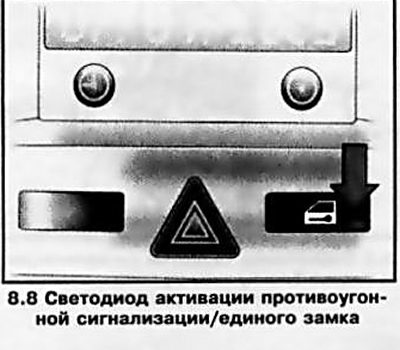
The main switch for the single lock is located on the console part of the instrument panel, above the central air vents to the right of the hazard warning switch (see illustration 3.1). It is used to lock doors from the inside (in this case, if the key is in the ignition, all doors must be closed), as well as for simultaneous locking of all doors from the outside without using the remote control and mechanical key (see Section 3).
When you press the main switch button, all doors are locked - the LED built into the button should light up.
Note: When the driver's door is open, the single lock does not lock the vehicle.
To unlock the doors, you must press the same button again or pull the inside handle of any door.
Note: When the double locking system is activated (see below), it is not possible to unlock the doors either from the main locking switch or from the interior door handles.
In the event of an accident of a certain severity, the doors locked with the main switch are unlocked automatically (to provide assistance from outside). The hazard warning lights are also automatically activated.
Note: The key must be in the ignition switch.
Remote control control
General information
The remote control controls the single lock, double locking system and anti-theft alarm system, and on models equipped with electric window lifts, also the lowering/raising of the windows. The remote control allows simultaneous unlocking/locking of all doors (including tailgate)It provides guaranteed activation of door locks/anti-theft alarms from a distance of approximately 3 meters (the success of using the remote control from a greater distance is determined by the terrain conditions).
Note: When using the remote control, it must be pointed directly at the vehicle.
When you lock the doors using the remote control, all current settings of the vehicle's electronic systems are saved and activated the next time you unlock the doors using the remote control.
Remote control failures may be caused by the following reasons:
- a) Incomplete closing of any of the doors;
- b) The battery level of the remote control has dropped;
- c) The distance between the remote control and the car exceeds 3 meters;
- d) Presence of interference from external radio signal sources;
- e) Multiple activation/deactivation of a single lock within a short period of time - the overload protection system is triggered (short-term system shutdown);
- f) Multiple attempts to use the remote control outside the range of the emitter - the device stops being recognized, synchronization must be performed (see below).
If the cause of the failure cannot be eliminated, the doors can be unlocked/locked in an emergency (see below) - if necessary, contact an Opel service station. When handling remote controls, observe the following precautions:
- Do not allow the remote control to come into contact with moisture!
- Do not drop or shake the remote control!
- Do not expose the remote control to direct sunlight or heat above 60°C for long periods of time!
- Try not to use the remote control unless necessary!
Unlocking and locking doors
The door lock is activated by pressing the door unlock button once - the anti-theft alarm and double locking system will be deactivated at the same time. Before locking the car, make sure that all doors are tightly closed. The doors are locked by pressing the lock button on the remote control once and briefly. To activate the double locking/anti-theft alarm system, you must press the same button again within 15 seconds of locking the car.
Note: If the ignition has been switched on, in order for the double locking system to be activated when locking, the driver's door must be opened and closed once.
The fact of unlocking/locking the lock and disabling/enabling the anti-theft alarm is confirmed by a single/double activation of the emergency alarm.
Control of electric windows from outside
Electric window lift control (on models with the corresponding configuration) is carried out by holding down the corresponding button on the remote control. To lower the windows, you need to hold down the unlocking button, to close - the door locking button.
Features of single lock control on models with an electronic key (Open system&Start)
Open System&Start provides a more convenient way to unlock/lock doors and start the engine, without using a remote control or a mechanical key. The driver only needs to have an electronic key, which can be stored, for example, in a jacket pocket. To lock/unlock the car, the electronic key must be within the reception range (about 1) meter from the car (see illustration 8.1). If the electronic key is recognized by the system as "authorized", the car can be unlocked by pulling the door handle, pressing the button under the tailgate catch bar (see illustration 3.4), and open the side doors/tailgate.
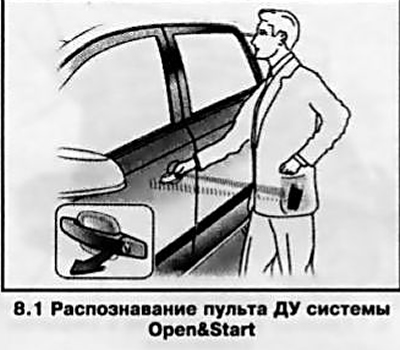
To turn the ignition on/off, start/stop the engine, the electronic key must be recognized by the system inside the car (see Section 21). Locking sensors are built into the outer handles of the front doors. When you touch the sensor window once, (see illustration 8.2) all car doors are locked (including tailgate). Touching the same window again within 15 seconds will activate the anti-theft alarm/double locking system.
Attention: Before locking, make sure that all vehicle doors are closed and the electronic key is not left inside the vehicle - otherwise locking will not occur!
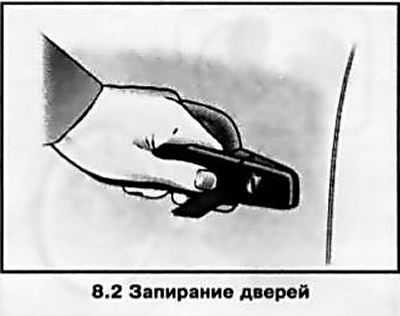
Note: If the ignition has been switched on, in order for the double locking system to be activated when locking, the driver's door must be opened and closed once.
Unlocking the locks becomes possible after at least 2 seconds from locking. During this time, you can check whether the car is locked by pulling the door handle or pressing the button under the tailgate catch bar. Open system&Start does not lock the car automatically if the electronic key is outside the car's reception range (the distance to the car is more than 1 meter). The window can be raised from outside the vehicle by holding your finger on the sensor window for a long time.
Caution: To ensure trouble-free operation, the lock sensor windows in the door handles must always be kept clean!
Unlocking/locking doors, controlling the electric window lifters from the outside can be done using the remote control built into the electronic key. All operations are performed in the same way as when using a conventional remote control (see above).
Unlocking and locking doors in emergency mode
Attention: Use emergency mode only if really necessary - contact an Opel service station as soon as possible! Replace batteries in a timely manner!
Models with mechanical key
If the remote control fails, unlock the driver's door with the key by turning it counterclockwise in the lock, then return the key to the vertical position and remove it from the lock cylinder. Unlocking of the remaining doors is performed from the main switch of the single lock on the console section of the instrument panel (see above).
Note: Unlocking from the main switch of the single lock will not occur if the double locking system was activated when the vehicle was locked.
If the anti-theft alarm is triggered when unlocking in emergency mode (with appropriate equipment), to deactivate it you need to turn on the ignition.
When locking, you need to open the front passenger door and close the driver's door from the inside, then press the main switch button (in this case, all doors will be locked) and slam the front passenger door.
In case of failure of the main lock, the driver's door is unlocked with the key as described above, the other side doors are unlocked by pulling the handles on the inside of the doors. The tailgate and the fuel filler flap remain locked.
Note: It is not possible to unlock the doors from the inside if the double locking system was activated when the vehicle was locked.
To lock the door, insert the key into the hole above the door lock (see illustration 8.3) and, pressing until a noticeable click is heard, engage the lock lock, then slam the door. The procedure must be repeated for each door. The driver's door can be locked from the outside with a key.
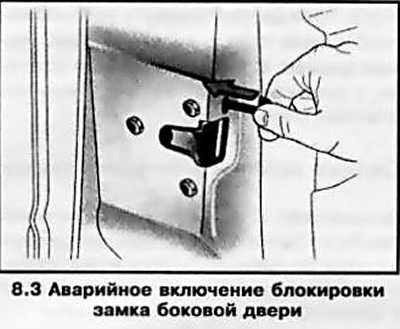
Note: Once the fuel filler cap is unlocked, it is not possible to lock it.
Models with electronic key
In case of failure of the Open system&Start or the electronic key on the instrument cluster, the corresponding indicator lamp lights up (see Section 16).
For emergency unlocking/locking of the car, a special emergency mechanical key is provided, stored inside the body of the electronic key. To remove the emergency key, it is necessary to press the lock on the back of the key fob and remove the service cover (see illustration 8.4).
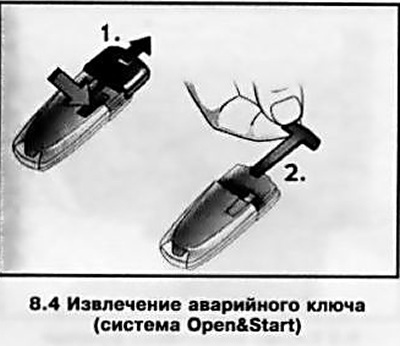
The emergency key can only lock/unlock the driver's door. The other doors are locked/unlocked in the same way as on models with a mechanical key (see above)
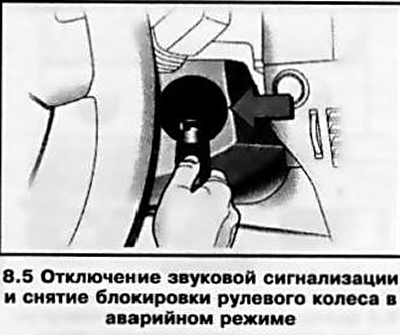
If the anti-theft alarm was activated the last time the vehicle was locked (on models with the corresponding configuration), when unlocking in emergency mode, the sound alarm may be activated. To turn it off and remove the steering wheel lock, you must turn on the ignition by bringing the electronic key to the designated place (see illustration 8.5) on the steering column cover and press the "Start/Stop" button, repeat the operation if necessary. A description of the emergency engine start/stop procedure is given in Section 21.
Replacing the remote control battery
If the remote control malfunctions/its operating range is reduced, the battery must be replaced immediately.
Note: The need to replace the electronic key battery is indicated by a corresponding message in the information display field (see section 17).
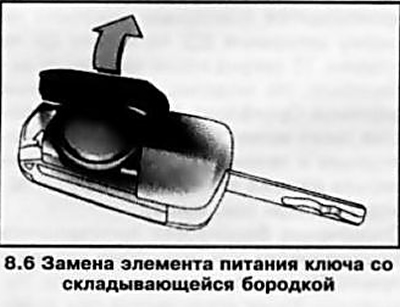
Before removing the battery, the key with a folding key bit must be unfolded. The battery of the key with a fixed key bit must be replaced at an Opel service station.
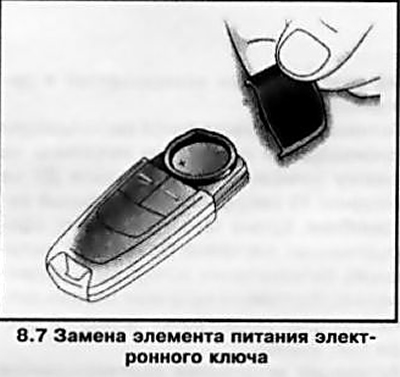
To remove the battery, open the service cover (see illustrations 8.6 and 8.7) — on the electronic key, you must first press the lock on the back of the key fob and remove the emergency key (see above) — remove the battery and install a replacement battery in its place.
Warning: Never use sharp or hard objects to remove the battery, otherwise you may damage the internal chrome coating of the remote control! Pay attention to the polarity when installing! Close the service cover. After replacing the battery, you must synchronize the remote control (see below).
Note: If the battery on a key with a folding key bit is replaced in less than 3 minutes, synchronization may not be necessary.
Make sure that the remote control is functioning properly - if necessary, contact Opel service station specialists for help, you can always buy replacement batteries there. It is recommended to use CR 2032 batteries.
Synchronization of the remote control device
Synchronization of the remote control device should be performed after replacing the battery or in case of failure of the remote control due to multiple attempts to use it outside the range of the remote control. On models with a mechanical key, it is necessary to unlock the driver's door with the key and insert it into the ignition switch - the remote device will be synchronized.
On models equipped with the Open system&Start, the device is synchronized automatically each time you press any of the buttons on the remote control.
 |
 |
Visitor comments