


Contents: Initiation of a single (central)…⬇ Locking the central lock ⬇ Unlocking the central lock ⬇ Possible causes of central lock…⬇
The RF remote control can only be used:
- to initiate the central locking
- to turn on/off the anti-theft alarm
Warning! Try not to let the remote control get too wet and do not press the control buttons on it unnecessarily.
The range of the remote control is approximately 3 m and may be reduced if there are obstacles and/or reflective objects between it and the vehicle. When using the remote control, point it at the vehicle.
Initiation of a single (central) castle
The authors of this Manual recommend using a remote control to open and close the doors of vehicles equipped with central locking.
When using the remote control, the control LED on it should light up. Correct reception of the signal from the remote control by the remote control system for locks/anti-theft alarm is indicated by single/double flashing of the hazard warning lights.
Locking the central lock
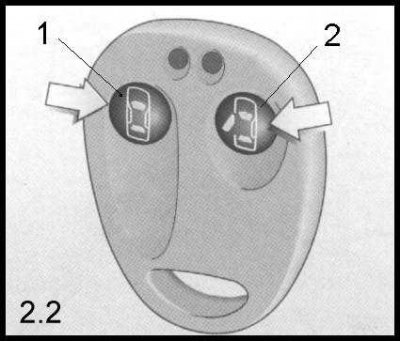
1. Press the button (1) on the remote control. At the same time, the red LED on the remote control should flash - the locks of all car doors, including the tailgate, are locked.
Caution! For safety reasons, do not lock the vehicle doors when the ignition switch is turned to the ACC or ON position!
(Text copied from a web portal www.opelbook.ru)
Unlocking the central lock
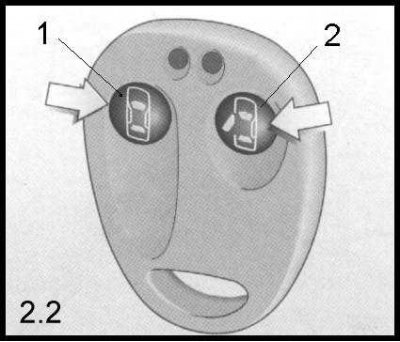
1. Press the button (2) on the remote control. At the same time, the green LED on the remote control should flash - the locks of all doors, including the tailgate, are open.
Possible causes of central lock failures
Failure of the central lock to operate by a signal from the remote control can only occur for one of the following reasons:
- The remote control is too far from the car.
- The battery level of the remote control has dropped - replace it.
- The remote control has been used repeatedly and successfully to control the central lock actuators from too great a distance - please reprogram it (see below).
Open the car door using the key.
Visitor comments