


Removal
1. Remove the gearbox and clutch (see the relevant chapter).
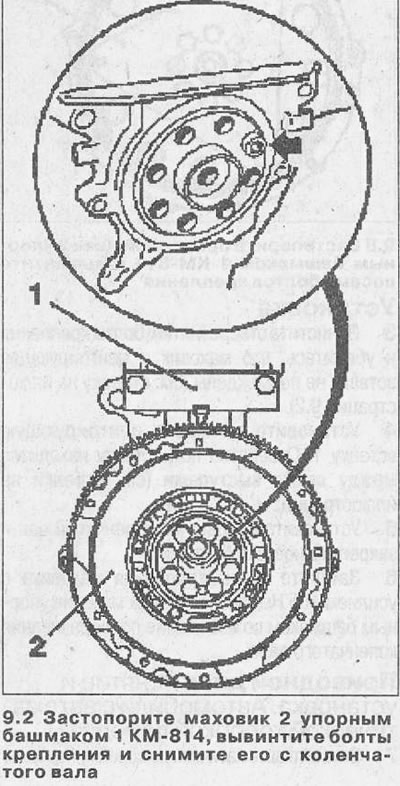
2. Lock the flywheel 2 with a thrust shoe 1 KM-814, unscrew the eight mounting bolts and remove it from the crankshaft (see illustration).
Installation
3. Clean the mounting bolt holes and make sure the flywheel and centering insert are not damaged (see arrow in illustration 9.2).
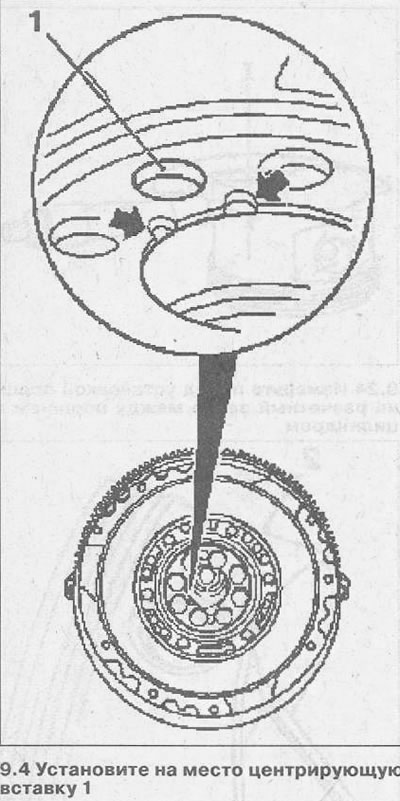
4. Install the centering insert 1 in place. The hole for the insert is located between the two protrusions (see arrows in the illustration).
(Material copied from this website: «www.opelbook.ru»)
5. Install the flywheel onto the crankshaft and secure with new bolts.
6. Tighten the flywheel mounting bolts to 105 Nm, blocking the flywheel with a thrust shoe to prevent the crankshaft from turning.
Drive Disc - Removal and Installation. Cars with Automatic Transmission
7. Remove the automatic transmission (see the relevant chapter).
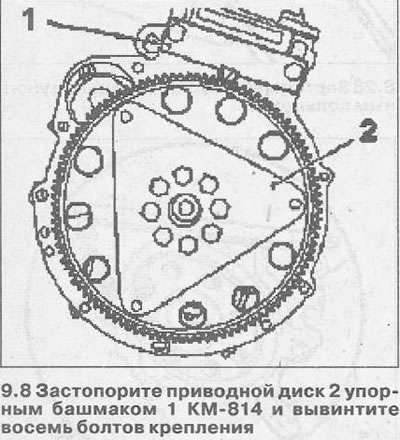
8. Lock the drive disk 2 with the thrust shoe 1 KM-814 and unscrew the eight mounting bolts (see illustration).
Installation
9. Clean the holes for the disc mounting bolts.
10. Install the drive disc onto the crankshaft and secure with new bolts.
11. Tighten the drive disc mounting bolts on the crankshaft to 120 Nm, blocking the disc with a thrust shoe to prevent the crankshaft from turning.
12. Install the gearbox (see the relevant chapter).
Visitor comments