


The selected gearbox mode ("D" - automatic, "M" - manual) and the current gear number are displayed on the corresponding instrument cluster display (see Section 16).
In addition, the selector lever is locked in the "P" and "N" positions - when the lock is activated, a control lamp mounted between the "P" and "R" positions lights up on the selector lever panel (see illustration 23.6).
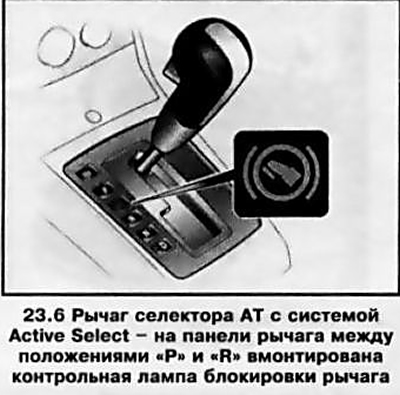
Note: In the "N" position, the lever lock is engaged with some delay and only when the vehicle is stationary.
[Material published on the website: www.OpelBook.ru]
To release the lock, press the lock button on the selector lever.
The car is controlled in automatic mode in the same way as when using the standard positions of the selector lever on a conventional automatic transmission (see above).
To switch to manual transmission control mode, move the selector lever to the left from position D - gears can be changed manually by briefly pressing the lever (see illustration 23.7) towards "+" to shift to a higher gear or "-" to shift to a lower gear.
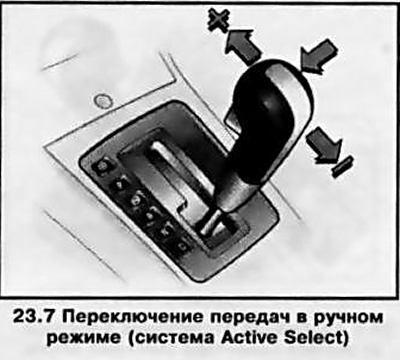
Note: Gear shifting will not occur if a higher gear is engaged at too low a speed or a lower gear is engaged at too high a speed for the given gear - constantly monitor the AT mode select display indication and the current vehicle speed.
In manual control mode, when the speed drops to a certain value by reducing engine speed, the gearbox automatically switches to a lower gear - when the speed increases/engine speed increases, automatic switching to a higher gear does not occur. Switching to a lower gear also occurs when the speed decreases by pressing the brake pedal.
If the selector lever is not in the "P" position when the vehicle is parked after the ignition is switched off, the selector lever lock indicator lamp on the selector lever panel will flash. Set the gearshift lever to the "P" position.
Note: On models equipped with the Open system&Start, when the ignition is turned off, the display shows the selected AT mode (see Section 16) the "P" indicator will flash for 10 seconds if the P position was not engaged or the parking brake was not applied before parking.
AT emergency operation mode
A malfunction of the automatic transmission is indicated by a corresponding control lamp on the instrument cluster (see section 16).
Note: On diesel models, the light may also indicate the need to remove water from the fuel filter.
If the lamp does not go out after starting the engine or lights up while driving, automatic gear shifting is not possible. To continue driving in manual mode, 2nd and higher gears can be used.
Note: In some fault conditions only top gear is available.
In automatic mode (position "O") only the highest gear is available.
To eliminate the causes of AT failures, contact the specialists of the Opel service station.
Emergency release of the selector lever lock
The need for emergency disabling of the AT selector lever lock in the "P" or "N" position arises in the event of a breakdown of the locking mechanism, as well as when it is necessary to tow a faulty vehicle. In addition, the selector lever may not leave the locked position if the battery has an insufficient charge level.
If the cause of the malfunction is a discharged battery, jump start the engine (see Introduction). If the lock cannot be disabled for other reasons, perform the following operations:
- Set the parking brake;
- Open the corresponding cover and remove the ashtray (see Section 17);
- Use a screwdriver to push down the yellow stopper (see illustration 23.8) and move the lever out of position P;
- Return the ashtray to its original position.
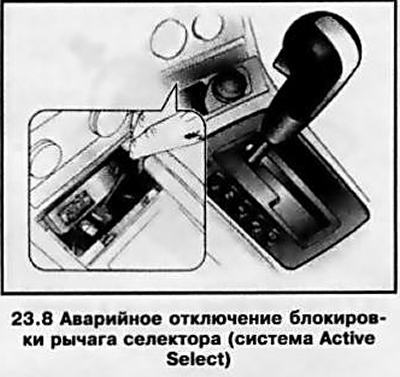
When the selector lever is switched back to position "P" "N", the locking occurs again.
At the earliest opportunity, contact an Opel service station to eliminate the cause of the malfunction, and/or recharge the battery.
Visitor comments