
OpelBook.ru
Cars AvtoVAZ Cars Mitsubishi Cars BMW Cars Mercedes Cars Nissan Cars Toyota Cars Chevrolet
English Русский
Български
Беларускі
Український
Српски
Hrvatski
Română
Polski
Slovenský
Magyar
 |  Sitemap  |  Contacts  |    


Main Astra Corsa Insignia Kadett Omega Vectra Zafira Others Articles
Vectra A (1988-1995, petrol) Vectra A (1988-1995) Vectra B (1995-2002, petrol) Vectra B (1995-2002) Vectra C (2002-2008)
  • Main
  • Vectra
  • Vectra A
  • Electrical equipment
  • Equipment and devices
  • Dashboard Switches — Removal and Installation

Dashboard Switches — Removal and Installation (Opel Vectra A)

            0

Contents: Light switch ⬇ Pushbutton switches ⬇ Headlight beam angle adjustment…⬇ Hazard warning lights switch ⬇ Heater Blower Motor Switch ⬇
1. Disconnect the negative battery cable.

Light switch


Removal


2. Turn the switch to the low beam position, then insert a small screwdriver or pry bar through the hole in the base of the switch handle to press the handle retaining clip. Remove the handle from the switch (see illustration).
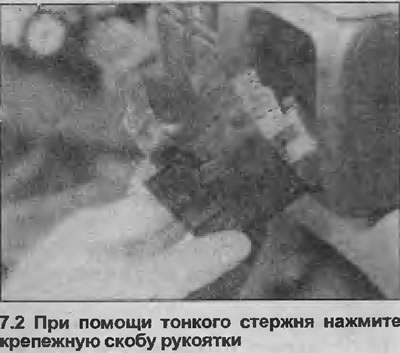
2. Turn the switch to the low beam position, then insert a small screwdriver or pry bar through the…


3. Press the switch bracket lock, then pull the switch out of the panel and disconnect the wiring contacts (see illustrations).
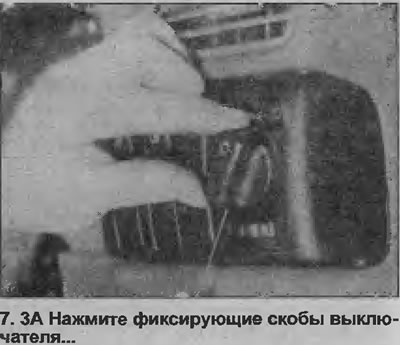
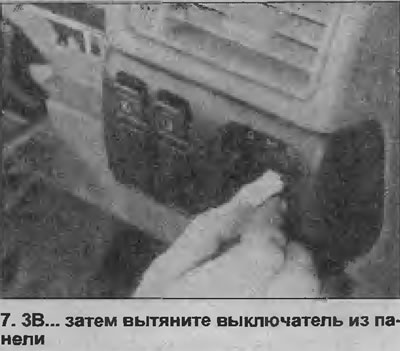
3. Press the switch bracket lock, then pull the switch out of the panel and disconnect the wiring…


3. Press the switch bracket lock, then pull the switch out of the panel and disconnect the wiring…


4. Please note that the switch assembly is non-separable and if any part of the switch is defective, replace the switch assembly


Installation


5. Installation is carried out in reverse order.

Pushbutton switches


Removal


6. First check the bottom of the switch, if there is a small hole in the panel, insert a thin screwdriver or metal rod into it. Release the switch retaining spring clip by pressing it up, then remove the switch and disconnect the wiring. If there is no hole, remove the switch using a small screwdriver as a lever. Insert the lever under the bottom edge of the switch (use sticky tape or a piece of cardboard to avoid damaging the edge of the panel). Disconnect the switch wiring contact and remove the switch (see illustration).
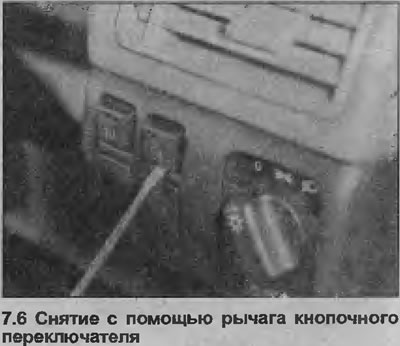
6. First check the bottom of the switch, if there is a small hole in the panel, insert a thin…


Installation


7. Installation is carried out in reverse order.

Headlight beam angle adjustment switch


8. The procedure is the same as for push-button switches.

Hazard warning lights switch


Removal


9. Using a screwdriver, carefully remove the cover from the switch (see illustration).
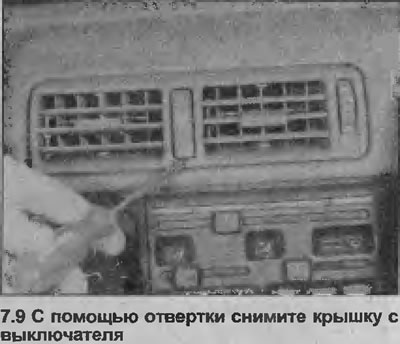
9. Using a screwdriver, carefully remove the cover from the switch (see illustration).


10. Using a screwdriver, remove the ventilation tip from the panel.


11. Remove the switch from the panel using a lever and disconnect the electrical wiring (see illustration).

Material copied from the portal: opelbook.ru
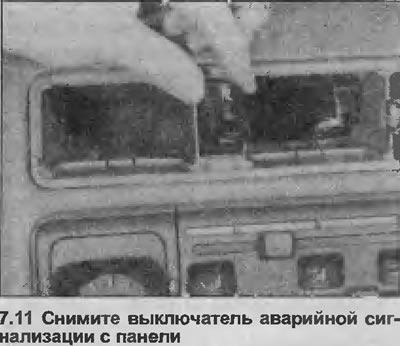
11. Remove the switch from the panel using a lever and disconnect the electrical wiring (see…


Installation


12. Installation is carried out in reverse order.

Heater Blower Motor Switch


Removal


13. Remove the heater control panel as described in Section 11. Disconnect the wiring contact from the switch.

14. Using a lever, remove the switch from the rear of the heater control panel.

Installation


15. Installation is carried out in the reverse order, but when installing the heater control panel see Section 11.


This article is available at russian, bulgarian, belarusian, ukrainian, serbian, croatian, romanian, polish, slovak, hungarian
Checking the article: Chernov Alexander

Share information:

Previous articles
Opel Vectra A: Equipment and devices
Next articles

Windscreen Washer/Wiper Switch — Removal and Installation
Light/Turn Signal Switch — Removal and Installation
Ignition switch — removal and installation
Fuses and Relays — General Description
Electrical Troubleshooting — General Description
General description and precautions
Electric outside mirror adjuster — removal and installation
Electric sunroof switch — removal and installation
Car interior light switch that turns on when doors are opened — removal and installation
Luggage compartment light switch — removal and installation
Brake light switch — removal and installation
Handbrake indicator light switch — removal and installation


See similar ones from other Opel car manuals:
▶ Cooling system switches — checking, removing and installing Opel Astra F (1991-1998, petrol)
▶ Removal and installation rear fog light (fog light) and… Opel Corsa B (1993-2000)
▶ Fuse box in the dashboard Opel Insignia A (2008-2017)
▶ Installing a Loudspeaker on the Dashboard Opel Kadett D (1979-1984)
▶ Dashboard Opel Omega A (1986-1993)
Link to this page in different formats

Visitor comments


No comments yet


How much will 48 + 13 =


Vectra C (2002-2008) 
  • General information
  • User manual
  • Vehicle device
  • Maintenance
  • Troubleshooting
  • Power unit
  • Engine repair
  • Cooling system
  • Power and control system
  • Engine electrics
  • Transmission
  • Clutch
  • Car gearbox
  • Drive shafts
  • Chassis
  • Car suspension
  • Steering
  • Brake system
  • Body
  • Exterior
  • Interior
  • Doors, locks and windows
  • Heating and ventilation
  • Electrical equipment
  • Equipment and devices
  • Headlights and lighting
  • Electrical circuits
Vectra B (1995-2002) 
  • General information
  • User manual
  • Weekly checks
  • Maintenance (gasoline)
  • Maintenance (diesel)
  • Troubleshooting
  • Power unit
  • SOHC gasoline engine
  • DOHC petrol engine
  • Diesel engine 1.7 liter
  • Diesel engine 2.0 liters
  • Engine repair
  • Cooling system
  • Fuel system (gasoline)
  • Fuel system (diesel)
  • Charging system
  • Launch system
  • Ignition and preheat
  • Transmission
  • Clutch
  • Mechanical gearbox
  • Automatic gearbox
  • Drive shafts
  • Chassis
  • Brake system
  • Wheel suspension
  • Steering
  • Body
  • Exterior
  • Interior
  • Doors and windows
  • Heating and ventilation
  • Electrical equipment
  • Equipment and devices
  • Electrical circuits
Vectra B (1995-2002, petrol) 
  • General information
  • Maintenance
  • Help with malfunctions
  • Power unit
  • Engine repair
  • Exhaust system
  • Cooling system
  • Fuel system
  • Multec injection system
  • Four point injection
  • Transmission
  • Clutch
  • Gearbox and drive
  • Chassis
  • Wheel suspension
  • Steering
  • Brake system
  • Wheels and tires
  • Body
  • Exterior
  • Interior
  • Electrical equipment
  • Fuses and electronics
  • Power devices
  • Ignition system
  • Lighting and signaling
  • Equipment and devices
  • Heating and ventilation
  • Electrical circuits
Vectra A (1988-1995) 
  • Power unit
  • Engine repair
  • Ignition system
  • Lubrication system
  • Cooling system
  • Injection system
  • Fuel system (carburetor)
  • Fuel system (diesel)
  • Exhaust system
  • Transmission
  • Clutch
  • Car gearbox
  • Chassis
  • Front suspension
  • Rear suspension
  • Steering
  • Brake system
  • Wheels and tires
  • Body
  • Exterior
  • Interior
  • Electrical equipment
  • Electrical circuits
Vectra A (1988-1995, petrol) 
  • General information
  • User manual
  • Maintenance
  • Power unit
  • SOHC engine
  • DOHC engine
  • Cooling and ventilation
  • Fuel system (carburetor)
  • Fuel system (injector)
  • Exhaust converter
  • Transmission
  • Clutch
  • Mechanical gearbox
  • Automatic gearbox
  • Drive shafts
  • Chassis
  • Brake system
  • Car suspension
  • Steering
  • Body
  • Body elements
  • Electrical equipment
  • Power devices
  • Equipment and devices
  • Electrical circuits
OpelBook.ru © 2017–2026 · Mobile version · · Sitemap: EN BG BY UA RS HR RO PL SK HU · Feedback · Site search
Astra F, petrol · Astra G, petrol · Astra G · Astra H · Astra J, petrol · Corsa B · Corsa C, petrol · Corsa C · Insignia A · Kadett D · Kadett E · Omega A · Omega B · Omega B2 · Vectra A, petrol · Vectra A · Vectra B, petrol · Vectra B · Vectra C · Zafira A, petrol · Frontera A, petrol · Frontera B · Ascona C · Vivaro A ·
We want your visit to be comfortable 🤝! We use cookies 🍪 to make that happen.