
It allows you to get the following information:
- information about the state of vehicle systems;
- route/fuel information.
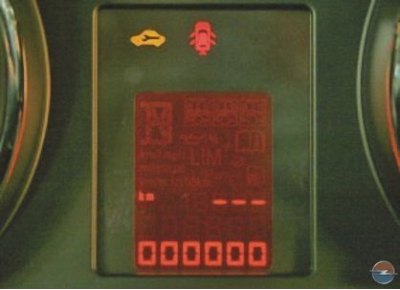
On-board computer information is displayed on the central information display 30 (see instrument cluster, pic. 1).
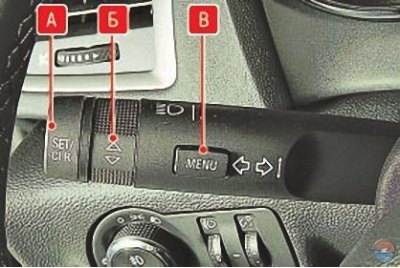
To display information on the central information display, use the controls located on the lever of the left stalk switch.
For selection menu route/fuel (trip computer function) click on the button IN («MENU»).
By turning the handle B select one of the submenus:
- on-board computer 1;
- on-board computer 2;
- power reserve;
- average fuel consumption;
- current fuel consumption;
- average speed;
- digital speed;
- traffic sign detection system.
Mode for displaying the distance that can be driven on the remaining fuel in the tank (power reserve). This mode displays the approximate distance that can be driven with the remaining fuel in the tank, taking into account the average speed and fuel consumption. This distance is recalculated and updated every second.
Attention! Even if the display shows the distance to your intended refueling, refuel as soon as possible if the needle of the fuel gauge is near the mark «0» and even more so if the signal lamp of the reserve remaining fuel lit up.
Note. The display will not change until approximately 20 liters or more of fuel has been added to the tank.
Mode of average fuel consumption. This mode displays the average fuel consumption, calculated from the amount of fuel consumed and the distance traveled since the battery was connected or the data was reset.
To reset the data, press and hold down the button for more than 1 s A («SET/CLR») on the steering column switch. After pressing this button for about 1 minute, the display will show «---- L/100km», then the average fuel consumption will be recalculated and displayed.
Current fuel consumption mode (instant consumption). This mode displays the current fuel consumption, calculated from the amount of fuel consumed and the distance traveled at a particular point in time. The current fuel consumption is recalculated and displayed every 2 s.
If the vehicle speed is reduced to approximately 5 km/h, the current consumption is not calculated and the display shows «---- L/100km».
Vehicle average speed mode. This mode displays the average vehicle speed calculated from the distance traveled and the time spent on the road since the battery was connected or the data was reset. The average vehicle speed is recalculated and displayed every 10 seconds.
To reset the data, press and hold down the button for more than 1 s A («SET/CLR») on the steering column switch. After pressing this button for about 1 minute, the display will show «---- km/h», then the average vehicle speed will be recalculated and displayed.
Digital speed mode. The display shows the vehicle's instantaneous speed digitally.
Traffic sign display system (if installed on a car) duplicates on the display road signs found along the route. At a particular point in time, the last detected traffic sign is displayed.
Information messages displayed on the central display automatically as needed. They contain information about the state of the vehicle's systems and recommendations for the maintenance of a particular unit. Depending on the vehicle equipment, a wide range of information messages can be displayed. To confirm the message, click on the button A («SET/CLR») on the steering column switch. Push button IN («MENU») it is possible to cause several messages to be displayed in turn.
Information messages can be displayed on the displays of the middle and upper levels.
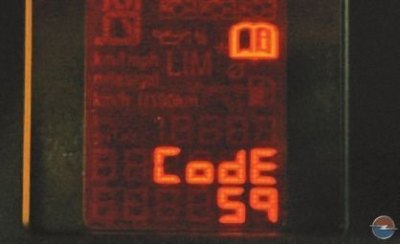
per display middle level messages («mistakes») are displayed in the form of digital codes:
- 1 - Change engine oil;
- 2 - The remote control is not detected, press the clutch pedal to restart;
- 3 - Low coolant level;
- 4 - Air conditioning off;
- 5 - The steering wheel is locked;
- 6 - Press the brake pedal to release the electric parking brake;
- 7 - Turn the steering wheel, turn the ignition off and on again;
- 8 - Turn the ignition off and on again, repeat the test again;
- 9 - Turn the steering wheel and start the engine again;
- 11 - Brake pads are worn out;
- 12 - The car is overloaded;
- 13 - Overheating of the air conditioning compressor;
- 15 - Malfunction of an additional brake light;
- 16 - Service the brake lights;
- 17 - Malfunction of the headlight level control system;
- 18 - Malfunction of the dipped beam of the left headlight;
- 19 - Malfunction of the rear fog lamp;
- 20 - Malfunction of the dipped beam of the right headlight;
- 21 - Malfunction of the left side turn signal;
- 22 - Malfunction of the right side turn signal;
- 23 - Malfunction of the reversing light;
- 24 - Malfunction of license plate lights;
- 25 - Malfunction of the left front turn signal;
- 26 - Malfunction of the left rear turn signal;
- 27 - Malfunction of the right front turn signal;
- 28 - Malfunction of the right rear turn signal;
- 29 - Check trailer brake light;
- 30 – Check trailer reversing light;
- 31 - Check the left turn signal of the trailer;
- 32 - Check the right turn signal of the trailer;
- 33 - Check the rear fog lamp of the trailer;
- 34 - Check the tail light of the trailer;
- 35 - Replace the battery in the remote control;
- 48 - Clean the blind spot lens;
- 49 - There is no signal from the lane departure warning system;
- 50 - Pedestrian protection system is on. Perform a hood reset;
- 51 - Compass not found;
- 53 - Tighten the fuel filler cap;
- 54 - Condensate in the diesel fuel filter;
- 55 - The diesel particulate filter is full;
- 56 - The difference in pressure in the tires of the front wheels;
- 57 - The difference in pressure in the tires of the rear wheels;
- 58 - Tires without air pressure sensors detected;
- 59 - Open and then close the driver's door window;
- 60 - Open and then close the front passenger door window;
- 61 – Open and then close the left rear door window;
- 62 - Open and then close the right rear door window;
- 65 - An attempt was made to hack;
- 66 - Service the anti-theft alarm;
- 67 - Service the steering shaft anti-theft device;
- 68 - Service the power steering;
- 69 - Service the front suspension;
- 70 - Service the ride height control system;
- 71 – Perform rear suspension maintenance;
- 74 - Service adaptive headlights;
- 75 - Service the air conditioning system;
- 76 - Service the side blind spot vision system;
- 77 - Service the lane departure warning system;
- 78 - Perform maintenance on the pedestrian protection system;
- 79 - Add engine oil;
- 80 - Change gear oil;
- 81 - Service the gearbox;
- 82 - The time for an engine oil change is approaching;
- 83 - Service the adaptive cruise control system;
- 84 - Engine power is reduced;
- 95 - Airbag service required.
Information messages on the display top level output as text.
These messages may be in one of the following areas:
- Liquid levels;
- Anti-theft alarm;
- Brake system;
- Vehicle control systems;
- Ride control system;
- Cruise control;
- Object detection system;
- Lighting, lamp replacement;
- Windshield wipers and windshield washers;
- Doors and windows;
- Remote control;
- Seat belts;
- Airbag systems;
- Engine and gearbox;
- Tire pressure;
- Diesel particulate filter.
In addition to displaying information on the central display, some messages are duplicated by sound signals (buzzer) in the following cases:
- the seat belt is not fastened;
- when starting off, any door is not closed;
- when the parking brake is applied, the car continues to move;
- the programmed speed is exceeded;
- the center display shows a warning message or code;
- the parking assistance system detects an obstacle;
- when the vehicle is stationary and the driver's door is open, the key is inserted into the ignition or the exterior lights are left on.
Visitor comments