


Contents: Clock function ⬇ Setting the hours and minutes ⬇ Instantaneous fuel consumption ⬇ Average fuel consumption ⬇ Average speed of movement ⬇ Power reserve ⬇ Stopwatch ⬇ Outside air temperature ⬇
An on-board computer is installed on request. It is located on the instrument panel between the central ventilation nozzles and has three control keys, above which there is a screen with digital readings.
The computer provides the following information: current time; instantaneous fuel consumption; average speed of movement; power reserve; stopwatch; outside temperature.
The on-board computer control keys have the following purpose:
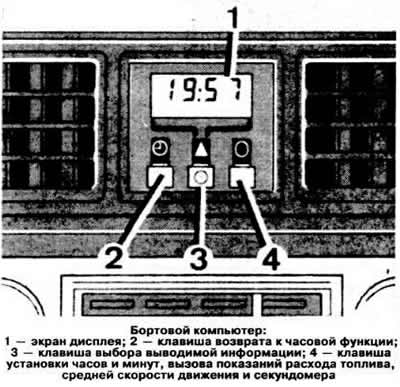
- left key: return to clock function;
- middle key: sequentially outputs information to the screen in the order specified above when the key is pressed;
- right key: Set hours and minutes. Start and stop the stopwatch. Call up average fuel consumption and average speed readings at any time.
Clock function
The time is displayed continuously, including when the ignition is switched off. The time indications are saved after the ignition is switched on until pressing the left button calls up other information programmed by pressing the middle button.
Setting the hours and minutes
Press the right button, which will cause the clock readings to flash.
Press the left key to set the desired hour digit. Short presses change the digits slowly, while long presses change the digits quickly.
Press the right key: the number of minutes starts flashing.
Press the left key to set the desired number of minutes. Short presses change the numbers slowly, while long presses change the numbers quickly.
To start the clock with readings accurate to the second, press the right button.
Instantaneous fuel consumption
This information is displayed on the screen instead of the time when you press the middle button while the car is moving. At speeds below 10 km/h, the readings are given in l/h (the "l/h" icon appears in the lower left corner of the screen). At speeds above 10 km/h, the readings are given in liters per 100 km (the "1/100 km" icon appears at the bottom of the screen).
Average fuel consumption
This information is displayed instead of the instantaneous fuel consumption readings when you press the middle key. It can also be displayed at any time (for example, when stopping to refuel the car) by pressing the right button. The readings are given in l/100 km and are accompanied by the "1/100 km" icon.
Average speed of movement
This information is displayed instead of the average fuel consumption readings when you press the middle key. It can also be displayed at any time (for example, before resuming traffic) by pressing the right key. The information is given in km/h and is accompanied by the appearance of the "Km/h" icon. When determining the average speed, the computer does not take into account the car's stops with the ignition turned off.
Power reserve
This information is displayed instead of the average speed readings when the middle button is pressed. The displayed value shows the number of kilometers the car can travel with the remaining fuel in the tank and with the average fuel consumption determined over the last 32 km of travel. The "Km" icon is also displayed on the screen. After refueling, the new range readings are displayed on the screen by pressing the right button or automatically after a run of approximately 10 km. If the range is less than 50 km, its readings in the form of flashing numbers are displayed automatically without pressing the middle button. If desired, this information can be removed from the screen by selecting some other information.
Stopwatch
This function is displayed instead of the power reserve readings when you press the middle key. The stopwatch is started and stopped by pressing the right key: first press: start, second press: stop; third press: set to zero.
The stopwatch readings are given as follows:
- during the first 10 minutes: in minutes, seconds and tenths of a second;
- for a period of up to 60 minutes: in minutes and seconds;
- for a period of up to 100 hours: in hours and minutes;
- over a period of time exceeding 100 hours: in hours.
Outside air temperature
This information is displayed instead of the stopwatch readings when you press the middle key in degrees Celsius and is accompanied by the "C" icon at the bottom of the screen.
[Material copied from this resource: OpelBook]
Warning. When the vehicle is stopped with the engine running or when driving at low speed, the temperature readings may change due to the heat radiation from the engine. If the outside temperature is several degrees above 0°C, pay attention to the possibility of ice on the road.
Visitor comments