


GTC Sedan/Hatchback Models
1. Remove the rear combination lights (see Chapter 12).
2. Remove the license plate light (see Chapter 12).
3. Remove 6 mounting bolts (arrows A) (see accompanying illustration) and detach the rear wheel arch protection from the bumper (see also Section 7). Disconnect the lower holders and unscrew the 2 upper mounting bolts.
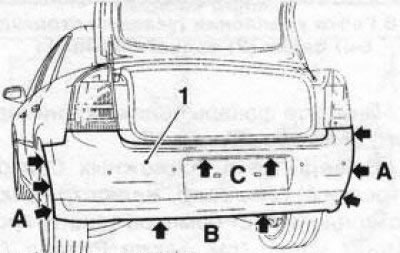
6.3 Fastenings (indicated by arrows) rear bumper pads (1) (gTC Sedan/Hatchback models)
4. Press on the side edges of the bumper cover and release the cover from the side guides. Be careful not to damage the bumper cover fastening.
5. Release the bumper cover from the guide and remove the cover with the help of an assistant. If equipped, disconnect the electrical connector of the parking assistance sensors.
6. Give away 8 mounting nuts (see accompanying illustration) and remove the rear bumper beam from the frame.
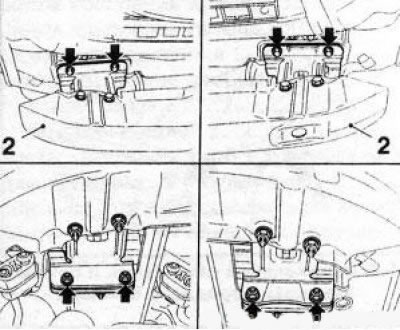
6.6 Fastening nuts (indicated by arrows) beams (2) of the rear bumper
7. Installation is carried out in the reverse order of removal. When installing the beam, it is necessary to use new mounting bolts and nuts. The bumper beam flange should be sealed with wax for protection after tightening the bolts. Pay attention to the routing of the wiring harnesses.
Models Universal
8. Remove the rear combination lights (see Chapter 12).
[Original article on the web portal: opelbook]
9. Remove 2 mounting bolts on each side of the vehicle (see accompanying illustration) and release the upper edge of the bumper trim, then remove the tailgate threshold trim.
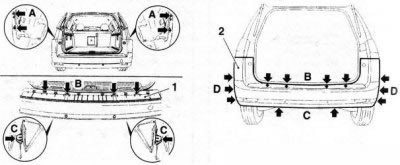
6.9 Fastenings of the rear bumper trim (2) (models Universal) - indicated by arrows: A. Rear wheel arch protection mounting bolts; B. Lower holders; C. Upper mounting bolts; 1. Adjusting the threshold of the rear door bumper
10. Unscrew the 4 central bolts, press the 2 lower fasteners and release the rear bumper cover from the holders (see illustration 6.9). Then unscrew 3 bolts on each side and separate the trim from the rear wheel arch protection.
11. Release the side faces of the bumper cover on the right and left from the guides and remove the cover with the help of an assistant. Be careful not to damage the cover fasteners
If equipped, disconnect the parking assistance sensor wiring connector.
12. Remove the 6 mounting bolts and nuts and remove the rear bumper beam (see illustration 6.17).
13. Installation is carried out in the reverse order of removal. When installing the beam, it is necessary to use new self-locking fastening bolts and nuts. The bumper beam flange should be sealed with wax for protection after tightening the bolts. Pay attention to the routing of the electrical wiring harnesses.
Signum Models
14. Remove the rear combination lights (see Chapter 12).
15. Remove 6 mounting bolts (arrows A) (see accompanying illustration) and detach the rear wheel arch protection from the bumper (see also Section 7). Disconnect the lower holders, remove the rear door sill trim and unscrew the 4 upper mounting bolts.
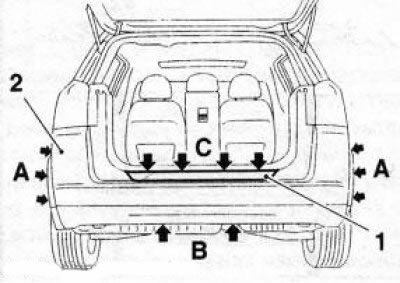
6.15 Fastenings of the rear bumper trim (2) (signum models) - indicated by arrows: A. Upper mounting bolts; B. Central mounting bolts; C. Fixators; 1. Tailgate threshold trim
16. Release the side faces of the bumper trim on the right and left from the guides and remove the trim with the help of an assistant. Be careful not to damage the bumper trim fastening. If equipped, disconnect the electrical wiring connectors of the parking assistance system sensors.
17. Unscrew the 6 mounting bolts and nuts and remove the rear bumper beam (see accompanying illustration).
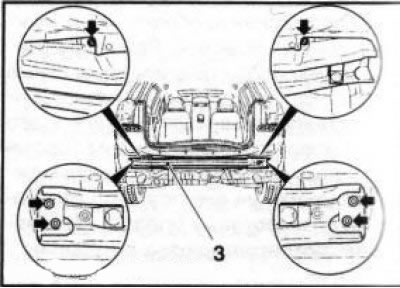
6.17 Bolts (indicated by arrows) beam mounts (3) of the rear bumper (models Universal and Signum)
18. Installation is performed in the reverse order of removal. When installing the beam, it is necessary to use new self-locking fastening bolts and nuts. The bumper beam flange should be sealed with wax for protection after tightening the bolts.
Visitor comments