


Contents: Removal the fog light and headlight…⬇ Removal the switch in the control…⬇ Removal the hazard warning switch ⬇
The key switches are located in the Vectra at the bottom of the light switch (fog lights and fog lamps), in the control module, and also in the center console. Unfortunately, it is not possible to change the bulbs for the switch lighting separately. If the bulb is faulty, you must accept it or replace the switch assembly.
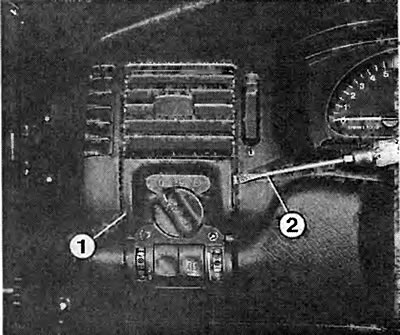
Removing the light switch: Insert a wide screwdriver (2) between the air flow mixing nozzle and the light switch (1) and press the light switch out of the cutout.
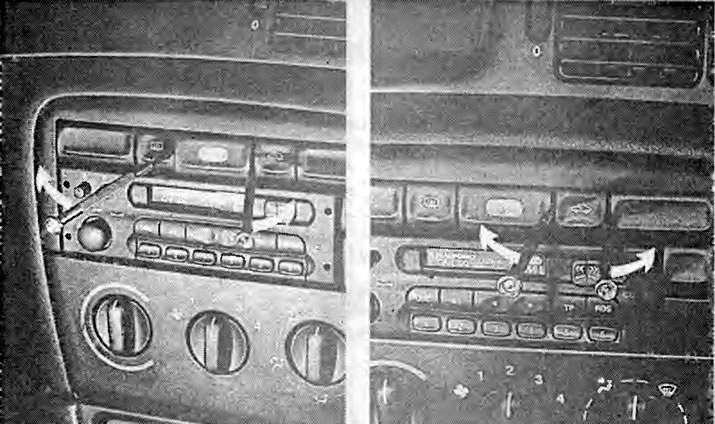
Removal the hazard warning switch. Left: insert two screwdrivers on the right and left sides of the switch trim and carefully pry the trim away from the hazard warning switch.
Right: using small grips, carefully squeeze the latches (arrows) of the hazard warning switch. At the same time, remove the switch from the cutout.
Removal the fog light and headlight switch
Remove the light switch.
Removing the switch in the control module
Insert a small screwdriver into the hole at the bottom of the switch and the switch element will be released
Press the fog light and headlight switch away from the light switch.
When installing, press the switch element until it locks into the light switch.
Removal the switch in the control module
Press the switch out of the cutout using two small screwdrivers or a crochet hook. To protect it from damage, place a piece of paper between the screwdriver and the cutout.
To remove the switch, you can also make your own removal tool.
For this you need a metal strip 5-10 mm wide and max 1 mm thick.
Clamp the end of the metal strip in a vice by about 1 mm and bend it at a right angle with a hammer.
While doing this, tap with a hammer near the edge of the bend so that, if possible, a small rounding is created in the area of the corner.
Slide the hooks of the pull-out tool between the cutout and the switch and remove the switch.
Removal the hazard warning switch
Turn on the hazard warning lights.
Insert a screwdriver into the bottom of the switch trim and carefully pry the trim away from the hazard warning switch.
On the side of the switch, use the small grips to squeeze the locking tabs.
Remove the hazard warning switch from the cutout.
When installing, press the hazard warning switch until it locks into place.
Press the switch cover into place.
Visitor comments