


General information
1. On most models covered in this manual, the infotainment system has an anti-theft code that prevents the system from being used in another vehicle. If the power supply is interrupted, such as when the battery is disconnected, when a system fuse blows, etc., the user must enter the correct security code to activate the equipment.
2. The security code must be specified in the user manual of the infotainment system - it must be stored outside the car. Before disconnecting the battery, make sure you have this code. If you lose it, contact an Opel service station for help.
Note: On models produced since 2005, the security code is recognized by the electronic system without the owner's intervention and does not need to be entered when connecting the battery. Check with official Opel representatives about the features of your audio system.
3. On models equipped with a navigation system, removal/installation of the system unit is performed in a similar order.
Removal and installation
Note: Depending on the configuration, the infotainment system may be equipped with a special holder that allows you to quickly remove and install the system. This requires special handles (Opel-KM-6067).
Material published on the website: OpelBook.ru
4. Disconnect the cable from the negative terminal of the battery (see Chapter 5).
5. Remove the 4 mounting screws (see illustration 31.5a) and insert the special handles into the freed holes of the infotainment system (see illustration 31.5b) until they lock into place. Pull the system towards you by the handles and remove it from the mounting housing.
Note: Power is supplied to the infotainment system via a plug connection, the female end of which is secured to the mounting housing and the male end to the infotainment system.
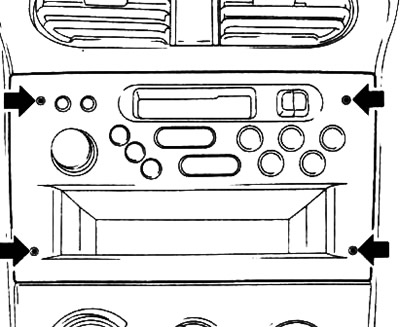
31.5a. Screws (indicated by arrows) infotainment system mounts.
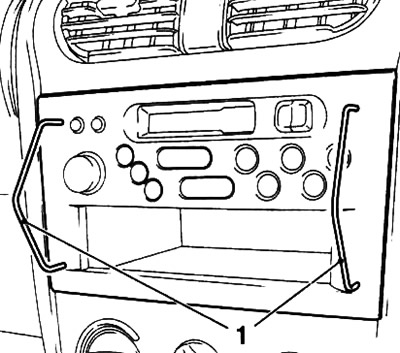
31.5 B. Special handles (1) Opel-KM-6067
6. If necessary, remove the mounting screw (see accompanying illustration) and remove the mounting housing from the console section of the instrument panel. Disconnect the wiring connector and antenna cable from the back of the housing.
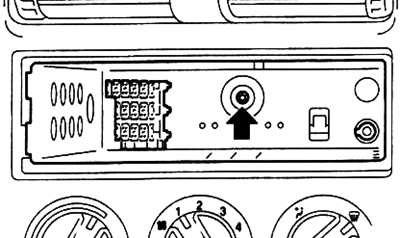
31.6 Mounting screw (indicated by the arrow) mounting case for infotainment system
7. Installation is carried out in reverse order.
Visitor comments