


Contents: Removal ⬇ Installation ⬇
Removal
Remove the rear wheel.
Remove the brake disc or brake drum.
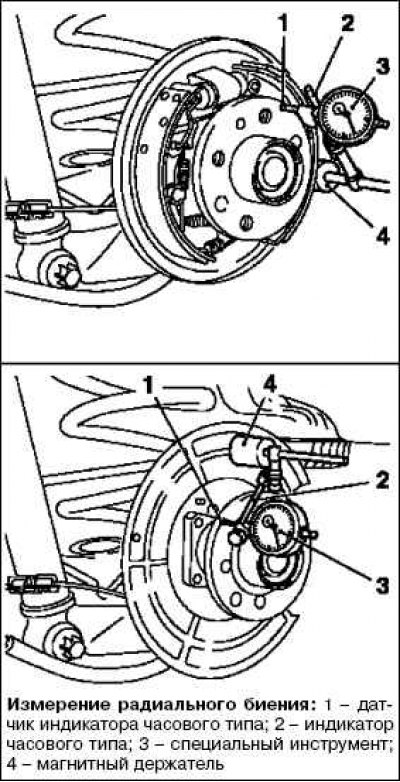
Attach the MKM-571-B special tool with dial indicator bracket and magnetic holder to the brake shield or cover.
Install the dial indicator sensor against the outer edge of the wheel bearing.
Set the indicator to "0".
Rotate the wheel bearing slowly.
Measure the radial runout.
Permissible lateral runout is: 0.04 mm.
Note: If the value is different from the specified value, replace the wheel bearing.
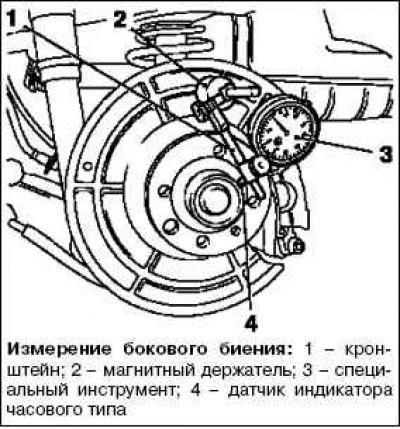
Install the special tool MKM-571-B (3) with a dial indicator, bracket (1) and magnetic holder (2) on the brake shield.
Install the dial indicator sensor opposite the wheel bearing (as shown in the picture).
Set the indicator to "0".
Rotate the wheel bearing slowly.
Measure the lateral runout.
Permissible lateral runout: no more than 0.05 mm.
Note: If the value is different from the specified value, replace the wheel bearing.
Installation
Remove the special tool MKM-571-B with dial indicator bracket and magnetic holder.
Install the brake disc or brake drum.
Install the rear wheel and tighten the mounting bolts to a torque of 110 Nm.
Visitor comments