


Contents: Removal ⬇ Installation ⬇
Removal
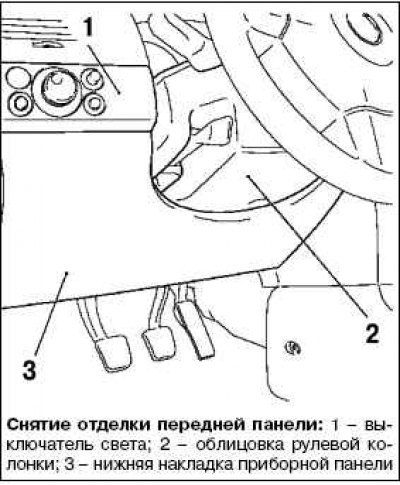
Remove the steering column trim.
Remove the light switch.
Press the light switch on the left, turn it clockwise and remove it.
Remove the lower instrument panel trim by unscrewing the 4 mounting bolts.
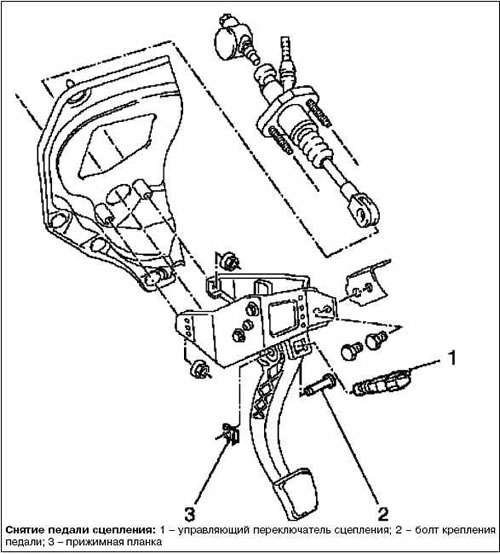
Disconnect the clutch control switch.
Disconnect the return spring from the clutch pedal
Disconnect the clutch pedal from the clutch master cylinder.
Bend up with a screwdriver and detach the pressure plate.
Loosen the pedal bolt.
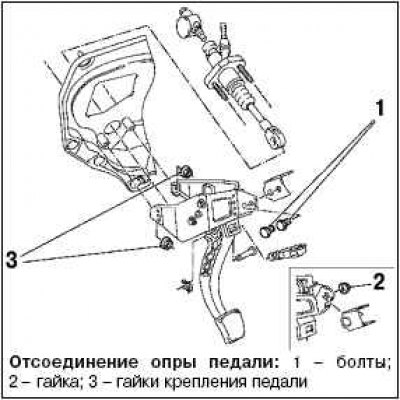
Disconnect the pedal support from the crossmember.
On left-hand drive vehicles, remove the 2 mounting bolts.
On right-hand drive vehicles, loosen the mounting nut.
Disconnect the pedal support from the clutch master cylinder by unscrewing the 2 mounting nuts.
Move the clutch master cylinder back.
Note: Do not damage the wire harnesses and attached components.
Remove the pedal support carefully together with the clutch pedal.
Installation
Install the pedal support with the clutch pedal.
Note: Please use new bolts when installing.
Attach the pedal support to the crossmember, tightening the 2 mounting nuts to a torque of 20 Nm.
Note: Use new nuts.
Connect the clutch pedal to the clutch master cylinder.
Attach the clamping bar.
Note: Use a new clamp bar.
Attach the return spring to the clutch pedal.
Connect the clutch control switch.
Install the lower instrument panel trim.
Install the light switch and turn it counterclockwise.
Install the steering column cover.
Visitor comments