


Contents: Activating/deactivating the Twin…⬇ Adjusting the sound volume ⬇ Controlling playback modes ⬇ Limitations when controlling the…⬇
On eligible models, the Twin Audio system allows rear passengers to listen to music independently of the audio source selected for the main infotainment system.
Note: This system can only control the audio source that is not currently being used by the infotainment system.
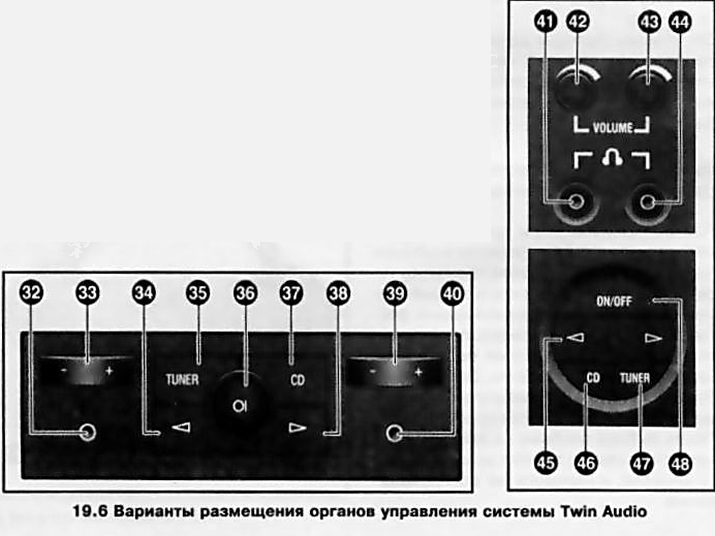
The system panel is built into the rear wall of the center console above the ashtray for rear passengers. The options for placing the controls on the Twin Audio system panel are shown in Illustration 19.6, to which all references in the text refer. There are two jacks for listening to music (32, 40, 41, 44) for connecting stereo headphones (the plug sockets have a diameter of 3.5 mm). It is recommended to use headphones with a total electrical resistance of 32 ohms. Passengers can independently adjust the volume of the headphones.
Note: Headphones are not included in the standard equipment of the vehicle.
Warning: To avoid hearing damage, do not listen to music with headphones for a long time at high volume!
Activating/deactivating the Twin Audio system
The Twin Audio system can be activated when the infotainment system is activated. The system is activated/deactivated by pressing button (48) or (36), depending on the equipment.
Note: If the ignition has been turned on, press the same button again to activate the Twin Audio system.
When Twin Audio is activated, the speakers in the rear passenger compartment are automatically muted and are switched on again when Twin Audio is deactivated.
Text copied from an internet website: www.OpelBook.ru
Adjusting the sound volume
Depending on the car model, the volume in the corresponding headphones is adjusted either by turning the rotary controls (42) or (43), or by using the keys (33) or (39).
Controlling playback modes
To select an audio source, press the "TUNER" button (35) or (47) to switch to radio reception, or the "CD" button (37) or (46) to switch to CD playback, respectively.
To select a wave range in the radio playback mode, press the "TUNER" button (35) or (47) - this will switch between the FM and AM ranges.
Note: Changing the waveband is not possible if the radio is selected as the audio source for the main infotainment system.
The buttons (34), (38) and key (45) can be used to search for previously set frequencies or music tracks. These controls have the same functions as the corresponding sectors of the 4-way switch button (14) of the main infotainment system (see above).
Note: Buttons (34) and (38) or key (45) of the Twin Audio system do not function if the main infotainment system and the Twin Audio system are set to the same audio source (radio or CD player).
Limitations when controlling the Twin Audio system
The Twin Audio system can only control the audio source that is not currently being used by the main infotainment system. The main audio system controls always have priority over the Twin Audio controls.
Example: If the driver and front passenger are listening to the FM radio, the rear passengers cannot change the waveband or select radio stations using the Twin Audio system, but they can remotely control CD playback.
While the main system is operating in CD player playback mode, when the TP function is activated, you can only switch to another station that transmits traffic messages using the Twin Audio system in radio playback mode.
Activating the Random function (play CD tracks in random order) is not possible in the Twin Audio system.
Visitor comments