


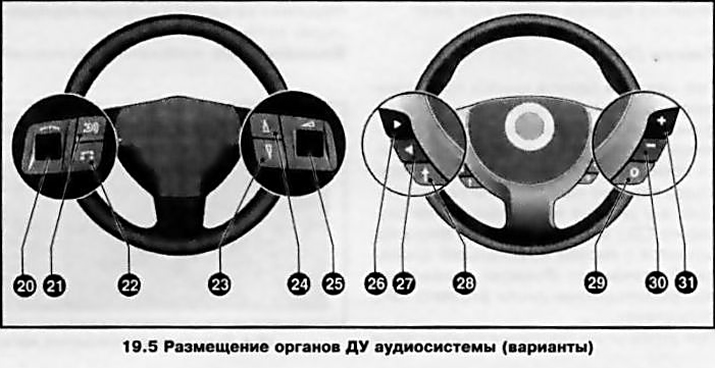
Below is a description of the functions performed by each control.
Option A (on the left in the illustration)
Left Panel Roller Regulator (20)
When equipped with an infotainment system with a BID and GID information display, rotating the roller controller selects menu items, moves the cursor, and manually searches/tunes radio stations.
When controlling the on-board computer (see section 17) (for system with BID and GID displays) by pressing the left roller control you enter the computer menu and confirm the menu item selection. In addition, when the system is equipped with a BID monitor, holding the control down for approximately 2 seconds resets the selected trip computer parameter - holding the wheel down for approximately 4 seconds resets all trip computer parameters.
Button (21)
When you press this button:
- in radio playback mode, the receiver switches to the next preset radio station;
- in audio CD playback mode, disc playback starts from the first music track;
- in MP3 disc playback mode, you can move to the next album (catalog).
Button (22)
This button selects the audio system playback mode - each time you press it, the system will switch from radio playback mode to CD player mode and back.
Buttons (23) and (24)
These buttons allow you to tune to the next/previous radio station or skip one track forward/backward when playing a CD.
Right panel roller regulator (25)
Rotating the roller control up or down will increase or decrease the playback volume accordingly.
If you hold the control down, the volume will change gradually.
Option B (on the right in the illustration)
Button (26)
When the system is equipped with the TIG information display, this button in the radio playback mode allows you to tune in to a radio station broadcasting on a higher frequency, and in the CD playback mode, to switch to the next recording. When the system is equipped with the GID display, the button (26) is used to move the cursor to the left or up.
Button (27)
When the system is equipped with the TIG information display, this button allows you to tune into a radio station broadcasting on a lower frequency in the radio playback mode, and to switch to the previous recording in the CD playback mode.
(Text copied from this portal: Opelbook.ru)
When the system is equipped with a GID display, button (26) is used to move the cursor to the right or down.
Button (28)
Pressing this button when operating a system equipped with a three-function display (TID) switches to the next preset radio station in the radio playback mode, and starts playback of the disc from the first music track in the audio CD playback mode.
Note: There is no MP3 disc playback control function.
When operating the on-board computer on systems with a GID display, pressing the button enters the computer menu and confirms the selection of the menu item.
Note: On models equipped with an on-board computer and a graphic information display, when the radio or CD player is operating, buttons (26), (27) and (28) do not perform any functions.
Button (22)
This button selects the audio system playback mode - each time you press it, the system will switch from radio playback mode to CD player mode and back.
Buttons (30) and (31)
Pressing the corresponding button will increase or decrease the playback volume.
Visitor comments