


Contents: Activating/deactivating the audio…⬇ Adjusting the sound volume ⬇ Setting up sound parameters ⬇
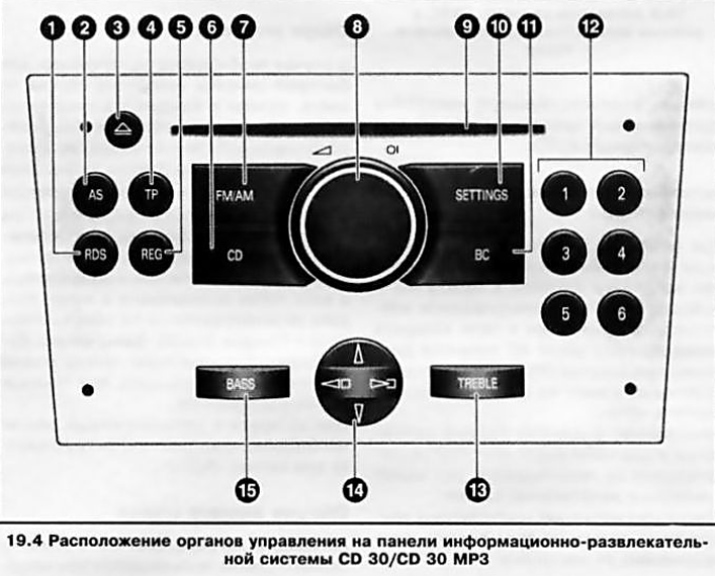
The location of the controls on the infotainment panel is shown in Figure 19.4, to which all references in the text refer.
Activating/deactivating the audio system
The infotainment system is activated by pressing the central button of the rotary volume control (8). The system will be activated in the playback mode that was set before the system was deactivated.
To turn off the system, press the button (8) again.
Note: If you activate the infotainment system with the ignition off, the system will automatically turn off after 1 hour.
In addition, it is possible to activate/deactivate the system when turning the ignition on/off (auto power on function) — to operate in this mode, it is necessary to turn off the ignition without turning off the audio system — the system is deactivated. When the ignition is turned on again, the audio system will be activated in the mode that was set before turning off the ignition.
This function is installed in the factory settings of the system and is activated by default. If necessary, it can be disabled - the audio system will be activated/deactivated only by pressing the button (8).
To deactivate the automatic turn-on feature:
- Press the SETTINGS button (10) - the display will show "Audio";
- Press the lower sector of the 4-position switch (14) - the display will show "System";
- By successively pressing the right sector of the 4-position switch (14), select the item in the menu "Ign.Logic ON/OFF";
- By pressing the upper or lower sector of the 4-position switch (14), select the required setting:
- when choosing "Ign.Logic ON" auto power on function activated;
- when choosing "Ign.Logic OFF" the automatic switch-on function is disabled.
Approximately 6 seconds after the last button press, the display will return to the main menu display mode.
Note: When the battery is disconnected and reconnected, the auto-on function will be reactivated.
Adjusting the sound volume
The sound volume is adjusted by turning the volume control knob (8).
Note: On models equipped with SSV sound level control system (Speed Sensitive control Volume), the audio system playback volume will be adjusted automatically depending on the vehicle speed.
When activated, the infotainment system starts playing the sound at the last set volume. Using the corresponding menu (see below), you can preset the maximum volume level when switching on. The selected maximum volume level when activating the infotainment system will only be set if the sound volume before switching off the system was higher than this value, and the infotainment system must have been switched off for at least 5 minutes with the ignition off.
If necessary, the sound can be turned off without turning off the system as a whole (sound blocking). To do this, hold down the volume control button (8) for more than 2 seconds - the display will show "Mute" and the sound sources will be turned off.
Note: When the audio system receives a traffic information service signal (see below), the sound mute is automatically released.
To remove the sound block, press the button or turn the volume control knob (8) - the display will show the current playback mode.
Setting up sound parameters
Sound parameters are adjusted via the corresponding menu and buttons "BASS" (15) "TREBLE" (13) on the infotainment system control panel.
To enter the sound parameter settings menu, press the "SETTINGS" button (10) - the display will show "Audio". If the display shows "Settings", press the lower sector of the 4-position switch (14) to go to the "Audio" menu item.
The sound parameters to be adjusted are selected by successively pressing the right/left sector of the 4-position switch (14) - the names of the selected parameter will be displayed in the display window field in the following sequence:
FADER (front and rear speaker volume balance) (with appropriate equipment) <-> BALANCE (left and right speaker volume balance) <-> SOUND (select equalizer mode) <-> TA VOLUME (traffic announcement volume) <-> SDVC (automatic volume control system depending on the speed of movement) <-> EXT.IN.VOL. (the volume of the signal from an external source, such as a mobile phone) <-> ON VOLUME (sound volume when the audio system is activated) <-> FADER <-> RTU <-> etc.
After selecting the desired parameter, its adjustment is carried out by pressing the upper/lower sector of the 4-position switch (14). The FADER, BALANCE,, EXT.IN.VOL., ON VOLUME parameters are adjusted using conventional units from -12 to +12. When the desired value is selected, it is automatically entered into the system memory.
Note: New minimum volume for traffic announcements (when setting the TA VOLUME parameter) will be set only if it is lower than the previously set minimum traffic announcement volume.
When you select the SOUND parameter, the equalizer settings switch between 5 preset modes after each button press - the corresponding inscription, for example "Rock" or "Jazz", appears in the display window field.
The SDVC parameter allows you to adjust the level of road noise compensation, choosing one of the values from 0 to 5.
Exit from the setup mode is done by pressing the "SETTINGS" button (10) - the display will show the selected playback mode. Exit from the setup menu can occur automatically by the timer signal if the settings are not used for more than 3 seconds.
Note: When exiting the menu by the timer signal, the TY and BID displays will show the inscription "Audio", followed by the name of the current audio signal source - the GID display will show the general settings menu "Settings".
The treble and bass tones can be adjusted using the preset equalizer modes (see above) or in manual adjustment mode.
Note: When setting in manual mode, the previously set equalizer mode is cancelled.
To manually adjust the low frequency tone, press the "BASS" button (15) - the display window will show the corresponding inscription and the previously selected low frequency tone level. Adjustment is carried out by pressing the upper/lower sector of the 4-position switch (14). Adjustment is carried out using conventional units from -12 to +12. When the desired value is selected, it is automatically entered into the system memory.
Note: The bass tone control applies to the currently selected audio source and is memorized separately for the radio and CD player.
Exit from the setup mode is done by pressing the "BASS" button again or automatically by the timer signal if the settings are not used for more than 3 seconds.
Manual adjustment of high frequencies is carried out in the same way as adjustment of low frequencies by pressing the "TREBLE" button (13).
Visitor comments