


- Three-function information display (TID);
- Multi-information display (BID);
- Graphic (monochrome or color) information display (GID).
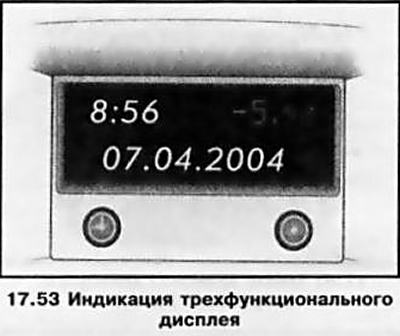
When the ignition is on, the display screen shows the time of day and outside air temperature, as well as the date/operating parameters of the car radio (see illustration 17.53). The brightness of the screen is adjusted using the same potentiometer that adjusts the intensity of the instrument lighting (see above). When the ignition is off, the current information (time, date, outside temperature) can be displayed on the display screen for 15 seconds by briefly pressing one of the two control buttons located below the display (see ibid). The display of the "F" indicator warns of a system malfunction - contact an Opel service station as soon as possible to fix the problem.
Outdoor temperature indication
The thermometer reacts to a drop in air temperature immediately, and to an increase - with some delay. Be careful: when the thermometer shows several degrees above zero, there may already be ice on the road. To warn of the risk of icing of the road when the outside air temperature drops to a value of about 3°C, a snowflake-shaped pictogram appears on the display screen in the temperature indication field. When the temperature rises, the pictogram goes out only at 5°C.
Setting date and time
Manual installation
Turn off the radio. The setting is made using two buttons located below the display (see illustration 17.53):
- a) Hold the button down for about 2 seconds – the day of the week display should start flashing;
- b) Use the button to set the day of the week;
- c) Using the button, proceed to setting the month display;
- d) Use the button to adjust the reading;
- e) proceed to setting the year display;
- f) adjust the reading;
- g) proceed to setting the clock display;
- h) adjust the reading;
- i) proceed to setting the minutes display;
- j) adjust the reading;
- k) start the clock (with zeroing of the second countdown).
Automatic installation
On models equipped with infotainment systems, the current time and date can be set automatically when receiving a radio station that supports the Radio Data System (RDS) format. Activation of the automatic time synchronization function is confirmed by the BDS icon appearing in the display field.
Some RDS radio stations transmit inaccurate time. If this causes the chronometer to frequently show inaccurate time, you should turn off automatic synchronization (with appropriate equipment) and set the time manually.
Activate/deactivate automatic time synchronization as follows:
- a) Hold down the button for about 2 seconds - the chronometer should go into setting mode;
- b) Press the button twice - the year display should start flashing;
- c) Keep the button pressed for about 3 seconds until the R0S icon flashes on the display screen and the inscription "RDS TIME" appears (the year display should continue to flash);
- d) Press the button to turn on or off the automatic time setting mode: RDS TIME 0 = off.; RDS TIME 1 = on.;
- e) To exit the setup mode, press the button three times.
Visitor comments