


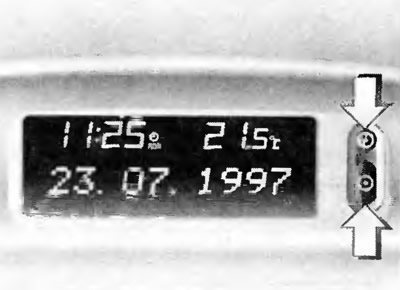
Turn off the receiver.
Set the date and time by pressing the two buttons next to the display (arrows):
Press the button with the watch nomogram (top button) for a period of not less than 2 seconds (the display is activated), after which the numbers indicating the days will start flashing.
Use the bottom button to set the day, month and year, then the hours and minutes (after each installation, the number that should be installed next will start flashing).
The clock will start counting time from 0 sec.
If you are setting only the time, press the top button until the hour and minute digits start flashing.
Automatic date and time setting
This setting is only possible if you are receiving time signals from RDS stations (Radio Data System).
The source is on the online website [OPELBOOK.ru]
Automatic installation occurs after switching on the receiver. On the display this installation is shown by a clock symbol with the signature RDS.
Disabling automatic installation (for example, in case of poor reception):
- press the top button for at least 2 seconds,
- press the top button twice (until the year numbers start flashing)
- press the top button for about 3 seconds until the display shows the line RDS TIME
Press the bottom button until the following lines appear:
- RDS TIME 0 = Deactivated
- RDS TIME 1 = Activated
- Press the top button three times
Visitor comments